

Why am I getting low quality leads? Choose a Meta form or landing page
A landing page isn’t automatically better for lead quality, and a Meta instant form isn’t automatically why you’re getting poor prospects. If you’re asking why you’re getting low-quality leads, look at the fit between your ad, the form, and the people who submit it. Add one or two relevant qualifying questions to help distinguish genuine interest from casual clicks.
It’s frustrating to follow up with leads who aren’t ready, aren’t a fit, or don’t remember submitting a form. Choosing an instant form or landing page can affect how much effort someone makes before sharing their details, but neither format can fix a mismatch between your promise and your audience.
This guide explains when each option makes sense, how to spot invalid or low-intent leads, and how sharing lead outcomes with Meta can improve campaign signals. You’ll have a clearer way to diagnose the problem and choose an adjustment based on lead quality, not just submission volume.
Key Takeaways
- Compare ad clicks with analytics sessions, then use CRM outcomes to find where lead quality drops.
- Send meaningful lead outcomes back to Meta so campaign optimization can account for more than form submissions.
- Choose instant forms for a simpler submission path or landing pages when more context helps qualify prospects.
- Look for patterns such as invalid contact details, little engagement or leads that don’t match your offer before changing your campaign.
1. Are Meta instant forms or landing pages better for lead quality?
Meta instant forms reduce the steps between an ad and a submission, while landing pages can explain an offer before someone shares their details. Neither format guarantees better prospects. Compare qualified leads in your CRM, not just submission counts. Add one or two relevant questions, such as the service needed or a preferred appointment time, to reveal intent.
Start with a simple diagnostic: compare Meta Ads Manager clicks with analytics sessions for the same campaign and period. A gap above 40% is a red flag for possible bot traffic. For example, 500 Meta clicks and 150 analytics sessions signal a large click-to-session discrepancy. Then compare sessions with form submissions and CRM records to see where the drop occurs.
Track outcomes beyond form fills: valid contact details, responses, booked appointments, and sales opportunities. Use consistent CRM labels, such as qualified, unreachable, or outside your service area. Score leads against clear criteria tied to your offer, service area, and buying intent. Add relevant business details to records only when they’re accurate and useful.
Keep data clean as it changes. Remove duplicate records, correct obvious errors, and update outdated contact details when new information comes in. Stale records can make a campaign look weaker than it is, while inconsistent labels obscure which ads attract viable prospects. Analytics engagement adds context: an engaged-sessions rate above 50% is considered healthy.
Make your ad copy specific about the service, audience, and key limitations. Choose keywords that match the customer’s need, then make the landing page repeat the promise and explain the next step. Consistency helps people decide whether the offer fits before they submit.
For local businesses in the United States, state the locations served and service offered in the ad and landing page. Use CRM records to flag inquiries outside your area, then refine location targeting and copy based on those patterns. In addition to digital advertising, building community-based referral pipelines can also help generate high-intent inquiries, with organizations like franchise.networkinaction.com providing opportunities to establish and lead local business networking groups.
2. Feeding lead-quality outcomes back to Meta
Meta receives a stronger signal when campaigns report qualified outcomes, not just completed forms. Connect your CRM to Meta through an event integration, such as the Conversions API, and send an event when a lead meets your qualification criteria. Match each outcome to its campaign and ad where possible. Keep the signal meaningful: a valid inquiry isn’t qualified simply because someone submitted a form.
Instant forms can prefill contact fields, making submission easier but potentially inviting low-intent responses. Review each form’s questions and settings. Ask for information that helps determine fit, such as the requested service or the customer’s location. A review step can prompt people to check their details before submitting, while a clear offer helps them understand what they’re requesting.
Agree on what “qualified” means before marketing and sales share outcomes. For example, a lead might need a service you provide, fall within your service area, and show genuine intent to proceed. Apply that definition consistently in your CRM. If sales classifies similar inquiries differently, Meta receives inconsistent feedback, making campaign comparisons less useful.
AI-based filtering can flag duplicate records, invalid contact details, or inquiries that conflict with your criteria. Treat those flags as prompts for review, not proof that someone is unsuitable. Calculate cost per qualified lead by dividing campaign spend by qualified leads, then compare it with the cost per form submission. Responding to new leads within five minutes is recommended to improve contact and conversion rates.
Use the pattern to adjust targeting, form questions, or follow-up rather than chasing cheaper submissions alone. For practical help improving Facebook ad campaign quality, connect campaign signals with the outcomes your sales team records.
3. Choosing between instant forms and landing pages
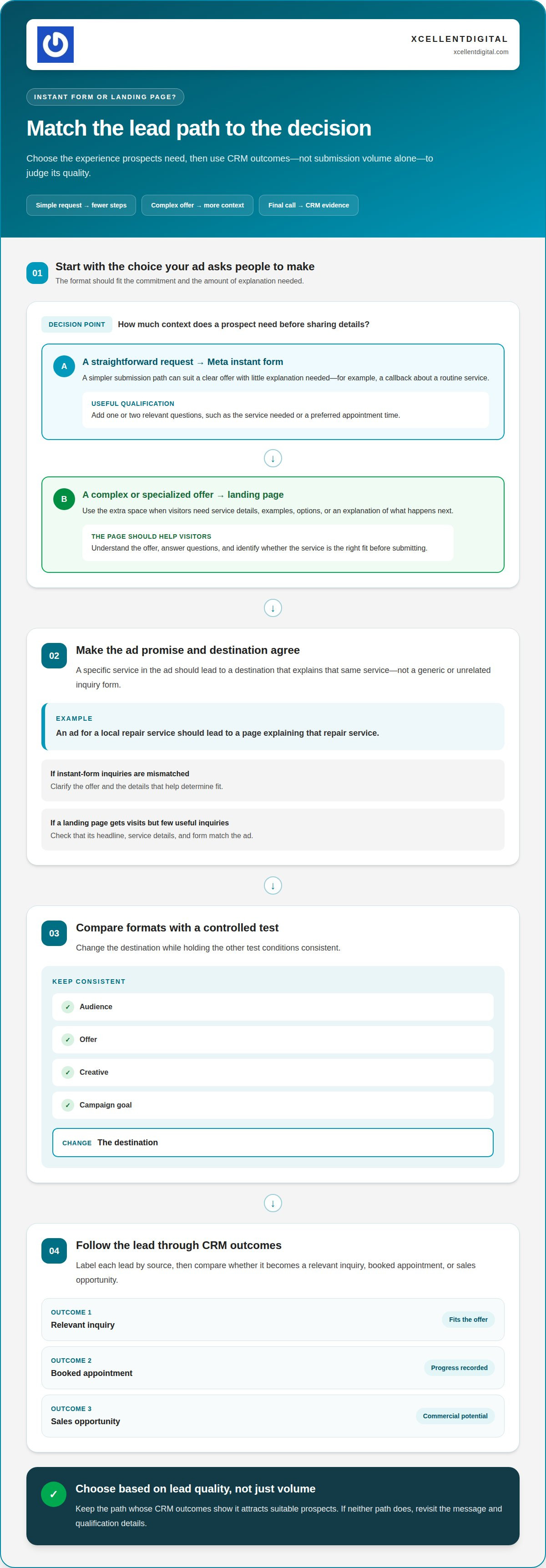
Choose the format that fits the decision your ad asks people to make. A Meta instant form may suit a straightforward request, such as asking for a callback about a routine service. A landing page offers more room to explain a complex offer, describe what happens next, and answer questions before someone submits details. The right choice depends on how much context prospects need.
Consider the commitment involved. For a simple consultation request, an instant form may remove unnecessary steps. For a specialized service with different options, a landing page can describe those choices and help visitors identify the right fit. Match the ad’s promise to its destination: an ad about a specific service shouldn’t lead to a generic page.
Compare formats with a controlled test. Keep the audience, offer, creative, and campaign goal consistent, then change the destination. In your CRM, label each lead by source and track whether it becomes a relevant inquiry, booked appointment, or sales opportunity. This shows which experience attracts suitable prospects, rather than simply generating more submissions.
- Choose an instant form when the offer is clear and the next step needs little explanation.
- Choose a landing page when visitors need service details, examples, or a clear explanation of the process.
- Rework the message when either path attracts people who misunderstand the offer or aren’t a fit.
Assess lead quality alongside friction. If an instant form brings in mismatched inquiries, clarify the offer and qualification details. If a landing page gets visits but few useful inquiries, check that its headline, service details, and form match the ad. For example, an ad promoting a local repair service should lead to a page explaining that service, not an unrelated general inquiry form. Keep the better-performing path only if CRM outcomes support the choice.
4. Traits of low-quality leads
A low-quality lead isn’t simply someone who doesn’t buy. Look for patterns: invalid contact details, no response, a request unrelated to your offer, or a location you don’t serve. One missed call proves little. Repeated records with the same problems point to a campaign, audience, or data-quality issue worth investigating.
Check contact validity first. A bulk list of 10,000 contacts may contain email addresses where half bounce, making delivery results unreliable. For Meta leads, check for malformed emails, disconnected phone numbers, duplicates, and submissions that don’t match the requested service. Treat each as a distinct issue; a duplicate may be a real prospect, while a false contact detail may not be.
Engagement can add another clue. An engaged-sessions rate below 20% may signal possible bot traffic, while spending under five seconds on a landing page is another suspicious signal. A bounce rate above 90% is also identified as a sign of suspicious bot activity. These metrics are warning signs, not proof that every brief visit or bounce is fake.
Compare suspicious activity with actual lead records. If analytics show very short visits and your CRM contains repeated, unusable details, review the traffic source and campaign placements. If visitors engage with the page but request a service you don’t provide, unclear ad copy or an audience mismatch may be the issue. Keep bot indicators separate from sales-fit problems.
Build a review habit: tag each lead as invalid, duplicate, unreachable, out of area, or mismatched, then compare those labels by campaign. For local businesses, check that the advertised service and location align with the inquiry. If inaccurate local details contribute to confusion, improve your Google Business Profile details so people can better understand what you offer and where.
XcellentDigital: Facebook Ads
XcellentDigital manages Facebook Ads to help businesses reach prospects and improve campaign relevance. If your ads generate submissions but few suitable inquiries, connect campaign decisions to the outcomes your team records in the CRM. Clear qualification criteria can help show whether the issue lies with the audience, the offer, or the path from ad to inquiry.
Bring examples of suitable and unsuitable leads, along with the ads and forms that generated them. These provide a practical starting point for reviewing which messages attract the right prospects and where expectations diverge. XcellentDigital can also align Facebook Ads with AI Agents, Search Optimization, or Pay Per Click when those services fit your marketing needs.
Visit xcellentdigital.com to discuss your Facebook Ads.
Build a clearer path from inquiry to opportunity
If you’re still asking why you’re getting low-quality leads, treat your next campaign as a learning opportunity. Define a qualified inquiry clearly, then use that standard to guide decisions across your ads and sales process. Consistent follow-up and reliable CRM notes give your team a stronger basis for the next adjustment.
XcellentDigital offers Facebook Ads, Google Business Profile Optimization, and AI Agents. If you want a practical partner to help refine your digital marketing around lead quality, contact XcellentDigital to improve lead quality. Bring the patterns you’ve noticed, such as recurring mismatches between inquiries and your offer, so the conversation can focus on what to improve next.
You don’t need to solve every issue at once. Start with one clear change, learn from the response, and build from there.
Frequently Asked Questions
Are Meta instant forms or landing pages better for lead quality?
Neither format is automatically better; choose based on the decision your prospect needs to make. An instant form can work for a clearly defined request, such as booking a callback about one service. A landing page can help when prospects need to compare service options or understand a more involved process. Judge the choice by which inquiries your sales team can handle and move forward.
How do I stop bot and fake leads from Meta ads?
Reduce suspicious submissions by reviewing placement performance and adding sensible checks to the submission process. Industry analyses have estimated invalid traffic on Meta’s Audience Network at up to 67%, so inspect whether a placement is producing contacts your team can use. Look for repeated patterns across campaigns, then adjust placements or form requirements and monitor whether valid inquiries improve.
What Makes a Lead “Bad” for Sales?
A lead is poor for sales when they cannot reasonably become a customer, not simply because they haven’t purchased yet. For example, someone requesting a commercial service from a business that only serves residential customers doesn’t fit the offer. Sales teams should agree on reasons to disqualify leads, such as unsupported job types or lack of decision-making authority, and record them consistently.
What should I optimize my Meta lead campaign for?
Optimize for outcomes that reflect business value, rather than treating every form submission equally. Decide what counts as a meaningful result, such as a completed appointment or sales-qualified opportunity, and make sure the team records it reliably. If your tracking captures only form submissions, improve measurement before drawing conclusions about campaign performance.
Why am I getting low-quality or spam leads from Meta (Facebook) ads?
If you’re wondering why you’re getting low-quality leads, compare what the ad promises with what people receive after clicking. A broad message like “Get help today” can attract people with very different needs. A specific offer, clear service details, and aligned follow-up help set expectations. Also check that leads are routed correctly and reach the right sales team.
What are the most common causes of low-quality leads?
Common causes include an offer that attracts casual interest, ad messaging that leaves the service unclear, and a handoff that loses useful context. For example, a salesperson who receives only a name and phone number may have to restart the conversation without knowing which service the person requested. Review the path from ad click to sales follow-up, including routing rules and the details passed into your CRM.













Leave a Reply
Want to join the discussion?Feel free to contribute!