

How to Choose Marketing Automation Software for Your Business
The best marketing automation platform isn’t the one with the longest feature list. Knowing how to choose marketing automation software means matching its core features to your customer touchpoints, existing tools, and the first process you want to improve. Start with CRM integration, workflow triggers, reporting, ease of use, and room to grow, then compare each option with your day-to-day needs.
It’s easy to focus on flashy features and miss practical fit: whether leads move smoothly from marketing to sales, whether you can build useful customer segments, and whether results give you enough clarity to decide what to do next. This guide will help you map the customer journey, identify valuable automations, and compare platforms on features that support your business. You’ll have a grounded way to assess your options without paying for complexity you won’t use.
Key Takeaways
- Prioritize a platform that connects with your CRM and the tools your team already relies on, so leads can move smoothly between marketing and sales.
- Choose around your business size and what you expect to use over the next 12 months, rather than paying for capacity or features you don’t need.
- Map the customer journey, then select one high-impact workflow and define the customer action that should trigger it.
- Compare how each option handles customer segments, interaction tracking, analytics, A/B testing, workflow editing, and potential usage limits.
What Core Features Should You Look for in a Marketing Automation Platform?
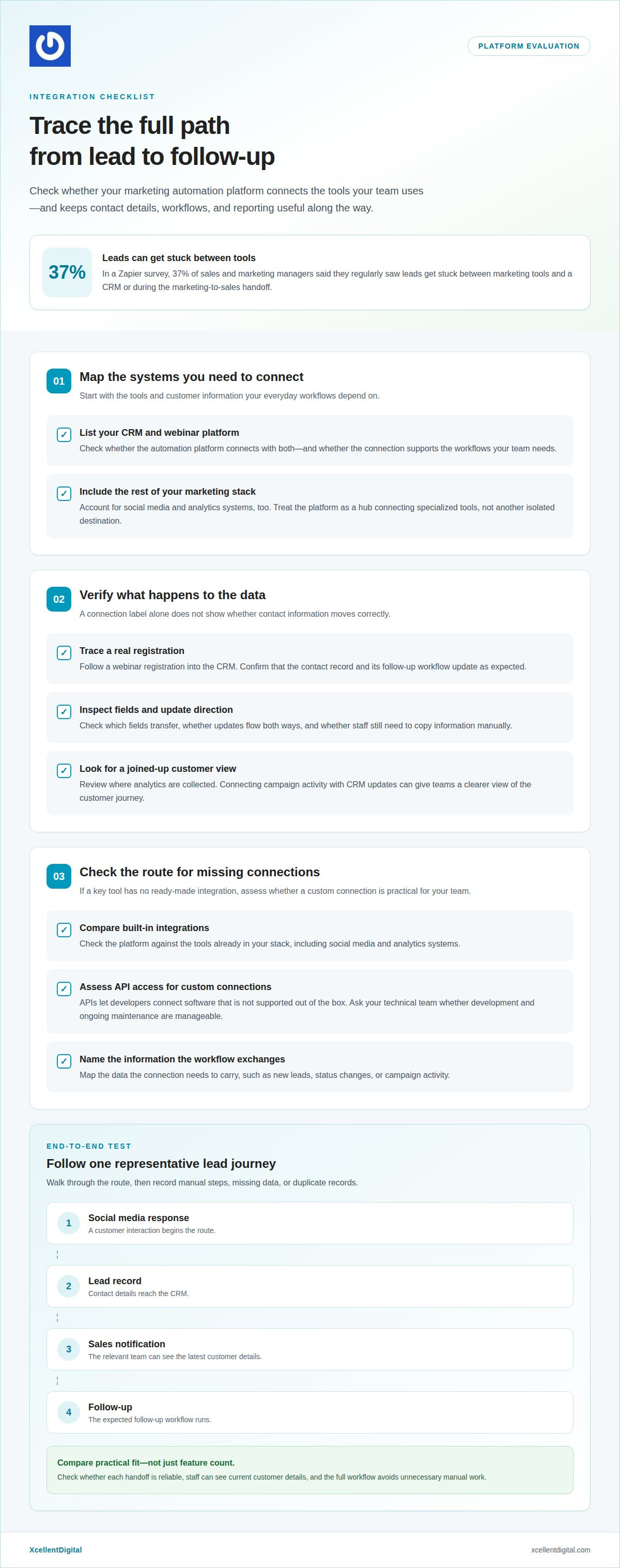
Evaluate integration by tracing how contact information moves between your CRM, webinar platform, and marketing tools. Choose a platform that connects these systems and keeps essential workflows and analytics useful in one place.
-
Check CRM and Webinar Integrations
List your CRM and webinar platform, then test the connection between them. For example, trace a webinar registration into the CRM and confirm that the contact record and follow-up workflow update as expected. Check which fields transfer, whether updates flow both ways, and whether staff must copy information manually. Zapier’s survey found that 37% of sales and marketing managers regularly saw leads get stuck between marketing tools and a CRM or during the marketing-to-sales handoff. Use that risk as a reason to test the full path, not just the connection label.
-
Assess API Access and Custom Integrations
Compare built-in integrations with your existing tools, including social media and analytics systems. If a key tool has no ready-made connection, ask your technical team whether API access can support a custom integration. APIs let developers connect software that a platform doesn’t support out of the box. Before choosing, map the information your workflow needs to exchange, such as new leads, status changes, or campaign activity. Then assess the development and maintenance effort your team can manage.
- Map your entire marketing technology stack before committing. Treat the automation platform as a central hub that connects specialized tools, rather than another isolated destination. Draw a simple route: social media response, lead record, sales notification, and follow-up. Check whether each handoff is reliable and staff can see the latest customer details. Review where analytics are collected, too. A platform that connects campaign activity with CRM updates gives teams a clearer view of the customer journey. Test one representative workflow from start to finish, then note manual steps, missing data, or duplicate records. Use those findings to compare integrations on practical fit, not feature count.
What is the best marketing automation software for small business?
Choose marketing automation software to fit your business size, customer journey, and the campaigns you’ll actually run. Common risks include over-automation, poor segmentation, and unsolicited emails that can damage deliverability and return on investment. To decide how to choose marketing automation software, weigh those risks against your team’s actual needs.
-
Match Software to Business Size and Market
Estimate your current contact volume, then compare it with what you expect to use over the next 12 months. A business handling no more than a thousand leads a month may not need capacity for a million. For a small business, prioritize a platform that supports useful email marketing and segmentation without adding workflows your team won’t maintain. Commerce businesses may need different campaign triggers than service businesses.
-
Identify Business Automation Needs
Write down one repetitive task that slows your team, then define the customer action that should start an automation. For example, a new subscriber could trigger a welcome sequence, while an unanswered inquiry could prompt a timely follow-up. A basic welcome sequence and follow-up can help even with 200 contacts. Name the trigger, message, owner, and next customer step before selecting software.
-
Match Features to Business Needs
Translate each task into a feature requirement before comparing platforms. A content-led business might prioritize landing pages, newsletter growth, and interest-based segmentation. An online store may need abandoned-cart reminders tied to customer activity. Match each feature to a campaign you plan to run, then remove tools that don’t support that goal. For local campaigns, connect automation to a clear local profile marketing strategy.
-
Review Common Risks and Limitations
Check how the platform handles audience consent, message targeting, and workflow errors before activating campaigns. Sending automated email to unsolicited recipients can hurt IP reputation, deliverability, and return on investment. Don’t assume software replaces human follow-up: marketing and sales teams still need to nurture leads and learn which prospects convert. Keep these criteria in view as you decide how to choose marketing automation software, and expand only after reviewing your first workflow’s results.
Understanding customer touchpoints and defining a strategy
Map each interaction before choosing a marketing automation tool. Note what customers need, what action they take, and what response should follow.
- Trace the customer journey from first visit to purchase and follow-up. Include touchpoints such as a website visit, social engagement, an email signup, and a sales conversation. Since 96% of website visitors aren’t ready to purchase on their first visit, plan useful next steps for people who need more information. Match each message to the customer’s stage, not just the channel.
- Identify the signals that should trigger an action. A product-page visit, webinar registration, or repeat email click, for example, can indicate interest. Decide what response fits each signal, such as sending relevant information or notifying a sales representative. Enterprise teams should map where customer data is collected and used across channels, then assess whether the platform aligns with GDPR and CCPA requirements.
- Build a strategy around one workflow, then check whether your team can manage it. Document the trigger, audience, message, and next step. See whether staff can edit workflows without technical help and tailor messages for different customer segments. Assess how the platform can scale as your contact base or team grows. SaaS software can support adding users without downloading software or setting up new hardware.
- Match customer support to your team’s schedule before choosing a platform. Compare the provider’s support hours with the times your team manages campaigns, then check available channels, such as chat, email, or phone. A team launching an email workflow outside its usual hours, for example, needs a clear support route. Treat support access as part of implementation, not an afterthought.
Criteria for evaluating marketing automation software
Compare each platform against measurable tasks, not polished demo screens. Test how it handles customer data, campaign results, workflow changes, and costs based on your expected use.
For US compliance review, include CAN-SPAM and applicable state privacy laws in your requirements. Ask vendors how their tools support your data-handling processes, while assessing legal obligations separately.
- Test measurement and optimization features against a real campaign example. Can the automation tool track website interactions and leads, show useful analytics, and support A/B testing? Check whether its segments use the customer data you already collect. Compare lead scoring, too: traditional systems use rules you set, while AI-powered platforms can use predictive analytics to estimate conversion likelihood.
-
Check Security, Privacy, and Compliance Requirements
Document privacy and security questions before reviewing a vendor’s claims. Ask how the platform manages access to customer data, records communication preferences, and supports your processes for CAN-SPAM and relevant state privacy laws. For enterprise evaluation, include GDPR and CCPA in the compliance review. Don’t treat a feature list as proof of compliance; identify the controls your team needs to operate campaigns responsibly.
-
Prepare Questions for Vendor Demos
Bring one workflow and ask the vendor to demonstrate it from trigger to result. Can your team edit it without technical help? Can the platform report conversions and compare message variations? Ask how it handles webinar follow-up, segment creation, and limits on sends, users, workflows, or automation runs. A live walkthrough can expose gaps that a feature presentation hides.
- Compare the full pricing structure against your expected contact count and email volume. Ask whether add-ons, support, setup, training, usage, or lead counts change the total, and whether introductory pricing changes after the first few months. Then record the platform’s limits and the results it can track. Explore a practical marketing automation approach to connect evaluation criteria with your follow-up goals.
XcellentDigital: Facebook Ads
XcellentDigital can help your business use Facebook Ads to attract attention and bring prospects into its marketing journey. Use the selection criteria above to clarify your audience, campaign goal, and follow-up process before investing in more activity. Prospective customers need to know how to respond, and your team needs a clear process for handling incoming interest. XcellentDigital also offers Google Business Profile Optimization, AI Agents, and Search Optimization to support a broader digital marketing approach. Consider Facebook Ads when paid social fits your audience and campaign goals, not simply because the platform is familiar. A clear plan helps connect advertising activity with the customer experience you want to create. Contact XcellentDigital to discuss your marketing goals.
Turn Your Evaluation Into a Practical Next Step
The next move isn’t to automate every customer interaction. Choose one process where a clearer, more timely response would help your team serve prospects better. Assign an owner to the workflow, agree on what a useful result looks like, and review its performance before expanding. That keeps technology connected to real customer needs, not just an impressive feature list.
Use your priorities to guide how to choose marketing automation software, and keep the decision grounded in the work your team can realistically support. If you’re ready to connect your marketing goals with a practical path forward, contact XcellentDigital to discuss your options. Take the next step with a clear purpose, and build from there.
Frequently Asked Questions
How is it different from email marketing tools?
Email marketing tools mainly help you create, schedule, and send campaigns. Marketing automation can use customer actions to guide what happens next across a broader process. After someone downloads a guide, for example, an automation might assign a follow-up task, update a contact record, and send a relevant email. Choose based on whether you need email production alone or coordinated customer journeys.
How Does a Marketing Automation Platform Support Your Lead Generation Efforts?
A marketing automation platform can capture prospect details and support consistent follow-up after someone responds to an ad, form, or offer. For example, someone who requests information can receive a relevant acknowledgement while the sales team gets a follow-up notification. Use the platform to connect lead capture with timely next steps, then review which sources bring prospects closer to a sale.
How do I choose a platform that fits my budget?
Set a budget by estimating how your team will use the platform, not by comparing subscription prices alone. Include contact counts, email volume, users, add-ons, onboarding, training, and support in your comparison. Ask how charges may change as usage grows, and check whether introductory pricing changes after the first few months. Choose a plan based on capabilities you expect to use, not a long list of extras.
How long does it take to implement a new platform?
A complete marketing automation system typically takes 4-8 weeks to plan, build, test, and launch. The work includes preparing customer data, documenting workflows, configuring messages, and checking that each trigger produces the right action. A simple first workflow may be faster if your process is already documented. Set aside time for testing, since a launch date matters less than reliable customer experiences.
What Scalability and Support Options Should a Marketing Automation Platform Offer?
Look for a platform that can accommodate more users and changing campaign needs without requiring a full rebuild. Review limits on contacts, sends, workflows, and automation runs, then consider how your requirements may change as the business grows. For support, compare available hours and channels with your team’s schedule. A clear route for resolving access or workflow problems can keep routine campaign work moving.
What features should marketing automation software include?
Start with features that support your team’s repeated tasks: trigger-based workflows, customer segmentation, campaign reporting, and CRM connectivity. Then consider whether staff can update messages and workflow steps themselves. A business promoting a webinar, for example, may need to manage registrations, reminders, and follow-up without rebuilding the process for each event. Favor useful, manageable capabilities over features that add complexity without serving a clear purpose.













Leave a Reply
Want to join the discussion?Feel free to contribute!