

Speed to Lead Automation: Choosing a System That Converts
What if the fastest reply isn’t the one that wins the lead? A speed to lead automation tool should do more than send an instant message. It should acknowledge an inquiry, capture useful context, and make the next step clear.
When inquiries arrive through different channels, a busy team can miss or delay a response, especially outside regular working hours. But generic messages or automated follow-up that pushes for a decision before understanding a prospect’s needs can undermine trust.
The goal is a connected process: respond promptly, route qualified prospects to the right person, and keep follow-up relevant and human. This guide explains how speed-to-lead automation works, what to compare when choosing a system, and how to measure whether your response process moves leads forward. It also shows why the tool needs to fit your sales funnel rather than operate as a disconnected autoresponder. XcellentDigital connects lead response automation with sales funnel development to help businesses build a more consistent path from first inquiry to meaningful follow-up.
Key Takeaways
- Separate an instant receipt message from a useful response that moves a sales conversation forward.
- Use a clear sequence to capture, qualify, route, and follow up on inquiries while preserving context for the person taking over.
- Compare a speed to lead automation tool by channels, routing, reporting, integrations, workflow flexibility, and human oversight, not just its feature list.
- Start with one valuable lead source, define ownership and follow-up boundaries, then track performance to see where the process needs attention.
- Connect lead response automation with AI agents, sales funnel development, and lead-generation activity for a more coordinated follow-up process.
What Is Speed-to-Lead Automation and What Does It Do?
A speed to lead automation tool uses software to acknowledge new inquiries, organize follow-up, and route leads to the appropriate person or next step. It can help a business respond consistently when staff are busy, but automation alone doesn’t make a response useful. Speed measures how quickly a prospect hears back; quality measures whether the reply addresses the inquiry and moves the conversation forward.
That distinction matters. “We received your message” confirms delivery, but it doesn’t answer a question about a service or establish what the prospect needs. A stronger process uses the information available to provide a relevant next step, then gives a team member the context to continue personally. This is part of the broader lead management process of organizing and handling business inquiries.
What does speed to lead mean in practice?
In practice, speed to lead is the time between a prospect’s inquiry and the business’s first meaningful response. That response might acknowledge the specific request, ask a relevant clarifying question, or explain what will happen next. The right response depends on the inquiry, not just the clock.
Consistency is the challenge. A web form can arrive while the team is serving customers, or a call can go unanswered during a busy stretch. Without a defined process, follow-up depends on who notices the inquiry and when. Automation can make the first step more reliable, while clear ownership ensures a person can take over when the prospect needs a detailed answer.
Which inquiries can an automation tool help manage?
A configured workflow can organize inquiries from web forms, advertising campaigns, missed calls, and other connected lead-capture channels. For example, when an ad generates a form submission, the process can record the inquiry, send an acknowledgment, and direct its details to the person responsible for follow-up. A missed call can create a gap too, particularly when the caller’s information and reason for reaching out aren’t captured for a later response.
Bringing inquiries into one tracking process can reduce scattered conversations and make it easier to see what needs attention. Start by mapping where inquiries come from, then decide how each source should be acknowledged, tracked, and handed off. A speed to lead automation tool works best as part of that response process, not as a standalone message sender.
How Automation Moves Inquiries to Human Conversations
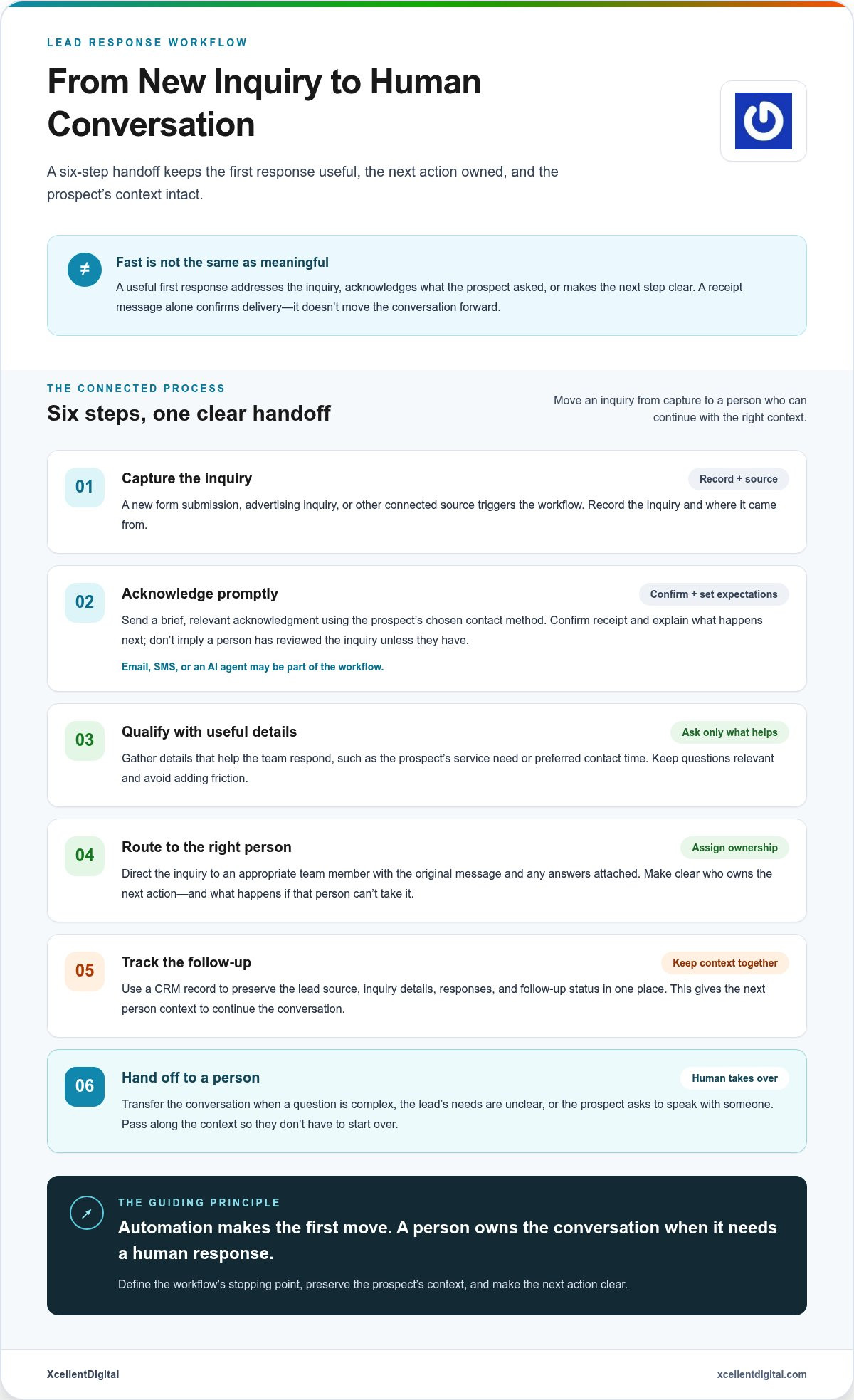
Automation works best as a guided handoff, not a wall between a prospect and your team. A practical workflow moves through six steps: capture, acknowledge, qualify, route, follow up, and hand off. Each step needs a clear purpose and owner. A lead management process helps organize those activities so an inquiry doesn’t disappear between the first message and a real conversation.
From lead capture to prompt acknowledgment
Start with a trigger: a new form submission, advertising inquiry, or another connected source enters the workflow. The system records the inquiry and can send a brief acknowledgment that confirms receipt and sets expectations, without pretending to answer a question it can’t resolve. Email, SMS, or an AI agent may be part of the workflow. Use the prospect’s chosen contact method and connect the relevant systems so the message and inquiry details stay together.
Make the acknowledgment specific enough to be useful. If someone asks about a particular service, confirm that the request came through and explain the next step in plain language. Don’t claim that a person has reviewed the inquiry unless that has happened. A thoughtful first touch builds a bridge; it doesn’t replace the conversation.
Qualification, routing, and human handoff
Next, gather only details that help the team respond, such as the prospect’s service need or preferred contact time. Use those details to route the inquiry to an appropriate team member, with the original message and any answers attached. Routing rules should clarify who owns the next action and what happens if that person can’t take it. This turns a notification into an accountable follow-up task.
A CRM record can preserve the source, inquiry details, responses, and follow-up status in one place. That context helps the next person continue the conversation instead of asking the prospect to start over. Set a clear stopping point for automation: a complex question, uncertainty about the lead’s needs, or a direct request to speak with someone can signal that a person should take over. AI agents can assist with parts of this flow, with their role defined by the workflow.
- Capture: Record the inquiry and its source.
- Acknowledge: Confirm receipt and set expectations.
- Qualify: Gather useful details without adding friction.
- Route and follow up: Assign an owner and track the next step.
- Hand off: Give a person the context needed to continue.
Automation should make the first move, then transfer clear ownership to a person who can continue the conversation. A speed to lead automation tool is most useful when these steps work together, not when it simply sends a fast message. XcellentDigital connects lead response automation with broader funnel planning. Explore lead response automation as part of a more coordinated follow-up process.
Comparing Speed-to-Lead Tools Beyond Just Features
A long feature list won’t tell you whether a tool fits your team’s day-to-day response process. Compare how it handles the channels you use, how easily you can adjust workflows, and whether every inquiry has a visible status and owner. The right speed to lead automation tool helps people respond with context, not just send a quick message.
Which tool type fits your lead-response process?
A standalone response tool may suit a focused need, such as organizing inquiries from one main source. CRM-based automation can be a better fit when a team needs shared lead records and follow-up visibility. A broader marketing automation platform may help coordinate lead response with multiple marketing activities. In specialized high-stakes sectors such as plaintiff litigation, firms often turn to dedicated growth infrastructure providers like nexuslegal.group to optimize lead intake and follow-up. Choose based on the process you need to manage, not the size of the feature list.
| Comparison area | Standalone response tool | CRM-based automation | Broader marketing automation |
|---|---|---|---|
| Channels | May focus on selected inquiry sources. | Can support lead activity associated with CRM records. | May connect response with wider marketing activity. |
| Workflow flexibility | Often centers on a defined response process. | Can tie follow-up steps to lead records and team activity. | Can suit businesses coordinating multiple campaign workflows. |
| Routing and ownership | Assess how clearly inquiries reach a responsible person. | Look for visibility into assignment and follow-up ownership. | Confirm the response task remains clear within broader workflows. |
| Reporting and integrations | Check which response activity is visible and which sources connect. | Assess whether lead status and progression are easy to review. | Consider whether reporting connects response with other marketing activity. |
| Human oversight | Make sure a person can take over when needed. | Review how staff can monitor and manage follow-up. | Ensure automation doesn’t obscure who owns the next conversation. |
What should you assess beyond the feature list?
Test the everyday work: can the team understand and update a workflow without unnecessary complexity? Can someone quickly see whether an inquiry is new, assigned, or awaiting follow-up? Reporting should help you review response activity and whether leads progress, rather than counting automated messages alone.
Also assess consent-aware messaging, access controls, and a clear human override. Keep messages relevant to the inquiry and the prospect’s chosen contact method. Define when automation pauses or hands over to a person. These safeguards address a common concern: automation feels robotic when it sends generic messages without context or continues after a human response is needed.
Start with essentials: reliable capture of the channels you use, clear ownership, useful status visibility, and a way to measure follow-up. Treat advanced capabilities as optional until they solve a real process need. A focused tool can be enough for a narrow workflow; broader automation makes sense when the team needs to coordinate lead response with more of its marketing activity.
How to Set Up and Measure a Lead Response Workflow
Start small: choose one high-value inquiry source and document what happens today, from the moment a lead arrives to the first meaningful follow-up. Note who sees the inquiry, who owns the next step, where delays occur, and how the team records the outcome. This baseline gives you something concrete to improve instead of automating a process no one has mapped.
Before activating a speed to lead automation tool, set four rules: who owns each inquiry, what the first message should accomplish, when the workflow should escalate to a person, and where follow-up should stop. The message can confirm receipt and explain the next step, but shouldn’t promise an answer or appointment the team hasn’t arranged. For broader process context, see XcellentDigital’s business growth and automation framework.
Launch a focused workflow and test the experience
Run the complete journey before relying on it: submit a test inquiry, review the acknowledgment, confirm the inquiry reaches the right owner, and check that the team can follow up with the original details. Read every message as a prospect would. Is it clear, relevant, and accurate about what happens next? Is there a straightforward way to reach a person?
Test exceptions too. Try a duplicate inquiry, a submission with missing details, and a situation where the assigned team member is unavailable. Decide how each case should be flagged and who takes responsibility. A small, well-tested workflow is easier to refine than a complex process that hides missed handoffs.
Measure response quality, not just speed
Choose a consistent period and compare results with your baseline. Track time to first response, the share of leads reached, qualified conversations, and progression to the next meaningful sales step, using the data available to your team. Keep lead sources distinct where possible. A change in source mix can affect results and make a simple before-and-after comparison misleading.
Fast acknowledgment is only one signal. If response time improves but contact, qualification, or progression doesn’t, review message relevance, routing, and follow-up ownership. Adjust one part of the workflow at a time, then measure again. To connect lead response with wider marketing priorities, explore this small business digital growth guide.
Build a response process that fits your lead sources and sales funnel. Explore lead response automation as part of a coordinated approach to inquiry follow-up.
How XcellentDigital Connects Lead Response Automation to Business Growth
Lead generation creates an opportunity. The next step is making sure each inquiry has a clear path into a useful conversation. XcellentDigital connects lead response automation with AI agents and sales funnel development to help businesses plan that path, from the activity that attracts a prospect to the follow-up that supports a sales conversation.
Connect lead generation with consistent follow-up
Facebook Ads, pay-per-click campaigns, and search optimization can each bring potential customers to a business. But an inquiry needs more than a source label. It needs a defined next step, a person responsible for follow-up, and a way to track what happens. Without that structure, the handoff from marketing to sales can feel like a dropped baton.
A practical workflow starts with the audience and the sales process. What information does the business need to understand the inquiry? Who should respond? What should the prospect hear first, and when should a person take over? Answering these questions shapes automation around the actual customer journey rather than forcing every lead into the same generic sequence.
XcellentDigital’s lead response automation, AI agents, and sales funnel development can work alongside a business’s advertising and search activity. The goal is to connect lead generation with a planned follow-up approach while keeping ownership and next steps clear. A speed to lead automation tool should support that system, not become a disconnected layer that sends messages without helping the team act on the response.
Choose a practical next step for your business
Start by identifying your highest-priority inquiry source. It might be a form generated by an advertising campaign or an inquiry driven by search activity. Then map what happens after that lead arrives: where the details go, who sees them, and where follow-up tends to stall. This gives you a focused place to improve before expanding the workflow to other sources.
Next, consider how automation and funnel development can support the process together. The workflow should reflect your audience, the questions prospects ask, and the steps your team uses to move a qualified lead forward. Keep the measures practical: monitor response activity and whether inquiries progress, then use what you learn to refine the process. No tool can replace clear ownership or a thoughtful human conversation.
Ready to make your lead follow-up more connected? Discuss a lead response workflow aligned with your inquiry sources and business goals.
Turn Faster Responses Into a Clearer Path Forward
A strong response process does more than acknowledge an inquiry quickly. It connects relevant follow-up with clear ownership, useful lead context, and a human handoff when a prospect needs more than an automated message. Choose a speed to lead automation tool based on how well it supports that process, not just how many features it offers.
Start with one important lead source, define who owns each next step, and test the full journey before expanding. Then measure response activity alongside contact, qualification, and lead progression. Those signals help you see whether the workflow is moving prospects forward, not simply sending messages.
XcellentDigital brings lead response automation and AI agents together with sales funnel development, digital advertising, and search optimization. This connected approach can help align how you attract inquiries with how your team follows up. Build a faster, more connected lead response process with XcellentDigital.
Take the first step with the inquiry source that matters most. A clear, thoughtful process can help your team respond more consistently and keep real conversations moving.
Frequently Asked Questions
What is a speed-to-lead automation tool?
A speed to lead automation tool is software that helps a business acknowledge, organize, and follow up on new inquiries. Depending on its setup, it may trigger a message, record lead details, route an inquiry, or prompt a team member to respond. The goal isn’t simply to send something quickly. It’s to create a relevant next step and make sure a person can take over when needed.
How quickly should a business respond to a new lead?
The right response target depends on the inquiry source, customer expectations, staffing, and the complexity of the service. Automation can acknowledge an inquiry promptly and set a realistic expectation for a personal response. Avoid treating a universal response-time figure as a rule for every business. Track your response timing alongside contact and qualification outcomes, then establish a standard your team can consistently meet.
Can speed-to-lead automation work with a CRM?
Yes, when the selected tools and integrations support the workflow. A CRM can store inquiry details, show lead status, and give the team shared context for follow-up. Define which system records each lead, what triggers the response, and who owns the next action. Then test the full path from inquiry to follow-up. This can uncover issues such as duplicate records, missing details, or a handoff that never reaches its owner.
Does automated lead response feel impersonal to customers?
It can feel impersonal if messages are generic, misleading, or keep arriving after a person has responded. Write a clear first message that relates to the inquiry and accurately explains what happens next. Use automation to acknowledge and organize the request, not to imitate a human conversation. Set rules for when messages stop and a team member takes over, especially when the prospect asks for personal help or has a complex question.
How much does a speed-to-lead automation tool cost?
Costs vary based on the platform, number of users, channels, integrations, and implementation needs. A business with one focused response workflow may need a different setup from a team coordinating several lead sources through CRM-connected automation. Compare the ongoing effort required to manage workflows as well as the software itself. There’s no single price that applies to every setup, so assess the scope that fits your sales process.
What happens if an automation tool cannot answer a lead’s question?
A well-planned workflow routes the inquiry to a person instead of guessing or leaving the prospect without a next step. It can acknowledge the question, capture relevant context, and notify the team member responsible for follow-up. Define escalation rules for complex requests, including who takes ownership. Test these handoffs before launch so the team knows what to do when automation reaches its limits.
How do you measure whether lead response automation is working?
Measure more than message delivery or response speed. Track time to first response, successful contact, qualified conversations, and progression through the sales process when reliable data is available. Compare results with a baseline and separate lead sources where practical. Review message relevance and whether handoffs are completed, too. Faster automation isn’t useful if prospects receive irrelevant follow-up or no one takes responsibility for continuing the conversation.













Leave a Reply
Want to join the discussion?Feel free to contribute!