

Automated Lead Nurturing Workflows: Turn More Prospects Into Customers
A fixed follow-up sequence can keep sending the same message long after a prospect’s needs have changed. That’s not nurturing; it’s noise. Effective automated lead nurturing workflows respond to what a person does and where they are in their decision, not just how many days have passed since an inquiry.
If leads hear from you inconsistently or receive generic messages at the wrong moment, it’s worth asking what should be automated. Automation should make follow-up reliable, not replace the judgment and timely conversations that help someone move forward.
This guide shows you how to map workflows to different lead needs and stages, use relevant behavior and content to shape the next step, and set clear handoff points for a real person. You’ll also learn which signals to measure so you can spot stalled leads, improve the journey, and connect marketing activity to sales progress. Lead response automation and sales funnel development can help your team follow through consistently while keeping each conversation personal.
Key Takeaways
- Build automated lead nurturing workflows around a prospect’s readiness and behavior, not just a fixed schedule.
- Start with one audience and one goal, then choose a trigger and content that support the next step.
- Use relevant context and clear branches to avoid repetitive messages and recognize when a person should step in.
- Track progress from engagement to qualified conversations and sales outcomes to see where your workflow needs improvement.
- Connect workflow planning with lead response automation and sales funnel development to keep follow-up aligned with your sales process.
What Are Automated Lead Nurturing Workflows, and What Problem Do They Solve?
Automated lead nurturing workflows are rules, messages, and actions that guide prospects based on their stage or behavior, helping them receive relevant information and a clear next step over time.
Think of a workflow as a practical way to keep follow-up from depending on someone remembering every task. It can begin when a prospect takes a meaningful action, then respond according to the information available and what the prospect does next. The goal isn’t to send more messages. It’s to make the next communication useful and prevent interested people from slipping through a process gap.
Nurturing has a distinct job. Lead generation attracts potential customers; an immediate inquiry response acknowledges a new request and helps start a conversation. A one-off campaign sends a message to an audience at a particular time. Nurturing supports prospects who need more information or time before deciding. It sits within the broader practice of marketing automation, which can coordinate marketing tasks and interactions. The workflow itself should begin with a clear purpose, not technology for its own sake.
How Is a Nurturing Workflow Different From a Follow-Up Sequence?
A fixed sequence sends messages in the same order after set intervals, regardless of what the recipient does. A workflow can branch: a prospect who reads a service overview might receive a relevant case example, while someone who requests a consultation should be routed toward a timely human conversation instead of continuing through generic emails.
That difference improves the experience through better timing and relevance. For example, an accounting firm could send a prospect who downloads a guide a follow-up about the topic they explored. If the prospect replies with a question, the workflow should pause so a person can respond. Each message should offer a sensible next step, not simply fill a slot on a calendar.
Which Prospects Benefit From Ongoing Nurturing?
Nurturing is useful for people who have shown interest but aren’t ready to decide. They may need to compare options, understand how a service works, discuss the decision internally, or wait until a better time. A thoughtful workflow can share helpful information at a measured pace, giving them room to evaluate without leaving them to restart the search for answers.
Keep active opportunities distinct from leads who aren’t ready or haven’t responded. A prospect already discussing scope or next steps may need direct, personal sales follow-up, not an automated educational sequence. For an unresponsive lead, repeated nudges can become noise. Set a sensible stopping point and use signals of renewed interest to determine whether another relevant message is appropriate.
The strongest automated lead nurturing workflows support a real sales process: they offer useful information, adapt when a prospect’s actions change, and leave space for human judgment. Automation can make follow-up more consistent, but it can’t replace understanding what a prospect needs or deciding when a direct conversation matters.
How Automated Lead Nurturing Workflows Move Prospects Forward
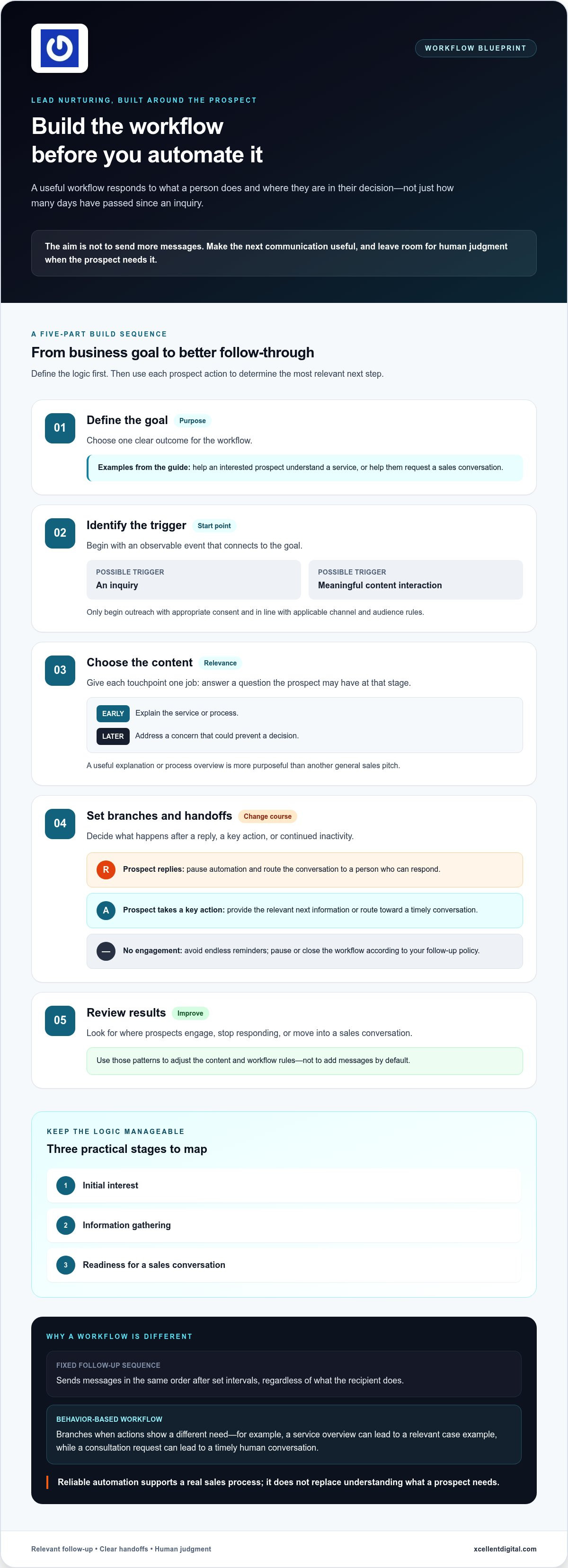
A useful workflow doesn’t just send messages. It connects a business goal to a prospect’s actions, then changes course when those actions show a different need. Build the logic before setting up the automation. Start small, define where a person should take over, and make sure each message has a reason to reach the prospect.
Use this sequence to shape your first workflow:
- Define the goal. Choose a clear outcome, such as helping an interested prospect understand a service or request a sales conversation. A focused goal makes it easier to decide which actions belong in the workflow.
- Identify the trigger. Start with an observable event tied to that goal, such as an inquiry or a meaningful content interaction. Only begin outreach when you have the appropriate consent and follow applicable rules for the channel and audience.
- Choose the content. Match each touchpoint to a question the prospect may have at that stage. A useful explanation or process overview is more purposeful than another general sales pitch.
- Set branches and handoffs. Decide what happens after a reply, a key action such as booking, or continued inactivity. Pause automated messages when a person needs a direct answer, and route the conversation to the appropriate team member.
- Review results. Look at where prospects engage, stop responding, or move into a sales conversation. Use those patterns to adjust the content and workflow rules rather than adding messages by default.
Choose Triggers, Stages, and Useful Branches
Keep the logic manageable: select only events that help you decide what to do next. Map a few practical stages, such as initial interest, information gathering, and readiness for a sales conversation. After a reply, pause the sequence and hand off the conversation. After a key action, send the relevant next information. If there’s no engagement, avoid endless reminders; pause or close the workflow according to your follow-up policy.
Match Each Touchpoint to the Prospect’s Next Question
Give every message one job. Early in the journey, explain a service or process; later, address a concern that could prevent a decision. For example, after a business service inquiry, send a concise overview of how the process works. If the prospect replies with a question, stop the automated path and assign a person to respond. If they book a conversation, end nurturing and pass the context to the sales team.
That handoff is part of the workflow, not a failure of automation. Make it explicit so a prospect doesn’t receive a scheduled pitch while a real conversation is underway. If you’re connecting follow-up to a broader sales process, lead response automation and sales funnel planning can help clarify where those human touchpoints belong.
Personalization Without Spam: Make Workflows Fit Lead Readiness
Automation feels impersonal when it ignores why someone reached out, keeps sending after they reply, or treats every prospect as equally ready to buy. The fix isn’t adding a first name to every message. It’s using reliable context to make each touchpoint relevant, then pausing when the conversation needs a person.
Use information a prospect has shared or actions that clearly relate to their interest. A service inquiry, stated concern, or current decision stage can guide what you send next. Don’t infer a need from a weak signal or write as if you know more than the available information shows. Clear segments can make one communication useful to different audiences without pretending every lead has the same priorities.
| Approach | What the message uses | Example |
|---|---|---|
| Generic | The same message for every lead | “Ready to get started? Contact us today.” |
| Segment-based | A shared need or stage | For prospects comparing services: “Here’s what to consider when reviewing your options.” |
| Behavior-informed | A specific, relevant action | After someone reads a process guide: “Here’s a closer look at the steps involved.” |
Segment-based messages are a useful starting point: they connect content to a group’s shared needs without requiring detailed tracking. Behavior-informed messages can add relevance when the action is meaningful and the follow-up fits it. Keep the distinction practical. A page visit alone may not explain someone’s situation, so avoid treating it as proof of buying intent.
What Should a Workflow Personalize?
Prioritize stated interests, relevant business needs, and lifecycle stage when you have that information. For example, prospects seeking an overview can receive introductory guidance, while those evaluating next steps may benefit from a process explanation. Personalization should change the substance of the message, not just its greeting. If the context is missing or uncertain, use clear general language instead of guessing.
When Should Automation Pause for Human Follow-Up?
A reply, a direct question, or a request to speak signals that a personal response may be more useful than the next scheduled message. Set pause or exit rules so the prospect doesn’t receive conflicting communications while a team member is handling the conversation. Silence is less clear: it doesn’t prove interest or disinterest. Reduce or stop follow-up according to your policy rather than treating inactivity as permission to keep sending.
Respectful communication also depends on consent, suitable message frequency, and straightforward ways for people to manage their preferences or stop messages. Make these choices easy to understand and honor them across the workflow. The aim of automated lead nurturing workflows isn’t maximum contact. It’s a relevant, considerate exchange that leaves room for a human conversation when the prospect asks for one.
Build and Measure a Lead Nurturing Workflow Without Overcomplicating It
You don’t need a complex system to make follow-up more consistent. Start with one audience, one goal, and one workflow. Keep the logic simple enough for your team to understand and review. The aim is to learn whether the right prospects receive useful messages and move toward a meaningful next step, not to automate every possible interaction.
Start With a Minimum Viable Workflow
Before building, write down who the workflow serves, what starts it, what you want the prospect to do next, and which conditions pause or end the journey. Prepare a small set of messages that address real questions at different stages. Then test the full path using internal scenarios: a prospect replies, books a conversation, takes another key action, or remains inactive. Fix confusing branches before live leads enter.
Use this checklist to keep the first version focused:
- Audience: Define one group with a shared need or stage, rather than mixing every inquiry together.
- Goal and trigger: State the outcome you’re working toward and the observable action that starts the workflow.
- Messages and branches: Prepare relevant content, then specify what happens after a reply, key action, or period without engagement.
- Exit conditions: Decide when the workflow ends, such as when a prospect books or a staff member takes over.
- Test and launch: Check message links, timing, routing, and exits in realistic scenarios before enabling the workflow for live prospects.
Measure Progress and Improve One Decision at a Time
Choose measures that connect to the workflow’s goal. Engagement indicators, such as message interaction, can show whether people notice the content; replies and booked conversations show whether it supports a next step. Then review qualified conversations and sales outcomes to understand whether that activity is useful to the business. Don’t treat opens or clicks alone as proof that a workflow is working.
Look for patterns along the path. Are messages reaching their intended audience? Do prospects respond to one touchpoint but disengage after another? Are staff members stepping in at a particular branch? Check delivery, relevance, replies, and workflow exits before making changes. If you alter the audience, message, and timing all at once, you won’t know which change affected the result. Adjust one element, record what changed, and compare the same measures over a suitable period. That gives your team a clearer basis for the next decision.
A simple measurement routine can keep automated lead nurturing workflows tied to real sales activity: review engagement, handoffs, qualified conversations, and outcomes together. To connect that work with a broader growth plan, explore XcellentDigital’s business growth and automation framework.
How XcellentDigital Can Help Connect Lead Nurturing to Your Sales Process
A nurturing workflow works best as part of a connected sales process, not as a separate batch of automated messages. Lead generation brings prospects into the journey; sales funnel development gives their next steps structure; lead response automation supports consistent follow-up. Planning these pieces together helps define what happens from first interest through a qualified conversation, including where a team member should take over.
XcellentDigital provides lead response automation and AI agents, and develops sales funnels. These services support a deliberate process, but the starting point is still your business: clarify the outcome you want, the stages a prospect moves through, the information that helps at each stage, and who owns personal follow-up. With those decisions in place, automation has a clear role without being asked to replace human judgment.
Connect Lead Sources to a Consistent Follow-Up Journey
A prospect’s source and stated interest provide useful context for what should happen next. Someone who responds to Facebook Ads for local lead generation, for example, may have arrived with a particular service or offer in mind. Carry that context into the next conversation so follow-up feels connected to the reason they reached out, rather than like a fresh, generic pitch.
That continuity doesn’t require a complicated system. Agree on how lead sources and expressed interests are recorded, then use that information to guide relevant content and routing. If different sources create different expectations, account for those differences in the journey. Keep the workflow focused on what the prospect needs to understand next, and let your team handle questions that call for a personal response.
Keep Automation Useful, Accountable, and Human
Automation needs an owner. Assign someone to review workflow performance, check that messages remain accurate and relevant, and make sure human handoffs reach the right person. Revisit the process when your services, sales steps, or consent practices change. A workflow that once matched the business can become confusing if its messages or routing no longer reflect how the team works.
Review the customer experience as well as the numbers. Check whether the message fits the lead’s stated interest, whether a reply interrupts automated follow-up, and whether the team can see enough context to continue the conversation. Keep clear responsibility for the next action; otherwise, automation can create a new gap instead of closing one.
Thoughtful automated lead nurturing workflows connect lead generation, funnel planning, and human follow-up around a process your team can maintain. If you’re ready to map that process to your sales journey, talk with XcellentDigital about your lead nurturing workflow.
Make Your Next Follow-Up More Intentional
Your next step doesn’t need to be a complete overhaul. Pick one point where prospects commonly lose momentum, then decide what a useful next interaction would look like. That small, deliberate change gives your team a practical place to begin and a clearer way to judge whether the process is helping.
Think of automated lead nurturing workflows as a working part of your customer journey, not a set-and-forget project. As your business changes, revisit whether each message still reflects the questions prospects ask and whether your team knows when to take over. Keep the process clear, respectful, and flexible enough to improve.
Ready to make your follow-up more consistent? Talk with XcellentDigital about building a lead nurturing process around your sales journey.
Frequently Asked Questions
What is an automated lead nurturing workflow?
An automated lead nurturing workflow is a planned set of follow-up actions that changes based on a prospect’s information or activity. For example, someone who requests details about a service might receive relevant educational content, while a prospect who asks to discuss options moves into a personal sales conversation. The workflow helps organize those next steps; it doesn’t decide that every lead is ready to buy or replace the judgment of your team.
How do you create an automated lead nurturing workflow?
Begin with a specific audience and a business goal, such as helping people who requested a guide understand a related service. Decide what information starts the workflow, what content is appropriate, and which events stop or redirect it. Then test the path with sample scenarios, including a reply and a booking. Keep a record of the rules so the person responsible for sales follow-up understands why a prospect is receiving a particular message.
Can automated lead nurturing workflows feel personal?
Yes, if the message reflects a prospect’s actual interest rather than relying on surface-level personalization. Mentioning a first name won’t make an irrelevant offer feel thoughtful. Instead, use details the prospect chose to share, such as the service they asked about, and make the content useful for that need. If the context is incomplete, use a neutral message rather than implying you know the person’s situation.
How many messages should a lead nurturing workflow include?
There’s no universal message count. Include only the touchpoints needed to answer likely questions and offer a sensible next action. For instance, a short journey might clarify what happens after an inquiry, address a common concern, and invite a conversation. Review whether each message earns its place. If two messages serve the same purpose, combine or remove one instead of adding more simply to keep the sequence active.
How long should a lead nurturing workflow run?
Set the workflow length according to the decision and the prospect’s engagement, not an arbitrary calendar rule. A time-sensitive request may need a shorter path than a considered purchase that involves internal discussion. Define a point where messages stop, such as a completed booking, a direct request to pause, or the end of the planned content. Revisit inactive contacts later only when there’s a clear, appropriate reason to do so.
What should happen when a prospect replies to an automated message?
Pause the automated messages and make the reply visible to the person responsible for follow-up. The next step depends on what the prospect says: a question needs an answer, while a request to talk calls for a direct response from your team. Add enough context for the staff member to continue naturally, and don’t restart the automated path until it’s clear that another message makes sense.
Do small businesses need AI to automate lead nurturing?
No. A small business can start with straightforward rules, clear message ownership, and a process for handling replies. AI agents may be useful as part of a broader automation approach, but they aren’t a prerequisite for organizing follow-up. Choose complexity based on the work you need to manage. XcellentDigital offers AI agents and lead response automation, which can be considered alongside your sales process and team responsibilities.













Leave a Reply
Want to join the discussion?Feel free to contribute!