

AI-Powered Lead Response: Turn More Inquiries Into Conversations
What if a new inquiry could get a timely, useful first reply without making a prospect feel like they’re talking to a script? That’s the goal of ai powered lead response: keep conversations moving when your team is busy or unavailable, while leaving meaningful sales conversations in human hands.
It’s frustrating when follow-up slips through the cracks. A fast message isn’t useful, though, if it feels impersonal or misses the prospect’s question. AI works best as a first step, not a replacement for your team.
In this guide, you’ll learn how AI-powered lead response works, where it can support your follow-up process, and what it can’t do on its own. You’ll also see how to assess its impact by looking beyond reply speed to qualified conversations and sales, and how to build a reliable handoff to your team. XcellentDigital provides AI agents and lead response automation to connect timely follow-up with the rest of your lead-generation and sales process.
Key Takeaways
- See how ai powered lead response can support the first interaction with an inbound prospect without replacing human sales conversations.
- Map a clear path from inquiry to first reply to team handoff, including what happens when a request needs human judgment.
- Compare manual follow-up, automated-first workflows, and human-led approaches to find a fit for your team’s needs.
- Measure more than messages sent: track whether follow-up leads to qualified conversations and sales.
- Learn how AI agents, lead response automation, and sales funnel development can connect follow-up with your broader lead-generation process.
What Is AI-Powered Lead Response, and Which Leads Does It Handle?
AI-powered lead response uses artificial intelligence to help handle the first reply to a new business inquiry. The prospect has already reached out; the system’s job is to support a timely, relevant first interaction and guide what happens next. It can keep an inquiry from sitting unnoticed while staff are serving customers, in meetings, or otherwise occupied. The goal isn’t to close a sale automatically. It’s to acknowledge the person, understand the reason for their inquiry, and make the next step clearer.
That distinction matters because “AI for sales” can describe several different activities. Inbound lead response starts with a prospect who has contacted your business. Outbound prospecting starts with the business searching for or approaching potential prospects. General marketing automation may coordinate communications across a broader campaign, whether or not someone has just made an inquiry. These approaches can work together, but they solve different problems.
How AI lead response differs from chatbots and outbound AI
Inbound response begins after a person asks about a service, submits an inquiry, or otherwise signals interest. Outbound AI, by contrast, may help identify prospects or initiate outreach. A chat interface can be one way to receive or respond to an inquiry, but it isn’t the whole process. The workflow also needs to capture useful context, identify what needs attention, and give a person a clear way to take over when judgment or a detailed answer is needed.
Think of a prospect who sends a question while the team is helping another customer. A useful response workflow is designed around that incoming request, rather than treating the person like a name on a cold outreach list. General marketing automation is broader still: it might support a campaign or customer journey without focusing on the immediate first response. Define the purpose before deciding what to automate.
What a helpful first response should accomplish
A strong first interaction should make the prospect feel heard, not processed. It acknowledges the inquiry, establishes what the person wants to discuss, and gathers only information that helps direct the next conversation. If someone asks about a particular service, for example, the response should address that question instead of launching into a generic sales pitch.
Set a clear expectation for what happens next, but promise a specific response time only if your team can reliably meet it. Keep the message focused: acknowledge the request, say what the next step is, and ask one relevant question if a key detail is missing. Staff should be able to see what information has been collected and what follow-up is needed.
- Acknowledge: Recognize the inquiry and its topic.
- Clarify: Ask only for details that help guide the next interaction.
- Direct: Explain the next step without implying a sale is certain.
Good ai powered lead response supports your team’s follow-up; it doesn’t replace the listening, expertise, and trust-building that make a sales conversation work. Define which inquiries the workflow should handle, what it should do when a question needs human judgment, and how staff will continue the conversation. That gives automation a clear role while keeping people responsible for the relationship.
How an AI-Powered Lead Response Workflow Moves From Inquiry to Handoff
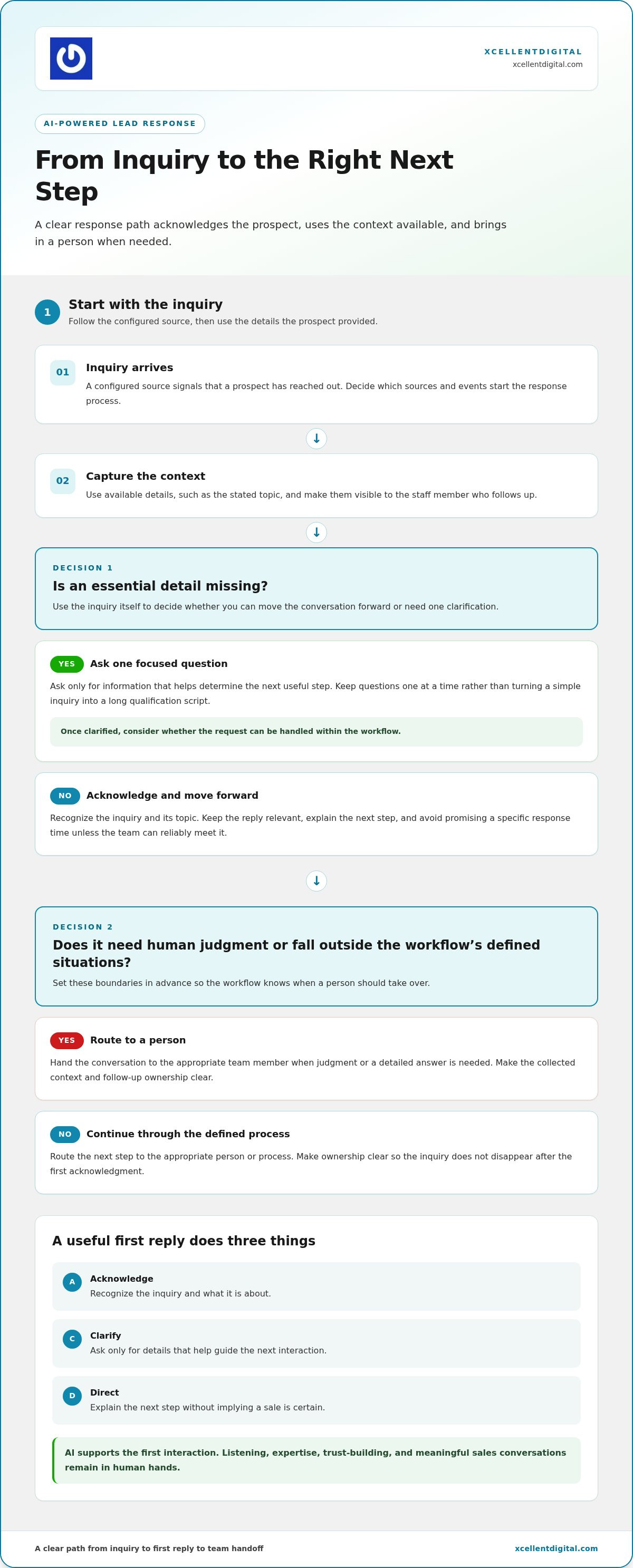
A dependable workflow gives each new inquiry a clear path instead of leaving follow-up to memory. It starts when a configured source registers an inquiry, uses the details available to understand what the prospect is asking, sends a relevant first response, and routes the conversation for follow-up. The point isn’t to make every interaction automatic. It’s to make the next action easier for both the prospect and your team.
Map the process in order:
- Inquiry arrives: A configured source signals that a prospect has reached out. List the sources you use and decide what event should start the response process for each one.
- Context is captured: The workflow uses details provided with the inquiry, such as its stated topic, when those details are available. Make sure the information is visible to the staff member who follows up.
- A first response is sent: The message acknowledges the request and stays relevant to what the prospect shared, rather than relying on a generic pitch.
- Follow-up is routed: Direct the next step to the appropriate person or process, and make ownership clear so the inquiry doesn’t disappear after the initial acknowledgment.
Keep the questions focused. A long qualification script can make a simple inquiry feel like an obstacle course, especially when the prospect has already explained what they need. Ask only for information that helps determine the next useful step. If the person’s request is clear, acknowledge it and move the conversation forward. If something essential is missing, ask one relevant question at a time rather than piling on requests.
Decide which sources trigger a response, which details the workflow should use, and where the handoff should go. Build those choices around your actual lead journey, not assumptions about what every AI tool can do. Also define what happens when details are incomplete or a request falls outside the situations the workflow is designed to handle.
What happens between a new inquiry and the first reply?
Once a configured source identifies an inquiry, the workflow can use the information included in it to shape an acknowledgment. For example, a prospect asking about a particular service should receive a reply that reflects that topic, not a broad message that could apply to anyone. The response should avoid guessing at missing details. A clear, modest acknowledgment is more useful than a confident answer the system can’t support.
When should a person take over the conversation?
Route complex questions, sensitive concerns, and requests that require business judgment to staff. Give the person taking over the relevant details the prospect has already shared, so they can continue without making the prospect repeat the basics. Agree on which situations need human review and make that route clear to the team.
Human handoff is routing a conversation to staff when judgment, expertise, or personal attention matters. AI can help organize the first steps; your team brings the context and relationship-building needed for a real sales conversation. XcellentDigital’s lead response automation can support this process as part of the broader lead journey.
AI Versus Manual Follow-Up: Where Automation Helps and Where It Can Fail
There’s no single follow-up approach that fits every business. Manual replies give staff direct control, but inquiries can wait when the team is busy. Automation can make the first step more consistent, but it can also send a message that feels generic or misses the point. A human-led process supported by AI combines steady intake with personal judgment. The right balance depends on your inquiry volume, team capacity, and the kind of conversations you handle.
| Approach | Consistency and workload | Personalization and judgment |
|---|---|---|
| Manual-only | Staff manage each reply, which can increase workload and make follow-up vary during busy periods. | People can adapt to context and use judgment, though the quality depends on who responds and what they know. |
| Automated-first | A defined workflow can handle routine first steps consistently and reduce repetitive work. | Replies may feel impersonal or miss nuance; human review matters for questions outside the workflow. |
| Human-led with AI support | AI can support intake and repeatable tasks while staff manage follow-up. | People retain responsibility for nuanced conversations, and the quality of support depends on how well the process shares context. |
Automation supports lead follow-up only when its replies stay relevant and escalation remains clear. Treat that as a standard to test, not a promise that automation will outperform manual work. For a small team, a well-designed workflow can acknowledge an inquiry while staff handle other responsibilities. Consistent intake questions can also organize requests, making it easier to see what a prospect needs and what still requires attention. Connecting follow-up to the wider lead-generation and sales process keeps it from becoming a standalone task.
Where automation can support a small-business team
Use automation for repeatable steps, not as a substitute for understanding the customer. A short set of relevant prompts can gather useful context across incoming inquiries and help staff prepare for the next interaction. Keep questions tied to the prospect’s stated need; collecting extra details just because a form or workflow can ask for them adds friction without necessarily helping the conversation.
Risks to manage before relying on automated replies
A mismatched answer can make a prospect feel ignored. So can a reply that creates an expectation your team can’t meet, or a handoff that leaves staff without the context already provided. Before expanding the workflow, test common inquiry scenarios, review sample conversations, and revise responses that sound vague or make unsupported assumptions.
Keep human review available for unusual, sensitive, or high-stakes requests. Decide which situations need a person, then make that route clear to staff. AI powered lead response works best as part of a thoughtful process: routine support where it fits, human attention where the conversation calls for it. A clear division of responsibility helps protect trust while giving your team a workable way to manage follow-up.
How to Measure AI Lead Response Without Chasing Vanity Metrics
A busy dashboard can make a workflow look productive without showing whether prospects are getting useful help. Count replies sent, but don’t mistake activity for progress. To understand whether automation supports your sales process, record a baseline before launch, then compare the same measures over time. Use information your business can reliably access, and avoid setting expectations based on unsupported benchmarks or projected gains.
Start by documenting how inquiries are handled now. Note inquiry volume, how often a first response is recorded, how many prospects continue the conversation, and what next steps follow. Use the same definitions before and after implementation. For example, agree on what counts as a qualified conversation for your business, rather than changing the definition to make results look stronger.
Which indicators show whether the process is working?
Look at activity and outcomes together. Activity shows whether the workflow is running; outcomes help show whether follow-up is moving prospects forward. Choose a small set of measures you can review consistently:
- Inquiry volume: How many new inquiries came in during the review period?
- First-response coverage: What share received a first response through the configured process?
- Human intervention: How often did staff need to step in, and what prompted the handoff?
- Conversation progress: How many inquiries became qualified conversations, and what next step was agreed?
Don’t judge the process by response counts alone. Review whether replies addressed the inquiry, whether questions were left unanswered, and whether the prospect moved to a useful next step. A high number of automated messages means little if conversations stall or staff have to correct the same mistakes repeatedly.
How to improve the workflow using real conversations
Set a defined review period and examine a representative sample of exchanges, including routine inquiries and cases that needed staff attention. Look for missed intent, unclear wording, unnecessary questions, and expectations the business couldn’t meet. Ask the people handling follow-up which messages helped and where they had to clarify or repair the interaction.
When the same issue appears repeatedly, update the response guidance or routing approach, then observe what changes in the next review period. Keep the measurement window and definitions consistent so you’re comparing like with like. If inquiry volume or lead mix changes, record that context rather than attributing every difference to automation.
This practical approach helps you judge ai powered lead response by the quality and progress of conversations, not just the number of replies sent. XcellentDigital provides lead response automation to connect measurement with a clearer follow-up process.
How XcellentDigital Can Help Connect AI Lead Response to Your Sales Process
Lead response works best when it fits the way your business attracts and serves prospects. XcellentDigital provides AI agents, lead response automation, and sales funnel development to make follow-up part of the broader lead journey, not an isolated message. Start with the inquiries you receive and the next steps your sales process needs to support.
The right workflow reflects where leads come from, what prospects ask, and how your team handles follow-up today. Your advertising and search activity may generate inquiries, while your funnel shapes what happens after someone raises a hand. Planning those pieces together clarifies where automation can support the process and where staff should stay involved. The focus is a clearer workflow, not a promise of a particular sales outcome.
What to bring into a lead-response planning conversation
Start with the day-to-day picture. Identify where inquiries originate and how the team currently responds. Bring examples of common prospect questions, describe how conversations move between team members, and point out where follow-up tends to stall or lose context. You don’t need a perfect process map; an honest view of what happens now is a useful starting point.
Then define what a useful next step means for your business. It could be gathering information for a staff conversation, moving a prospect toward a sales discussion, or identifying that an inquiry needs a different kind of attention. Clear goals keep the discussion focused on practical needs rather than automation for its own sake.
- Lead sources: Where do inquiries begin, and what details usually accompany them?
- Current follow-up: Who responds, how is context shared, and where do delays or gaps appear?
- Desired next step: What should happen after the initial interaction for different kinds of inquiries?
Build a response process that keeps people in the loop
Automation should support timely engagement and organized follow-up, not unattended selling. XcellentDigital provides AI agents and lead response automation alongside sales funnel development, connecting response needs with how leads are generated and progressed. The workflow should reflect your business’s inquiry patterns and the role your team plays in continuing each conversation.
That human role matters. Staff bring business knowledge, judgment, and personal attention to questions that need more than a standard first response. A practical plan should account for how the team will stay involved and what information helps them continue a conversation without losing the prospect’s context.
If missed or inconsistent follow-up is creating friction, review your current inquiry and response process with XcellentDigital. You can explore an ai powered lead response approach tailored to your business and connected to the sales process you want prospects to move through.
Build a Follow-Up Process That Can Grow With Your Business
Turn your response goals into a process your team can use, review, and improve as your business changes. Decide what a prospect should experience after reaching out, where staff need to step in, and what information helps them continue the conversation. A clear operating rhythm gives automation a defined role without asking it to make every decision.
That planning can connect the first reply to the larger journey, from how a lead arrives to what happens after the initial conversation. XcellentDigital offers AI agents and lead response automation, with sales funnel development to connect response planning to broader follow-up processes. The aim is a practical approach to ai powered lead response that fits your business, not a promise of automatic sales.
Ready to shape a follow-up process around the inquiries your business receives? Talk with XcellentDigital about AI-powered lead response and explore an approach that keeps your team meaningfully involved. Start with the process you have, then build a clearer next step from there.
Frequently Asked Questions
What is AI-powered lead response?
AI-powered lead response uses configured automation and AI agents to engage with people who have already contacted a business. Depending on the setup, it may acknowledge a request, gather relevant details, or help direct the prospect to a next step. For example, an inquiry about a service can be handled differently from a request to change an existing appointment. Outbound prospecting is different: it begins with finding or contacting people who haven’t reached out.
Can AI respond to leads without sounding robotic?
Yes, if replies reflect the prospect’s actual question and avoid stock phrases that could fit any business. Review sample conversations for language that feels repetitive, overly formal, or unrelated to what the person asked. For instance, if someone asks whether a service fits a particular need, a generic greeting alone won’t feel responsive. Set clear boundaries, too: questions that call for empathy, judgment, or a detailed explanation should reach a person.
How quickly should a business respond to a new lead?
Respond as soon as your business reasonably can, while setting expectations your team can actually meet. The right standard depends on staffing, inquiry sources, and how follow-up is organized, so a universal benchmark may not suit your operation. Decide what the first acknowledgment can responsibly promise, then distinguish it from the timing of a fuller staff response. That way, prospects aren’t left guessing about what happens next.
Does AI lead response replace a sales representative?
No. AI can support early follow-up, but it doesn’t take the place of a representative’s ability to understand nuance, build rapport, or make business decisions. Consider a prospect whose needs don’t fit a standard service request: a staff member can ask follow-up questions and respond with context. Define which situations require that involvement, and make sure the representative can see what the prospect has already shared before continuing.
What information should an AI lead response system collect?
Collect only details that help clarify the request or determine a useful next action. If someone has already identified the service they’re interested in, there may be no need to ask them to repeat it. Keep questions relevant to your sales process and avoid requesting sensitive information that isn’t needed for the inquiry. If a response leaves important context unclear, route the conversation to staff rather than continuing to guess.
How can a business tell whether AI lead response is improving sales?
Compare results with a baseline using consistent definitions and a defined review period. Look beyond the number of messages sent: examine whether inquiries received a response, whether conversations became qualified opportunities, and whether prospects moved to a meaningful next step. For a fair comparison, note changes in lead volume or campaign sources that may affect results. More automated replies alone don’t show that sales performance improved.












Leave a Reply
Want to join the discussion?Feel free to contribute!