

Cost to Reinstate a Google Business Profile: What Businesses Pay in 2026
A suspended Google Business Profile can disrupt your visibility, but Google doesn’t charge a reinstatement fee. The cost to reinstate google business profile becomes a different question when you’re considering professional help. Any service fee depends on the work involved in your case.
If you’re worried about missed leads or unsure whether you need support, start by separating Google’s appeal process from optional professional assistance. The appeal process is free. An agency may charge for its own reinstatement support, but no outside service can guarantee that Google will restore a profile.
This guide explains what Google charges, what professional support may involve, and how to compare your options. You’ll also find practical steps for preparing to handle a case yourself or discussing it with a specialist, without relying on unsupported price promises.
Key Takeaways
- Google’s appeal process is free. The cost to reinstate google business profile may include separate, optional professional support.
- The scope of help can depend on the number and nature of the profile issues that need attention.
- DIY may suit owners who are comfortable reviewing Google’s guidance and organizing accurate business records.
- Before paying for assistance, get a clear description of the work, communication, responsibilities, and evidence handling.
- Google makes the final reinstatement decision, so treat guaranteed-result claims with caution.
Cost to Reinstate a Google Business Profile: What Google Charges
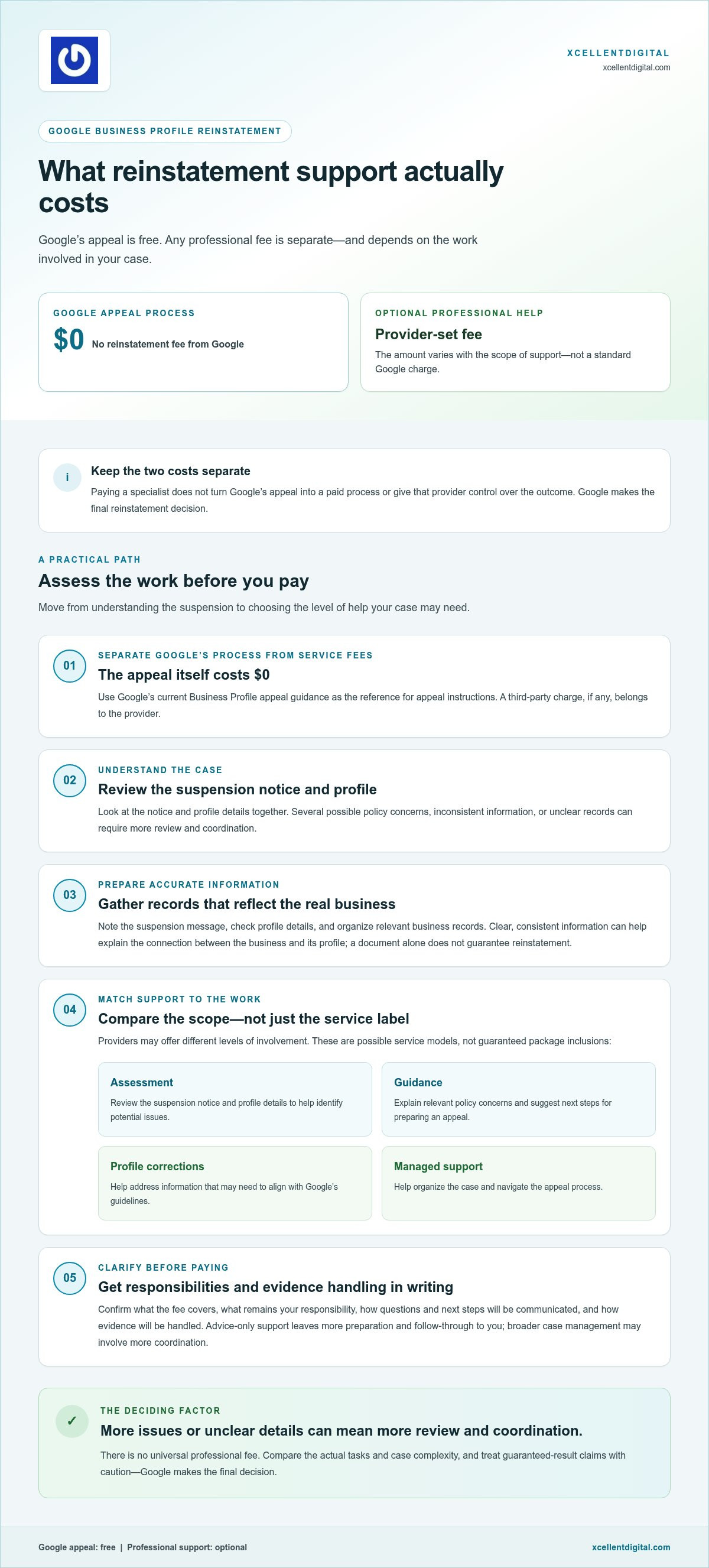
Google doesn’t charge a fee to appeal a suspended Business Profile or request reinstatement. The cost to reinstate google business profile through Google’s process is $0. If you hire a specialist, that is a separate, optional service. Any fee is set by the provider, not charged by Google as part of the appeal.
This distinction matters when your profile disappears from Search or Maps. The suspension and the support you choose are separate issues. You can follow Google’s process yourself or pay a professional to assist with parts of the work. Paying someone doesn’t make the appeal a paid Google process or give that person authority over Google’s decision.
Does Google charge to reinstate a Business Profile?
No. Google’s official Business Profile appeal guidance explains how to appeal a decision; it doesn’t identify a reinstatement fee. Use Google’s instructions as your reference for submitting an appeal and providing relevant evidence. Because policies and support steps can change, review the current guidance before acting. Google Business Profile on Wikipedia offers general background on the platform, but Google’s support documentation is the source to rely on for appeal instructions.
A third-party service is different. A provider may charge for its time and expertise, but that charge belongs to the provider. It isn’t a Google fee, and professional involvement doesn’t guarantee reinstatement. Google makes the final decision.
What does a professional reinstatement service fee cover?
There’s no universal service package. One provider might offer an assessment and guidance, while another may take on broader support. Possible service models include:
- Assessment: Reviewing the suspension notice and profile details to help identify potential issues.
- Guidance: Explaining relevant policy concerns and suggesting next steps for preparing an appeal.
- Profile corrections: Helping address information that may need to be brought in line with Google’s guidelines.
- Managed support: Helping organize the case and navigate the appeal process.
These are examples of possible scopes, not a promise that every provider includes each task. A lower fee may reflect a narrower role, while broader support may involve more hands-on work. Compare what the fee covers, what remains your responsibility, and how the provider will approach the work. Don’t assume that “reinstatement service” means the same thing everywhere. A clear scope helps you understand what you’re paying for and keeps Google’s free appeal process separate from optional professional assistance.
Why Google Business Profile Reinstatement Service Costs Can Vary
There isn’t one universal fee for professional reinstatement help. A straightforward case with clear business details may need less review and coordination than a case involving several possible policy issues, inconsistent profile information, or unclear records. The cost to reinstate google business profile with professional help depends on the scope of work, not a standard fee set by Google.
That distinction helps you assess a quote fairly. Two businesses may both have suspended profiles but need different levels of support before they’re ready to appeal. Focus on the work your situation may involve rather than assuming every suspension follows the same path.
How profile issues and documentation affect the work
A case review starts with understanding the profile and the business it represents. If key details are unclear or don’t match across the profile and business records, more time may be needed to identify what requires attention. One apparent issue may also sit alongside other concerns, so review the full profile and suspension notice before deciding on next steps.
Supporting records should accurately reflect the real-world business and the details represented on the profile. Depending on the case, relevant documentation may help clarify that connection. A document by itself doesn’t guarantee reinstatement. The goal is to present a clear, consistent account and address the issues that may be relevant to the appeal.
How support scope changes the service fee
Advice-only help generally leaves more preparation and follow-through to the business owner. Broader case management may involve more coordination, such as organizing information and guiding you through appeal steps. These are different levels of involvement, so compare them by the tasks included rather than by the service label alone.
Clarify who is responsible for each task. Will you gather and organize the records? Is the support focused on reviewing the situation, or does it extend to helping prepare the case? How will questions and next steps be communicated? Clear answers help you understand the work behind a fee without relying on a headline price or assuming a particular result.
Case complexity changes the scope of professional support because each additional issue, unclear detail, or documentation gap can require more review and coordination.
Before choosing a route, make a short list of what you know: note the suspension message, review the profile details, and gather accurate records about the business. This gives you a clearer starting point, whether you handle the process yourself or seek expert help. XcellentDigital’s Google Business Profile reinstatement support can help you organize a confusing profile issue and identify practical next steps toward restoring search visibility, without promising Google’s decision.
DIY or Hire Help? Compare Your Google Profile Reinstatement Options
Choosing between handling a reinstatement yourself and getting professional guidance depends on more than cost. Consider how clear the issue is, how much time you can devote to reviewing your profile and records, and whether you feel confident deciding what needs attention. Neither route guarantees Google will restore the profile. Choose the approach that gives you a clear, careful way to address the case.
Comparison: DIY and professional support
Effort: DIY means you review the profile, prepare information, and follow the process yourself. With professional support, some of that work may be guided or shared, depending on the agreed scope.
Case familiarity: As the owner, you know your business firsthand. A specialist may be familiar with common profile policy concerns, but still needs accurate information from you to understand your specific case.
Outside support: DIY leaves decisions and follow-through with you. Professional help can offer another perspective and a more structured division of responsibilities, while Google retains the final decision.
When handling the reinstatement yourself may make sense
DIY may be a practical fit if you understand the likely issue, your business details are consistent, and you’re comfortable organizing accurate records. For example, if you can identify a profile detail that needs correction and explain how it reflects your actual business, you may feel ready to manage the process yourself.
Read Google’s official instructions before submitting information. Keep a record of the details you’ve reviewed, and make sure what you provide is accurate and consistent. Avoid rushed edits based on guesses about what might resolve the suspension. A deliberate review helps you make informed decisions and avoid adding confusion.
If you want to understand the steps and preparation involved, XcellentDigital’s Google Business Profile reinstatement appeal process guide can help you decide what to consider before moving forward.
When professional reinstatement support may be useful
Outside guidance may be useful if the reason for suspension remains unclear, the profile has faced repeated setbacks, or the business details are complicated to explain. It may also help if you’re unsure which records are relevant or how to organize the information into a clear account.
Structured support can clarify what needs review, what information you’ll provide, and who is responsible for each next step. That division can be useful when you’re balancing the case with day-to-day business demands. Stay involved: you know the facts of your business, and the support process depends on information that accurately reflects them.
Use the cost to reinstate google business profile as one part of your decision. Weigh the effort you can take on, your confidence in the case, and the value of having someone help organize the next steps. Professional guidance may make the process easier to manage, but Google determines whether a profile is reinstated.
How to Evaluate Reinstatement Support Before You Pay
A clear proposal should tell you what you’re paying for, what you’ll handle, and where the support ends. Before committing, compare the written scope with the specific work your case appears to need. A vague promise to “fix” a profile doesn’t tell you whether the service includes diagnosis, corrections, appeal preparation, or help with communication.
Use this checklist to assess the offer:
- Match the scope to your case. Look for a plain description of the tasks involved, such as reviewing the profile, identifying possible policy concerns, recommending corrections, or helping prepare an appeal. If you already know what needs attention, avoid paying for support that doesn’t address that need.
- Clarify who does what. Get a clear account of which information or records you must provide, which steps you’re expected to complete, and what the service handles. This makes responsibilities clear before work begins.
- Understand communication. Find out how updates and questions will be handled and what progress information you can expect. Clear communication helps you stay involved and act on decisions that remain yours.
- Review evidence handling. Before sharing sensitive records or account access, understand what information is needed, how it will be used, and how it will be handled. Share only what’s relevant to the agreed work.
- Check claims carefully. Treat stated success rates as provider-reported unless they’re independently substantiated. Be cautious of claims that a special relationship or inside connection can override Google’s decision.
- Get the terms in writing. Make sure the description of work, responsibilities, and fee terms are clear. Don’t rely on broad language that leaves you guessing about what’s included.
Claims and scope deserve a closer look
Guaranteed reinstatement claims deserve particular scrutiny. A professional may help you understand the issue and organize next steps, but Google makes the final decision. No service description should suggest that payment can compel a particular outcome. Separate what the provider controls, such as agreed support tasks, from what Google decides.
Compare the proposed scope with your own case notes. If you’re unsure whether profile details need correction, look for an explanation of whether the work includes reviewing those details. If you need help organizing information for an appeal, check that the described support covers preparation rather than assuming it’s included. A Google Business Profile audit checklist can help you review profile quality as part of that assessment.
For a structured review of your profile issue and practical next steps, explore XcellentDigital’s GBP reinstatement support. Clear expectations help you make a considered choice while keeping the focus on accurate information and the work your case actually needs.
Get a Clear Reinstatement Plan With XcellentDigital
A suspended profile can leave you unsure what to fix first, especially when the notice doesn’t make the issue clear. XcellentDigital provides Google Business Profile reinstatement support to help businesses organize the situation, identify practical next steps, and work toward restoring search visibility. Google makes the reinstatement decision, so support should focus on addressing the case clearly, not promising a result.
The cost to reinstate google business profile through professional support depends on the work involved. Before discussing your situation, prepare a concise account of what happened and how the profile’s loss is affecting your business. That gives the conversation a practical starting point.
What to prepare for a useful reinstatement discussion
Start with the basics: the profile’s current status, the notice or issue you’re aware of, and any steps already taken. Note when you first noticed the problem and whether profile details were recently changed. Stick to what you know. A clear summary is more useful than guessing at the cause.
Gather accurate records that relate to the business and the way it operates. Keep them organized, but don’t send unnecessary sensitive information in an initial inquiry. You can describe what records are available and provide relevant details through an appropriate process as the case moves forward.
- Profile status: What you can currently access and what message you see.
- Known issue: Any profile details or policy concerns you’ve identified.
- Previous steps: Actions already taken and any response received.
- Business impact: How the loss of profile visibility is affecting calls, inquiries, or customer discovery.
This preparation keeps the discussion focused. It also helps separate confirmed facts from assumptions before you decide what to do next.
Turn profile recovery into a visibility plan
Reinstatement is an important step, but it’s only one part of rebuilding your local search presence. Once the profile issue is addressed, review whether the listing’s information is accurate and clearly represents the business. XcellentDigital also provides Google Business Profile optimization, connecting recovery with broader work to strengthen visibility and support lead flow.
For a practical look at profile quality beyond the suspension itself, the Google Business Profile optimization guide covers ways to assess and improve your listing. Keep the focus on accurate business information and a profile that reflects how customers can engage with you.
If the suspension is disrupting your visibility and you’d like help organizing the issue, explore XcellentDigital’s GBP reinstatement support. Share the profile status, what you’ve tried, and the business impact. That gives you a clearer starting point for working through the problem and planning next steps, without relying on promises about Google’s final decision.
Take the Next Step Toward Stronger Visibility
A suspended profile can make it harder for customers to find and choose your business. Use what you’ve learned about the cost to reinstate google business profile to decide what feels manageable: handle a clear case yourself or get help organizing the next steps. The goal is a sound plan that addresses the profile issue and keeps your wider visibility in view.
XcellentDigital provides Google Business Profile reinstatement support, profile optimization, and reputation management. These services can support the work of addressing a profile problem and strengthening your presence once you’re ready to focus on what comes next. No outside service controls Google’s final decision, but clear, practical support can make a confusing situation easier to work through.
If you’re ready to discuss your profile and its impact on your business, get help with your Google Business Profile reinstatement. Start with the situation as you understand it and the steps you’ve already taken. Take the next step with a clearer path and renewed focus on being found by the customers who need you.
Frequently Asked Questions
Does Google charge a fee to reinstate a Business Profile?
No. Google doesn’t charge a fee to submit an appeal or request reinstatement through its Business Profile process. A charge from an outside service is separate and comes from that provider, not Google. If you receive an invoice described as a Google reinstatement fee, check who issued it and compare the claim with Google’s official appeal guidance before paying.
How much does it cost to reinstate a Google Business Profile?
There’s no single fixed total for professional help, because providers set their own fees and define different scopes of work. The cost to reinstate google business profile with assistance depends on what the service includes and what your case requires. Before agreeing, request the fee and work description in writing, including any tasks or expenses that aren’t covered, so you can compare the offer with your needs.
Can I reinstate my Google Business Profile for free?
Yes. You can use Google’s appeal process yourself without paying a reinstatement fee. Start by reading the current instructions, then prepare an accurate explanation and any relevant records before submitting. Outside assistance is optional. If you manage the appeal personally, keep a copy of what you submit so you can refer to it if you need to track the case.
What affects the cost of Google Business Profile reinstatement help?
Fees can depend on how much review and assistance a case needs. For example, an unclear suspension notice, conflicting profile details, or a duplicate listing may require more investigation than a case with an obvious issue and consistent information. Previous appeal activity may also affect the support needed. Ask whether the quoted work addresses the specific issues you’ve identified rather than assuming all suspension cases require the same effort.
Is it worth hiring a Google Business Profile reinstatement service?
It may be useful if you’re unsure what triggered the suspension, have already faced a setback, or need help organizing a complicated account of your business. If the issue is clear and you’re comfortable following Google’s instructions, handling it yourself may be reasonable. Consider the time you can devote and the support actually offered. Professional help can guide your work, but it can’t decide the appeal.
Can a reinstatement service guarantee my profile will return?
No service can guarantee that Google will restore a profile. Google controls the reinstatement decision, even when an outside specialist helps prepare or organize a case. Be cautious if a provider promises a certain result or suggests it can bypass Google’s review. Read any written commitment closely: a promise to complete specified work is different from a promise that Google will approve the appeal.
Should I pay for help before submitting a reinstatement appeal?
Not necessarily. If you understand the issue, can prepare accurate information, and feel comfortable with Google’s instructions, you may decide to submit the appeal yourself. If the reason is unclear or you’re uncertain what to include, getting guidance before submitting may help you plan a more organized response. Consider your case and the proposed scope first. Paying for assistance is a choice, not a requirement.













Leave a Reply
Want to join the discussion?Feel free to contribute!