

Documentation for GBP Reinstatement: What Evidence Helps and How Long It Takes
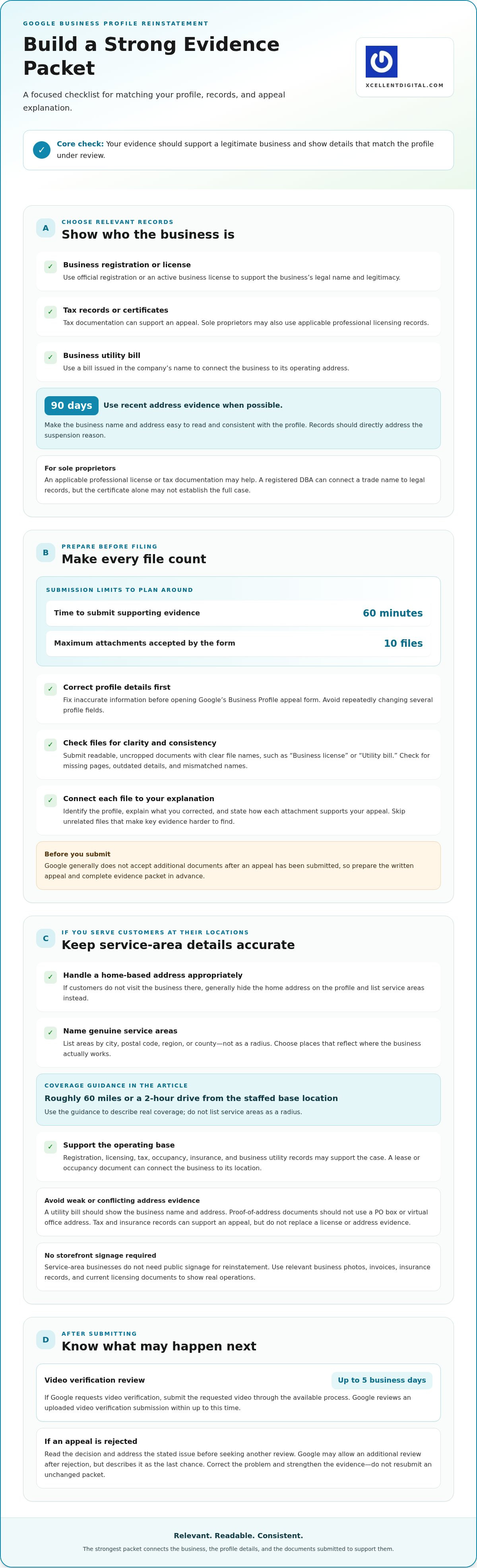
An LLC isn’t required to request Google Business Profile reinstatement. The right documentation for GBP reinstatement can include a business license, tax records, or a business utility bill, with proof of address dated within the last 90 days when possible. A utility bill should be in the company’s name, and the business name and address on your evidence should match the profile.
It’s understandable to worry that a suspension means your business structure or lack of a storefront rules you out. Sole proprietors and service-area businesses can appeal, too. Focus on showing that your business is legitimate, your profile details are accurate, and your documents support the information you submit.
This guide explains which evidence can help, how service-area businesses should handle address details, and what to prepare before filing. You’ll also learn what can slow a review, why complete, readable documents matter, and how to set realistic expectations for reinstatement.
Key Takeaways
- Build a focused evidence packet with current business records, and make sure names and addresses are consistent across documents and your profile.
- You don’t need an LLC to appeal; sole proprietors can use applicable licensing, tax, or utility records to support their case.
- Service-area businesses can show legitimacy without displaying a customer-facing storefront, but address settings and evidence should reflect how the business operates.
- Prepare readable, relevant files before opening the evidence form, since you have 60 minutes to submit supporting evidence and can attach up to 10 files.
- Review times vary with the suspension and the quality of the appeal; a video verification submission can take up to 5 business days to review.
1. What Documents Does Google Accept for GBP Reinstatement?
Google’s examples of appeal evidence include official business registration, a business license, tax certificates, and business utility bills. Sole proprietors may also use an applicable professional license or tax documentation. Choose records that connect your actual business to the details on your profile. If you submit a utility bill, use one issued in the company’s name.
For proof of address, use a document dated within the last 90 days when possible. Make the business name and address easy to read, and check that they match your profile. A current license or registration can support business legitimacy, while a recent utility bill can connect the business to its operating address. These records serve different purposes, so select evidence that directly addresses the suspension reason.
How do I submit a Google Business Profile reinstatement request? Correct inaccurate profile details first, then open Google’s Business Profile appeal form and submit the appeal with your supporting evidence. Prepare every file before opening the evidence form: Google gives you 60 minutes to submit supporting documents, and the form accepts up to 10 attachments.
Keep your packet focused. Submit readable, uncropped documents with clear file names, such as “Business license” or “Utility bill.” In your appeal statement, identify the profile, explain what you corrected, and connect each attachment to your explanation. If the business address prompted concern, for example, explain the address and attach records that support it. Avoid unrelated files that make key evidence harder to find.
Prepare the written appeal and files before you start. Google generally does not accept additional documents after an appeal has been submitted, so review the packet for missing pages, outdated details, or mismatched names first. If Google requests video verification, submit the requested video through the available process; Google reviews an uploaded video verification submission within up to 5 business days. Google does not publish a deadline for submitting video after an appeal.
If Google rejects your appeal, read the decision and address the stated issue before seeking another review. Google may allow an additional review after a rejection, but describes it as the last chance. Don’t resubmit an unchanged packet. Correct the problem, replace weak evidence, and make the connection between your profile and records clearer. Strong documentation is relevant, current, and consistent throughout.
2. What About Service Area Businesses?
Google’s eligibility rules require a profile to represent an eligible business accurately. Service-area businesses can apply without displaying a customer-facing address if customers don’t visit the business there. If you operate from home, generally hide that address on your Google Business Profile and list service areas by city, postal code, region, or county, not as a radius.
For registration evidence, use official business registration or an active business license showing the legal business name and address. Google also lists tax certificates and business utility bills as appeal evidence. Keep the name and address consistent with the profile details under review. A registered DBA can connect a sole proprietor’s trade name to legal records, but the certificate alone may not establish the full case.
Show the business’s operating base without publishing a private home address. A lease or occupancy document can connect the business to its location. A utility bill should clearly show the business name and address; proof-of-address documents should not use a PO box or virtual office address. Tax and insurance documents can support an appeal, but they don’t replace a license or address evidence.
Service-area businesses don’t need public signage for reinstatement, and signage photos may conflict with applicable guidelines. Instead, use relevant business photos, invoices, insurance records, and current licensing documents to show real operations. For service areas, Google’s guidance suggests coverage roughly 60 miles or a 2 hour drive from the staffed base location. Choose named service areas that reflect where the business actually works.
What are Google’s eligibility rules for a business profile? The profile must accurately represent an eligible business. A service-area business can hide its address if customers don’t visit the location, and its listed service areas should reflect genuine coverage, not a radius.
Common suspension triggers include keyword stuffing in the business name, virtual office or UPS Store addresses, and frequent profile changes. Compare the profile with registration, licensing, tax, and occupancy records. Remove promotional keywords from the business name, correct inaccurate addresses, and align other profile details with the business’s actual information before appealing.
How can I fix profile violations before requesting reinstatement? Correct the business name, address settings, and other inaccurate fields, then gather records that support the updated details. Avoid repeatedly changing several profile fields. Submit a consistent profile supported by current documents.
What risks come with creating a new profile after suspension? A new listing won’t fix the issue affecting the suspended profile and may create conflicting business details. Focus your appeal on the existing profile, correct the identified information, and provide records that connect the business name, operating base, and service area.
3. Frequently asked questions about reinstatement evidence
Use evidence that addresses the specific reason your profile was suspended. A business license may establish that the business exists, while a lease or utility bill can help connect it to a disputed location. An agency assisting with an appeal should organize records around the issue, not send a large packet of unrelated files.
What evidence is useful for a location-based suspension? Start with documents tied to the address named in the appeal. A lease naming the business, utility bills connected to the location, and photos of permanent signage can help show the business operates there. When relevant to the location issue, include three to five storefront photos, such as the entrance, signage, and customer-facing space.
Which files should I avoid submitting? Skip unreadable scans, cropped pages, and records that don’t identify the business or relevant location. Documents older than 6 months are a common reason for denial, so choose current evidence where possible. A screenshot of a document may obscure details; use the original PDF or a clear, high-resolution scan for licenses, tax records, and utility bills.
Can photos or website pages support an appeal? Yes, when they address the suspension reason and show real business operations. Photos can document a storefront or permanent signage, while website screenshots can show the business name, services, and contact details. Keep each image clear and relevant. A website screenshot alone doesn’t establish occupancy, so pair it with a lease or location-linked bill when address evidence matters.
What if the suspension concerns business legitimacy? Use official records such as business registration, an active license, tax documentation, or applicable professional licensing. Supporting items can include business insurance, invoices, and an established BBB Business Profile. Tax and insurance records may strengthen the packet, but they don’t replace a business license or proof of address when those are needed.
How should I connect documents to the suspension reason? State the concern plainly, then identify the document that addresses it. If Google questions the business address, for example, explain the location and attach a lease naming the business, along with a utility bill tied to that address. If the issue is the business name, align the profile with registration or licensing records before submitting the appeal.
Can I submit screenshots? Website evidence may be submitted as screenshots, but licenses, tax records, and utility bills should be actual PDFs or flat, high-resolution scans. Check that every page is complete and readable before submitting. The reviewer should be able to identify the issuing organization, business details, and relevant address without guessing or enlarging a blurry image.
What is Google Business Profile reinstatement?
Google Business Profile reinstatement means appealing a suspension and seeking to restore the profile. The appeal should correct inaccurate details and include relevant evidence supporting the business and its profile information.
4. Can You Reinstate a Google Business Profile Without an LLC?
Yes. An LLC isn’t required to request reinstatement if the business meets Google’s eligibility requirements. A sole proprietor can appeal using records that identify the business, such as an active business license, tax documentation, or professional license. Focus on showing that the business represented by the profile is real and its details are accurate.
Consistency is key. Compare the profile’s business name and address with registration, licensing, tax, and occupancy records before submitting. If the profile uses a trade name, a registered DBA can help connect it to the sole proprietor’s legal records. A DBA certificate alone may not establish the full connection, so pair it with other relevant evidence.
Check each record for consistent spelling, address format, and business identity. A license should be active and valid, with the legal business name and address matching the profile. If the profile has an old address or inaccurate business name, correct those details before appealing. Don’t rely on an explanation to resolve a mismatch that you can correct in the profile.
Address visibility works differently for service-area businesses. If customers don’t visit a home-based location, generally hide that address on the public profile. You can still use appropriate address documents to support an appeal. A lease or occupancy record can connect the business to its base, while the profile’s service area should list the places the business actually serves.
Signage evidence depends on the business model. A service-area business doesn’t need public signage for reinstatement, and signage photos may conflict with applicable guidelines. For a staffed storefront, relevant photos can support a location-based appeal. Choose evidence that fits the profile type instead of submitting storefront materials for a business that serves customers at their locations.
Tax and insurance records can add context, but they don’t replace a business license or proof of address. A utility bill should be in the company’s name. Keep documents complete and readable, and make sure each supports a specific profile detail. A clear match between the profile, license, and address evidence gives the reviewer a consistent account to assess.
Specialist support can help when an appeal has repeated denials, conflicting records, or several profile details that need correction. First identify the mismatch, then organize evidence around it. If registration uses a legal name but the profile uses a DBA, for example, include records that connect the two names. A coherent packet is more useful than unrelated documents.
5. Reinstatement timelines and factors affecting delays
Business Profile reinstatement commonly takes between 5 and 30 days, depending on complexity and evidence quality. Straightforward cases without major address or compliance issues may resolve in five to ten days. Soft suspensions typically receive a first response within 3 to 7 business days. Hard suspensions typically take 7 to 21 business days. These are different case patterns, not a promise of an actual decision date.
Complete, accurate documentation helps reviewers assess the violation without chasing missing details. Google reviewers see hundreds of submissions per day, so mismatched names or unclear scans can complicate the review. If the listing’s address is disputed, include records that support that location. If the business name raised concern, correct it and provide matching registration or licensing evidence.
A request for more information changes the timeline. A review may take 2-3 weeks if Google requests additional information. Video verification is another step: Google reviews an uploaded video verification submission within up to 5 business days. Google does not publish a deadline for submitting a video after an appeal, so respond promptly to any request and follow its instructions carefully.
Cases with unresolved policy issues can take longer. A reinstatement case may take 30 to 90 days when the suspension cause remains unfixed or documentation is inadequate. Escalation to Google’s specialist team may take 30 days or longer. Repeated submissions or rejections can stretch the process into several months, especially when each appeal repeats the same violation without correcting it.
After reinstatement, the profile’s return to Search and Maps may not be immediate. Re-indexing and rebuilding listing positioning may take 2 to 4 weeks. Separate that visibility recovery from the appeal decision itself. A profile can be reinstated while its search presence is still settling, so assess the reinstatement outcome and the listing’s visibility as distinct stages.
If Google denies an appeal, address the stated issue before submitting again. Most business owners should wait at least two weeks before resubmitting, unless Google requests a faster response. While an appeal is pending, check the Appeals Status Tool every 2 to 3 days. Avoid sending duplicate appeals during review, since repeated submissions can extend the process rather than resolve the client’s underlying problem.
Set expectations around what you can control: accurate profile details, relevant evidence, and a response to each identified violation. Keep a record of the submission date, Google’s messages, and any requested action. If your case is denied, revise the evidence and explanation before trying again. This gives the next review a clearer account of the business and its eligibility.
XcellentDigital: Google Business Profile Optimization
XcellentDigital helps businesses strengthen their Google Business Profile through profile optimization. After reinstatement, accurate business details and consistent information can help keep your listing aligned with how your business operates. If you’re preparing an appeal, profile optimization can also help identify details that need correcting, such as your business name, address settings, or service areas. It’s a practical next step when you want your profile information reviewed alongside your broader search presence. Keep supporting records consistent with any updates you make. Contact XcellentDigital for help improving your Google Business Profile.
Move Forward With a Clear Profile Strategy
Treat the appeal as part of a broader plan for your business’s visibility. Keep profile information aligned with how you operate, and use the same care when updating your website and customer communications. Consistency gives prospective customers a clearer picture of your business, whether they find you through search or an ad.
If preparing documentation for GBP reinstatement has raised questions about your profile or online presence, XcellentDigital can help with Google Business Profile Optimization. The company also offers AI Agents and Facebook Ads to support other parts of your customer journey. Choose support that fits your immediate goal, whether you’re improving profile accuracy or reaching potential customers.
Contact XcellentDigital for reinstatement help and take the next step with a steadier plan for your profile.
Frequently Asked Questions
Can You Reinstate a Google Business Profile Without an LLC?
Yes, an LLC isn’t required to request reinstatement if the business meets Google’s eligibility requirements. A sole proprietor can support an appeal with records tied to the business, such as an applicable license or tax document. A registered DBA, for example, can help connect a trade name with its owner’s legal records. Use documents that clarify who operates the business rather than forming an LLC solely for the appeal.
What About Service Area Businesses?
Service-area businesses can request reinstatement without showing a public address if customers don’t visit the business there. If the business operates from home, hide the home address on the profile and use named service areas that reflect actual coverage. Evidence can still connect the business to its operating base. An occupancy document, for example, may support the location without making a private residence visible to customers.
What Documents Does Google Accept for GBP Reinstatement?
Google’s examples include official business registration, a business license, tax certificates, and business utility bills. Depending on the suspension reason, useful supporting records may include insurance, a lease, invoices, professional licenses, business photos, or an established BBB Business Profile. Choose evidence that addresses the specific concern rather than submitting every available record. Documentation for GBP reinstatement should make the business’s identity and relevant details easy to understand.
Can I use a utility bill in my personal name?
A utility bill used to support an appeal should be in the company’s name. If the bill is issued to you personally, use other records to establish the business and its address, such as a current license or lease naming the business. Keep the business name and address consistent across the profile and evidence. A personal bill alone may not clearly connect the company to the location under review.
Can I use my home address for GBP reinstatement?
Yes, a home address can support an appeal when it’s the business’s genuine operating base. If customers don’t visit the home, generally hide the address from the public profile while using suitable records to support the appeal. Don’t substitute a PO box or virtual office address for proof of the actual operating location. A lease or occupancy document can help explain the business’s connection to its base.
How many documents should I attach to my appeal?
The appeal form accepts up to 10 attachments, so select the strongest records rather than filling every slot. Match each file to a specific issue, such as a license for business legitimacy or a lease for an address concern. Prepare the files before opening the evidence form, which allows 60 minutes for submission. Clear, relevant documents make the connection easier to follow than a larger, unfocused packet.
Need Help Preparing GBP Reinstatement Documents?
XcellentDigital offers GBP Reinstatement for businesses dealing with a suspended profile, along with Google Business Profile Optimization to improve profile accuracy and visibility. Support can be useful if prior appeals were denied or profile details conflict with business records. Organize your appeal around the stated suspension reason, then use relevant evidence to support the corrections. Contact XcellentDigital to discuss reinstatement support for your business profile.
What Affects the Speed of Your Reinstatement?
The suspension type, unresolved profile issues, evidence quality, and requests for more information can all affect timing. Soft suspensions typically receive a first response within 3 to 7 business days, while hard suspensions typically take 7 to 21 business days. If Google requests more information, review may take 2-3 weeks. Repeated submissions can prolong the process, so respond to the identified issue before appealing again.












Leave a Reply
Want to join the discussion?Feel free to contribute!