

Advanced Facebook Ad Targeting Options for Overlap and Changes
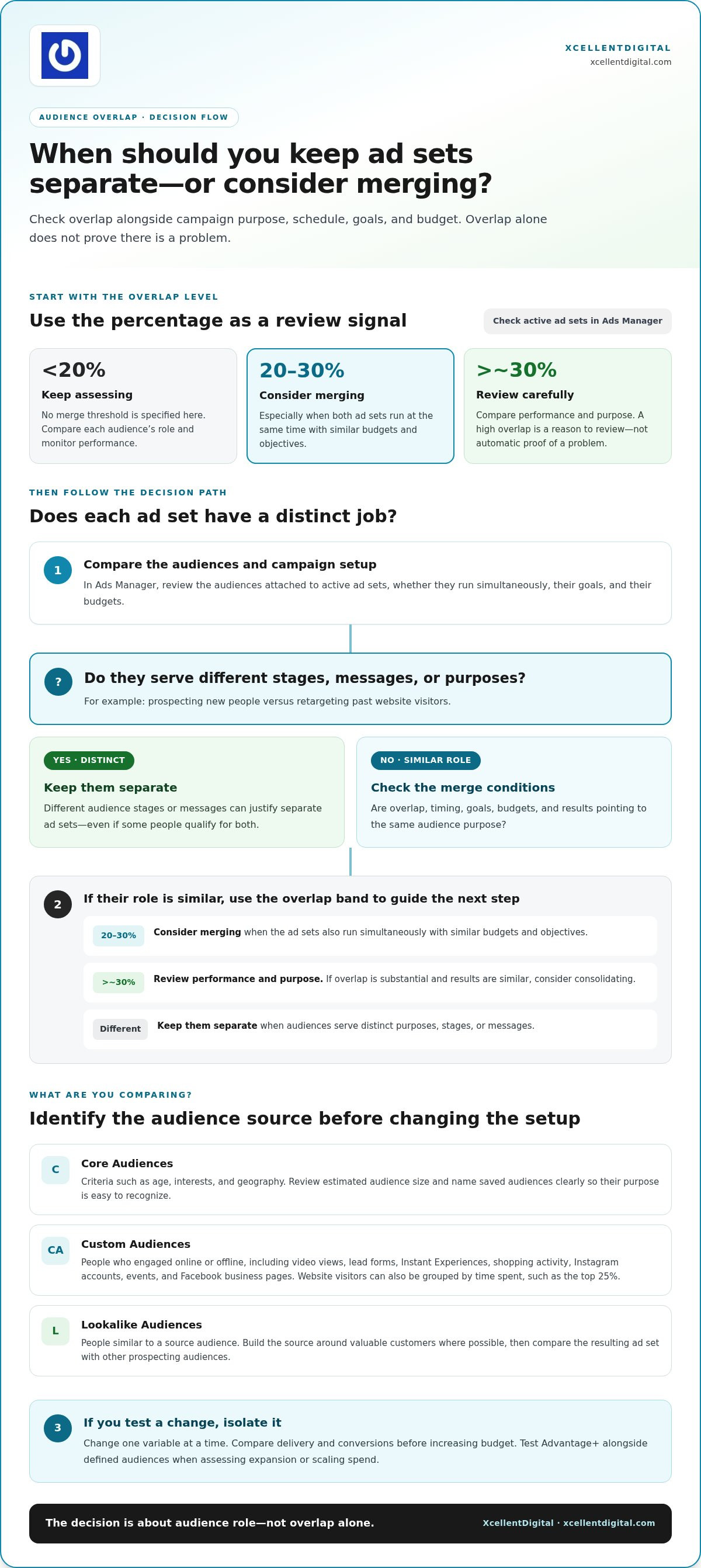
Audience overlap can quietly make your ad sets compete for the same people. Use advanced Facebook ad targeting options to monitor overlap: review it when it exceeds roughly 30%, and consider merging ad sets when overlap reaches 20% to 30%, especially if both run at the same time with similar budgets. The right move depends on whether the audiences, goals, and campaign schedules are genuinely distinct.
It’s frustrating when targeting changes or privacy limits make a campaign feel less predictable. This guide explains how to assess overlap, which targeting options Facebook planned to remove, and how privacy restrictions and detailed-targeting changes affect your choices. You’ll also see how Core, Custom, and Lookalike Audiences fit into a practical approach, so you can adjust your targeting with purpose instead of making rushed changes.
Key Takeaways
- Compare audiences by source, intent, and campaign purpose before deciding whether to keep them separate or combine them.
- Detailed targeting options have changed: learn which demographic, interest, and behavior signals may no longer be available and what broader approaches can replace them.
- Privacy changes affect the signals available for ad delivery, while sensitive topics such as health, race or ethnicity, political affiliation, religion, and sexual orientation face targeting restrictions.
- Use audience size as a practical guide: a Custom Audience needs at least 100 people to be usable, while Meta recommends at least 1,000 for effective optimization.
- Build stronger source audiences for lookalikes and compare Advantage+ expansion with your campaign goals before adjusting your setup.
1. How do you monitor and fix audience overlap?
Audience overlap means separate ad sets can reach some of the same people. Start in Ads Manager by reviewing the audiences attached to active ad sets, their goals, and whether they run simultaneously. Review overlap when it exceeds roughly 30%, especially when both audiences run at the same time with similar budgets. Overlap alone doesn’t prove a problem, but it gives you a clear reason to compare performance and simplify where audiences serve the same purpose.
Consider merging ad sets when overlap reaches 20% to 30%, particularly if their budgets and objectives are similar. Before combining them, check whether each ad set serves a different stage, such as prospecting versus retargeting. Keep distinct audiences separate when their purpose or message differs. For example, an ad for new prospects and a follow-up for past website visitors may need different creative, even if some people qualify for both. These advanced Facebook ad targeting options work best when each audience has a clear role.
Core Audiences use criteria such as age, interests, and geography. In Ads Manager, choose your criteria, review the estimated audience, and save it with a clear name. For example, label an audience “Local interest prospects” or “Website visitors retargeting” so its purpose is obvious when you build an ad set. Review saved audiences as you create campaigns to avoid multiplying near-identical audience groups.
Custom Audiences reach people who have engaged with a business online or offline. Engagement-based sources can include video views, lead forms, Instant Experiences, shopping activity, Instagram accounts, events, and Facebook business pages. You can also create a website-visitor audience focused on the top 25% of site visitors by time spent, which helps prioritize higher-intent users. Review these audience sources alongside Core Audiences to spot duplicated reach.
Lookalike Audiences help find new people with interests similar to your best customers. Build the source audience around valuable customers where possible, then compare the resulting ad set with other prospecting audiences. Facebook may offer lookalike expansion when the Facebook Pixel is installed and campaigns optimize for value events. Treat that expansion as a test: compare results against your existing audience setup before shifting more budget.
You can also test Advantage+ alongside defined audiences when assessing expansion or scaling spend. Change one variable at a time, then review delivery and conversions before increasing the budget. If two ad sets have substantial overlap and similar results, consider consolidating them. Keep them separate when they serve different purposes, and monitor performance. Use advanced Facebook ad targeting options to answer a campaign question, not to add complexity without a clear goal.
2. What Facebook Ad Targeting Options Is FB Removing?
Facebook planned to remove certain detailed ad targeting options starting January 19, 2022. The change covered thousands of options across demographic, interest, and behavior targeting, so advertisers needed to review saved audiences rather than assume every selection would remain available.
Age, gender, location, and spoken language help define who can qualify for an audience; platform placement controls where an eligible ad may appear. These settings serve different purposes: a U.S. audience aged 18–24 narrows by age and geography, while placement determines the available delivery surfaces.
Detailed targeting can use demographic details, interests, or behaviors as audience signals. Changes did not remove every option in those broad categories. Meta has described some affected options as relating to sensitive topics, including health, race or ethnicity, political affiliation, religion, and sexual orientation. Review the specific criteria in each saved audience rather than assuming all demographic or interest targeting has disappeared.
Interest layering can broaden or narrow an audience depending on how you combine selections. In an “include people who match” group, adding interests may let people qualify through any selected interest, an OR-style approach. Adding a separate narrowing group creates an AND-style condition: a person must match the first group and the additional criterion. For example, pair a broad interest with a relevant second signal, then compare reach and results with a simpler setup.
Lookalike and interest targeting can also be combined. A Lookalike Audience reaches people similar to a source audience, while an added interest can further qualify that reach. The combination may improve relevance, but extra narrowing can limit delivery. Compare it with the lookalike alone, considering both your campaign goal and conversions.
Signal loss adds another limit. After iOS 14.5 introduced App Tracking Transparency, users could choose to block app-level tracking; the industry-wide opt-in rate was 35%. That reduced the tracking signals available from some users, while targeting removals changed which detailed criteria advertisers could select. Together, these shifts can make narrow audience definitions harder to sustain.
When an option disappears, consider alternatives Facebook recommended: broad targeting, Custom Audiences, Lookalike Audiences, lookalike expansion, and targeting expansion. Test one alternative at a time, then compare delivery and campaign outcomes. If changing audience logic feels complex, get guidance on audience targeting before restructuring active ad sets.
3. Privacy changes and sensitive-category restrictions
iOS 14.5 introduced App Tracking Transparency, giving users the option to block app-level tracking. The industry-wide opt-in rate was 35%, reducing the availability of some app-tracking signals for advertisers. This shift affects how much user activity can inform campaign measurement and delivery. It doesn’t mean every audience signal disappeared, but it does make it important to build campaigns around more than one narrow data source.
Separate signal loss from changes to targeting controls. Less trackable activity can affect the information available to measure results; a removed detailed-targeting option changes the criteria advertisers can select. For instance, you might still have a useful customer list but no longer be able to select a particular interest. Treat these as different problems and choose a response that addresses the cause.
Meta has described some removed detailed-targeting options as relating to sensitive topics, including health, race or ethnicity, political affiliation, religion, and sexual orientation. When reviewing audience definitions, don’t build a campaign around inferring sensitive traits. Focus instead on the service, product, or customer action. For example, promote a general wellness appointment without targeting people based on a health condition.
There was also a transition rule for existing campaigns. Facebook said ads using an affected option to include people would continue running while Facebook automatically removed the outdated targeting. An ad could therefore remain active even as its original audience definition changed. After a targeting update, review active campaigns and compare their audience settings and delivery rather than assuming the saved setup is unchanged.
Audit your campaigns in Ads Manager. First, list active campaigns and the audience criteria attached to each ad set. Identify selections connected to sensitive topics or options that have changed, then note which campaigns depend on them for reach. This gives you a practical view of where changes may matter without requiring you to rebuild every campaign at once.
After the audit, replace a missing detailed signal with a broader, permitted approach that reflects genuine customer intent. For example, test a Custom Audience based on customer or engagement activity, then run a broader prospecting audience separately. Keep the message relevant to an observable interaction, such as a previous page visit or video engagement, rather than presumed personal attributes.
Finally, review performance using several indicators, not a single tracking signal. Compare delivery, clicks, leads, and completed actions across the updated campaign and its previous setup. If reported conversions shift after iOS 14.5, inspect the full funnel before changing the audience again. This disciplined approach helps distinguish privacy-related measurement gaps from a targeting choice that genuinely needs adjustment.
4. Removal of detailed targeting options
Facebook planned to remove certain detailed ad targeting options starting January 19, 2022. The change affected thousands of detailed ad targeting options, not every possible way to define an audience. That distinction helps: review the individual criteria in an ad set rather than assuming all demographic, interest, or behavior targeting disappeared.
Meta has described some removed options as relating to sensitive topics, including health, race or ethnicity, political affiliation, religion, and sexual orientation. When auditing an older campaign, identify criteria connected to those subjects and note how much the audience definition depends on them. That helps you understand where a change could affect reach or relevance.
Start in Ads Manager. Open each active ad set and examine its detailed-targeting selections, saved audience, and exclusions. Compare those settings with the campaign’s intended audience and objective. If a local offer relies on a narrow interest, for example, consider whether geography or a broader customer-intent signal can still serve the campaign’s purpose.
Don’t respond to a missing option by stacking unrelated interests. Each added criterion changes who can qualify, and excessive narrowing can limit impressions, clicks, and conversions. Test a simpler audience against the current setup, then compare delivery and results. Keep your ad message relevant to the people you want to reach.
Facebook has recommended broad targeting, Custom Audiences, Lookalike Audiences, lookalike expansion, and targeting expansion as alternatives to affected detailed-targeting options. These approaches use different signals. A Custom Audience can draw on business interactions, while a Lookalike Audience can help you reach new people similar to a source audience. Choose based on the campaign’s goal.
You can combine a Lookalike Audience with interest targeting to further qualify the people reached. Treat the combination as a test, not an automatic replacement: compare it with the lookalike alone and see whether the added interest improves relevance without restricting delivery too much. Let campaign performance, rather than habit, guide the decision.
For a controlled transition, document the original audience, make one targeting change, and review the updated ad set’s delivery. If Facebook removes a selection, compare a broader option with a Custom or Lookalike Audience. Keep the setup that best fits the campaign objective and observed results. This turns a platform change into a measured adjustment rather than a rushed rebuild.
5. What are Meta’s audience size recommendations and minimum audience requirements?
Separate the minimum needed to use an audience from the size that supports stronger optimization. A Facebook Custom Audience needs at least 100 people to be usable for ad targeting. Meta recommends at least 1,000 people in a Custom Audience for effective optimization. Reaching the minimum can make an audience eligible, but a larger source gives delivery more people to work with.
Lookalike Audiences have a different source-audience benchmark. Meta generally recommends at least 1,000 people in the source audience for best results. Build that source from customers or other people who represent the outcomes your campaign values. For example, a list of valuable customers can give Meta a more relevant basis for finding similar people than a list of unqualified inquiries.
Audience size and source quality work together. A source with 1,000 people may meet the recommendation, but the people in it still need to reflect the campaign goal. For a sales campaign, use a source connected to valuable customers or value events where available. For a lead campaign, choose people whose interactions align with the kind of leads you want.
Lookalike percentages show how much of the U.S. population the audience is designed to include. A 1% U.S. Lookalike Audience is estimated at approximately 2.4 million people. A 3% audience is estimated at approximately 7.2 million, while a 5% audience is estimated at approximately 12 million. Broader percentages increase potential reach, but they also move further from the closest matches.
Use those estimates as planning context, not as a performance score. A 1% lookalike can suit a tighter test, while a 3% or 5% audience can offer broader reach. Compare results against the campaign’s objective and source quality. If broader reach brings less relevant traffic, return to a smaller percentage or test the source audience itself.
In Ads Manager, check the audience size estimate after choosing the source and lookalike percentage. Then confirm that the audience is eligible and that its estimated reach fits the campaign’s purpose. For Custom Audiences, distinguish the 100-person usability threshold from Meta’s 1,000-person optimization recommendation. That avoids treating a technically usable audience as automatically large enough for efficient delivery.
Keep your decision tied to the available audience and campaign goal. A small retargeting pool may serve a focused purpose, while a prospecting campaign may need a broader Lookalike Audience. Review how each audience delivers before expanding it. Get help refining audience size and targeting for your campaign.
XcellentDigital: Facebook Ads
XcellentDigital can help you turn audience research into a more organized Facebook Ads campaign. If overlapping ad sets, changing targeting options, or unclear audience signals make your next move difficult, use a focused review to connect campaign goals with audience choices. That can include examining how your prospecting and retargeting audiences are structured, where expansion may fit, and what to compare when testing a revised setup. The aim is a clearer decision process, not adding targeting layers for their own sake. Bring this support in when you’re planning a new campaign or reassessing an existing one after platform changes. For help shaping your Facebook Ads approach, contact XcellentDigital.
Make Your Next Campaign Decision With Confidence
Your next move doesn’t have to be another round of audience tweaks. Treat each change as a deliberate test: define what you want to learn, make one adjustment, and use the results to guide the next decision. That discipline makes advanced Facebook ad targeting options a practical part of campaign planning rather than a maze of settings to revisit without direction.
If you want to connect audience choices to a wider growth plan, XcellentDigital offers Facebook Ads, Google Business Profile Optimization, and AI Agents. These services can bring advertising, local visibility, and lead handling into a more coordinated approach, shaped around what your business needs next.
Take the next step at a pace that fits your goals. Contact XcellentDigital about ad targeting to discuss your Facebook Ads approach. Keep testing with purpose, learn from each campaign, and move forward with a clearer plan.
Frequently Asked Questions
How do you monitor and fix audience overlap?
Compare overlapping ad sets by objective, message, and delivery results, then change only the audience relationship causing duplication. For example, separate an offer for new prospects from a follow-up for people who have already submitted a lead form. If both ad sets serve the same purpose, consolidate them and track whether delivery becomes more consistent. Keep a change log in Ads Manager so you can link performance shifts to specific edits.
What Facebook Ad Targeting Options Is FB Removing?
Facebook planned to remove certain detailed targeting options starting January 19, 2022, including some options linked to sensitive topics. If a saved audience relied on a selection that’s no longer available, rebuild its logic around a permitted signal tied to your campaign goal. For example, a business can test customer engagement or a broader interest instead of trying to infer a sensitive personal trait.
How do you let creative do the targeting?
Make the ad itself clearly identify who should care: name the problem, service, or situation in the opening line and visual. A roofing company, for example, can show a roof inspection and speak directly to property owners considering repairs. Nielsen attributes 56% of a campaign’s sales ROI to creativity, so test different messages and visuals while keeping audience settings consistent. This helps reveal which creative attracts the right response.
How do you match your targeting to your budget?
Choose audience breadth based on how much your campaign can support in testing. With a daily budget under $20, focus on retargeting Custom Audiences and warm traffic. At $20 to $50 per day, test one or two well-defined audiences. Broad targeting and Advantage+ start to make sense at $50 to $200 per day, while budgets of $200 or more can support structured prospecting and retargeting tests.
How do you retarget with Custom Audiences?
Build a Custom Audience around a meaningful interaction, then tailor the follow-up to that action. People who opened a lead form but didn’t submit it could see an ad that explains the next step; past customers could receive a different message. For a one-time product, excluding past purchasers may help avoid spending on repeat acquisition. Match the audience and message to the customer’s stage.
How do you target competitors’ audiences?
You can’t use a competitor’s private customer list as your own audience. Instead, test relevant interests where available or use a Lookalike Audience based on your own valuable customers, then make your ad’s difference clear. Highlight your service approach or product benefit rather than naming a competitor. Compare results with a broader audience to see whether the added signal attracts more qualified prospects.
How do you target recent Facebook shoppers?
Use an engagement-based Custom Audience to reach people who interacted with shopping activity connected to your business. Then create a follow-up ad that reflects what they viewed, such as a product category or related offer. This targets an observable interaction, not everyone who recently purchased on Facebook. Keep the message relevant to that action, and separate shoppers from other engagement groups when their follow-up needs differ.
What advanced audience targeting options are available in Meta Ads Manager?
Meta Ads Manager includes Core Audiences based on criteria such as age, interests, and geography, as well as Custom Audiences built from business interactions. Lookalike Audiences help you find new people similar to a source audience, and Advantage+ can support audience expansion. Detailed options can change, so choose controls that fit your goal and review whether sensitive-topic restrictions affect the criteria you plan to use.









Leave a Reply
Want to join the discussion?Feel free to contribute!