

Common Google Business Profile Policy Violations: A Practical Checklist
What if a visibility dip isn’t a policy violation at all? That uncertainty can make every profile edit feel risky. Common google business profile policy violations often involve details owners can check, but a ranking change or verification request doesn’t automatically mean your profile broke a rule.
Take a warning or restriction seriously, especially if it relates to inaccurate details or prohibited review practices. But guessing, making repeated edits, or appealing before you identify the issue can muddy the picture. Start with evidence, not assumptions.
This practical checklist shows you how to review your business name, address, categories, content, reviews, and duplicate listings against clear criteria. You’ll also learn how to distinguish a potential policy problem from an ordinary visibility or verification concern, what to correct first, and when to consult Google’s reinstatement guidance. If something doesn’t look right, you’ll have a steadier next step than simply changing details and hoping for the best.
Key Takeaways
- Common google business profile policy violations can involve business details, eligibility, profile content, or review practices. Check the relevant Google guidance before deciding a detail breaks policy.
- Compare your business name and address with how you actually operate, and check whether duplicate profiles could be causing confusion.
- Review categories, services, photos, and customer reviews for accuracy, unsupported claims, or practices that need closer policy review.
- Document each concern with the profile field, supporting evidence, date checked, and action taken before making changes.
- If your profile is restricted, identify the notice and cited policy, correct substantiated issues, then follow Google’s current appeal instructions.
What Are Common Google Business Profile Policy Violations?
A profile problem can make it harder for customers to find or trust your business. But a drop in visibility or a request to verify your information doesn’t automatically mean you’ve violated a rule. Common google business profile policy violations are issues to investigate, not a reason to assume your profile will be suspended.
A Google Business Profile policy violation is profile content or business conduct that conflicts with Google’s current requirements for eligibility, accurate representation, or permitted content. A routine update, such as correcting a phone number to match your current business details, isn’t a violation by itself. The key question is whether the profile represents an eligible business accurately and follows the applicable rules.
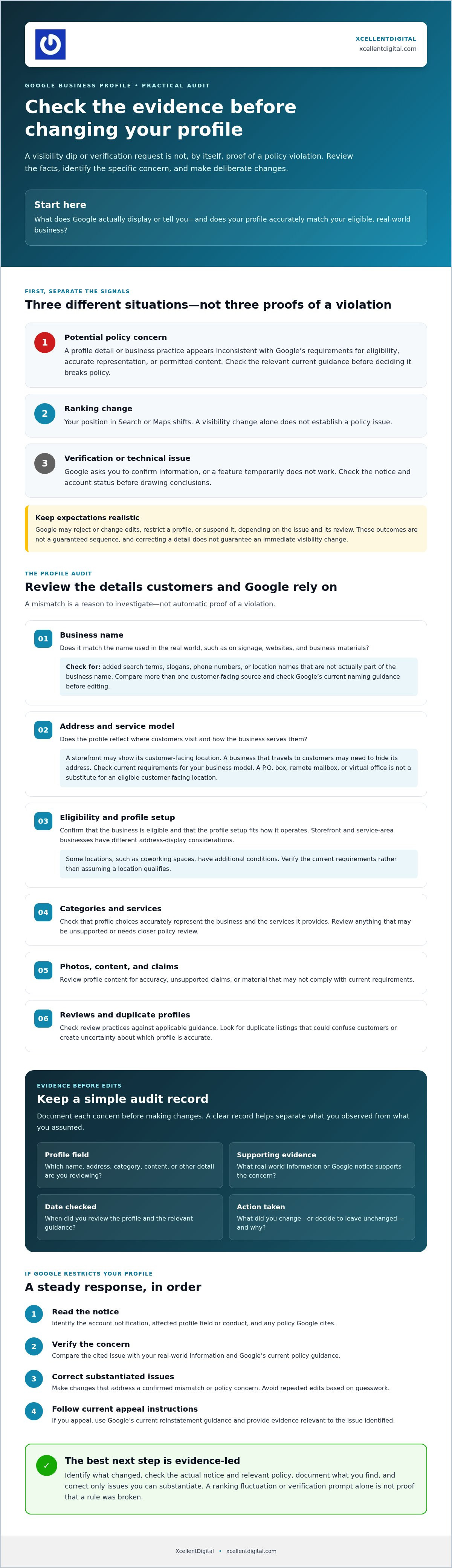
Keep three different problems separate:
- Policy concern: A profile detail or business practice appears inconsistent with Google’s requirements.
- Ranking change: Your position in Search or Maps shifts, but that alone doesn’t establish a policy issue.
- Verification or technical issue: Google asks you to confirm information, or a feature temporarily doesn’t work. Check the notice and account status before drawing conclusions.
Because profiles help customers discover businesses on Google Maps, it’s understandable to worry when something changes. Start with what Google actually displays or tells you, then compare it with your real-world business information.
What can happen when a profile does not follow policy?
Depending on the issue and Google’s review, the platform may reject or change profile edits, restrict a profile, or suspend it. These outcomes don’t follow a guaranteed sequence. A correction doesn’t always trigger enforcement, and not every issue leads to suspension. Read any account notification carefully, identify the specific field or conduct at issue, and don’t assume a change will immediately restore visibility.
Which profiles and businesses should check these rules?
Any business managing a profile should check both eligibility and accurate representation. Storefront businesses and service-area businesses have different address-display considerations: a storefront may show its customer-facing location, while a business that travels to customers may need to hide its address. Confirm the current requirements for your business model before editing. For broader profile setup guidance, see the Google Business Profile optimization guide.
Use this distinction as your first check: a policy concern needs evidence that a profile detail or practice conflicts with a requirement. A ranking fluctuation, verification prompt, or temporary glitch needs diagnosis, but isn’t proof of a violation. Pausing to check the evidence can help you avoid unnecessary edits and focus on any issue Google has identified.
Check Your Business Name, Address, Eligibility, and Duplicate Profiles
Start with the details that tell Google and customers who you are and where you operate. Several common google business profile policy violations involve a mismatch between the profile and the real business. A mismatch is a reason to investigate, not proof of a violation.
Does your profile name match your real-world business?
Google’s guidance says the profile name should reflect the name used in the real world, such as on signage, websites, and business materials. Check for added search terms, slogans, phone numbers, or location names that aren’t actually part of your business name. For example, adding “best plumber” or a neighborhood name to improve search visibility can make the profile name inaccurate.
Compare the listing with multiple sources, including customer-facing signage and official business materials. Don’t treat one document as automatic proof. The goal is to confirm a consistent, real-world name. Before changing the name, check Google’s current naming guidance. An unsupported edit can create more uncertainty instead of fixing the underlying issue.
Are your address and profile setup accurate?
Check whether customers visit the address shown and whether your profile reflects how you serve them. Businesses that travel to customers should generally hide their physical address. A P.O. box, remote mailbox, or virtual office isn’t a substitute for an eligible customer-facing location. A coworking location has additional conditions, including signage, customer visits, and staffing by the business’s own employees during business hours.
Look for duplicate listings for the same business, too. Don’t create extra profiles to try to gain visibility. If you find a duplicate, document what you found and use Google’s current guidance to address it rather than making another listing. Online-only businesses and lead-generation companies are generally not eligible for a Business Profile, so confirm eligibility before editing location details.
| Profile field | Evidence to check | Cautious corrective action |
|---|---|---|
| Business name | Signage, website, and official business materials | Remove unsupported additions only after confirming the real-world name and current Google guidance. |
| Address and service area | Whether customers visit, where staff work, and how the business serves customers | Correct the setup to match the actual business model. Don’t use a virtual or misleading address. |
| Eligibility and duplicates | In-person customer contact, separate eligible locations, and existing profiles | Review Google’s eligibility and duplicate-profile instructions before removing, merging, or creating profiles. |
If the evidence is unclear, pause before making a substantial change. A professional Google Business Profile review may help you assess the listing and identify a sensible next step.
Review Categories, Services, Photos, and Customer Reviews
Next, check whether your profile content accurately reflects what customers can expect. Some common google business profile policy violations involve misleading details or review practices, while other content may simply be unclear or ineffective marketing. Compare each concern with current Google policy and evidence from your actual business before changing anything.
Can categories, services, or promotional content misrepresent a business?
Choose the primary category that best describes your core business, then add only relevant, specific additional categories. Google allows one primary category and up to nine additional ones, but adding more categories doesn’t automatically make a profile more accurate. Check your selections against the services you actually provide. Don’t use a category just to attract searches for unrelated work.
Review each service description, business description, and promotional claim. Check whether a listed service is currently offered and whether claims about experience, credentials, or results can be supported. An awkward phrase or weak marketing message isn’t automatically a policy violation. Flag content that could give customers a false impression, then verify it against Google’s current content rules before editing.
Photos and videos should represent the business honestly. Inspect the original files and compare them with the profile. Are images authentic, or are they stock visuals or heavily altered in ways that could mislead customers? Save the source or context for any image you’re unsure about.
| Content area | Accurate information | Unsupported or needs verification | Evidence to inspect |
|---|---|---|---|
| Categories and services | Specific choices match the business’s core work and actual services. | Irrelevant categories or claims about services the business doesn’t provide. | Service records, business materials, and current Google guidance. |
| Promotional content and media | Claims and images reflect the real customer experience. | Unsubstantiated promises, misleading edits, or stock imagery presented as the business. | Original copy, image files, and supporting business information. |
| Customer reviews | Feedback comes from genuine customer experiences and is requested without pressure. | Incentives, selective solicitation, fabricated reviews, or pressure to remove criticism. | Request templates, staff instructions, and relevant review context. |
What review practices can create policy risk?
Ask customers for honest feedback without steering them toward a positive rating. Don’t offer incentives, screen out unhappy customers before sharing a review link, or pressure someone to change or remove a negative review. Google’s review rules also prohibit asking reviewers to mention a specific staff member, pressuring customers to post while at your location, and setting review quotas for staff.
Genuine customer experiences protect review integrity because they let people assess a business based on real interactions, not manufactured praise. An unusual review isn’t automatically a violation. Keep relevant records, use Google’s reporting process when you believe a review breaks policy, and let Google assess it.
Use This Google Business Profile Policy Audit Checklist
Review the profile in a steady order. This helps separate a documented policy concern from a ranking change, which may need a different diagnosis. For each finding, note the profile field, evidence, date checked, and action taken. The Google Business Profile audit checklist offers another reference for organizing your review.
- 1. Confirm eligibility. Check that the business meets Google’s current requirements for a profile and has in-person contact with customers in the way its business model requires.
- 2. Verify identity. Compare the profile’s name and details with customer-facing signage, business records, and materials customers use to identify the business. Look for specific inconsistencies, not just differences in wording.
- 3. Inspect the address. Confirm whether customers visit the listed location and whether the address-display setup reflects how the business serves them. Don’t substitute a virtual or misleading location.
- 4. Review profile content. Check categories, services, photos, descriptions, and review practices against actual business operations and current Google guidance. Mark uncertain items for verification instead of guessing.
- 5. Document findings. Save a dated screenshot of the relevant profile field, record the supporting evidence and source you checked, then note any correction and when you made it.
What evidence should you gather before editing?
Build a clear record before changing anything. Compare profile details with signage, business records, customer-facing materials, and actual operating practices. Save dated screenshots of the profile and relevant Google correspondence. Keep the record focused: protect customer and employee personal information, and don’t alter documents or create new profiles to conceal a suspected problem.
How do you prioritize findings without making the problem worse?
Correct substantiated factual inaccuracies before making optional promotional or optimization changes. Check each proposed edit against current Google guidance, then keep a note of what changed and why. If the evidence is incomplete or the issue is unclear, pause rather than making a series of speculative edits.
A visibility decline by itself doesn’t confirm a policy violation. Check ranking and performance separately from eligibility, profile accuracy, and any enforcement notice. If Google has restricted or suspended the profile, follow its current appeal instructions after reviewing the cited issue. The Google Business Profile reinstatement appeal guide can help you understand that process. If you need help assessing documented concerns, consider Google Business Profile review support.
What to Do After Finding a Violation or Profile Restriction
Finding a possible issue doesn’t automatically mean your profile is under enforcement. A profile that needs a factual correction is different from one Google has restricted or suspended. First, check the profile status and any message from Google. Then follow the process that applies to what you actually see.
How should you respond to a suspected or confirmed violation?
Take the next steps in order. A rushed edit or appeal can make it harder to explain what changed and why.
- Read the notice. Identify whether Google has requested verification, rejected an edit, or restricted the profile. Note any specific policy or profile detail mentioned.
- Check current Google guidance. Review the policy cited in the notice and confirm the current instructions for your profile’s status. Don’t rely on an old forum post or assume every profile issue uses the same process.
- Correct substantiated issues. Change only details you can confirm are inaccurate or noncompliant. Keep the profile consistent with your real business information, and save a record of the correction and its supporting evidence.
- Follow the applicable process. If Google has taken enforcement action, use its current appeal instructions after addressing the documented issue. Avoid repeated appeals or creating another profile to get around a restriction.
If you’ve noticed a visibility decline but received no enforcement notice, don’t treat the drop alone as proof of a policy violation. Review the profile and its status, then investigate ranking or technical factors separately. This common google business profile policy violations checklist can help you identify what to verify, but your next step should follow the evidence and Google’s current instructions.
When can professional reinstatement support help?
Consider specialist help if the cited issue is unclear, the supporting documentation is complex, or an appeal hasn’t resolved the restriction. A professional can help review profile details and organize a consistent case, but Google makes the decision. No representative can guarantee approval, a timeline, or restored rankings.
Before seeking help, gather the notice, relevant profile details, and records that support your explanation. XcellentDigital provides Google Business Profile reinstatement support for businesses working through these issues. Learn about Google Business Profile review support.
Keep Your Profile Accurate and Your Next Steps Clear
Protecting your Google Business Profile starts with checking the facts, not reacting to every change in visibility. This common google business profile policy violations checklist helps you review business identity, eligibility, profile content, and review practices with evidence in hand.
Keep a dated record of concerns and corrections. If Google has restricted your profile, follow the current instructions for that specific notice, and avoid speculative edits or repeated appeals. A ranking dip alone doesn’t confirm a policy violation, so diagnose visibility concerns separately.
If you’re unsure how to interpret a policy issue or organize a reinstatement case, expert support can help you assess the details. XcellentDigital offers Google Business Profile optimization and reinstatement services, but Google determines appeal outcomes. Review XcellentDigital’s Google Business Profile support.
A careful, evidence-led review gives you a clearer path forward. Keep your information accurate, make changes deliberately, and move ahead with confidence.
Frequently Asked Questions
What are the most common Google Business Profile policy violations?
Common google business profile policy violations can involve inaccurate business names or addresses, ineligible or duplicate profiles, misleading categories or content, and review manipulation. Treat these as starting points for an audit, not a complete list or a prediction that Google will take enforcement action. Check the current Google Business Profile policies and compare the relevant profile details with your actual business information before making changes.
Can keyword stuffing in a Google Business Profile business name cause a suspension?
Adding search terms, slogans, or location phrases that aren’t part of your real-world business name may conflict with Google’s business-name requirements. Don’t assume keyword additions are a safe way to improve visibility. Compare the profile name with signage and other customer-facing materials, then verify the current policy before editing. Google decides whether a specific profile violates its rules or faces enforcement, so suspension isn’t automatic.
Can a business have more than one Google Business Profile?
Yes, multiple profiles may be appropriate when they represent distinct, eligible business locations. Duplicate profiles for the same business location can create confusion, so don’t create extra listings to target more searches or get around a restriction. Check Google’s current guidance for your business structure, confirm that each profile represents an eligible location, and use the applicable process to address duplicates rather than making another listing.
Can fake or incentivized reviews violate Google Business Profile policies?
Yes. Reviews should reflect genuine customer experiences, and fake reviews, incentives tied to reviews, or pressure for positive feedback can violate Google’s review policies. Ask customers for honest feedback without requiring a particular rating or offering a reward. If a review seems inauthentic, save relevant details and use Google’s reporting options. Don’t retaliate, pressure the reviewer, or purchase replacement reviews, since those actions can create further concerns.
What should I do if Google suspends my Business Profile?
Read Google’s notice and current official guidance before taking action. Identify the policy area involved, review the profile for substantiated inaccuracies, and gather relevant supporting evidence. Correct confirmed issues, then follow the appeal process that applies to the profile’s status. Don’t create a replacement profile or submit unsupported claims. Reinstatement isn’t guaranteed, and the right steps depend on Google’s notice and current requirements.
How can I tell whether my profile has a policy violation or just a ranking drop?
A ranking change alone doesn’t establish a policy violation. Check your profile dashboard, account notices, verification status, and direct messages from Google for a specific issue. Then compare the profile with current policy requirements. If there’s no enforcement notice, investigate visibility factors separately instead of making rushed edits. Keeping these issues distinct can help you avoid introducing inaccurate information while trying to respond to a ranking change.
How often should I audit my Google Business Profile for policy issues?
Review your profile whenever the business changes its name, address, services, or operating model, and periodically confirm that its details remain accurate. Include new content and review-request practices in routine account checks. There’s no universal audit schedule that prevents enforcement. Use a documented checklist, and verify current Google policies before significant edits. A consistent review habit can help you spot mismatches early without treating every visibility change as a policy problem.












Leave a Reply
Want to join the discussion?Feel free to contribute!