

Google Business Profile Reinstatement Appeal Process: The Expert Guide to Reclaiming Your Leads
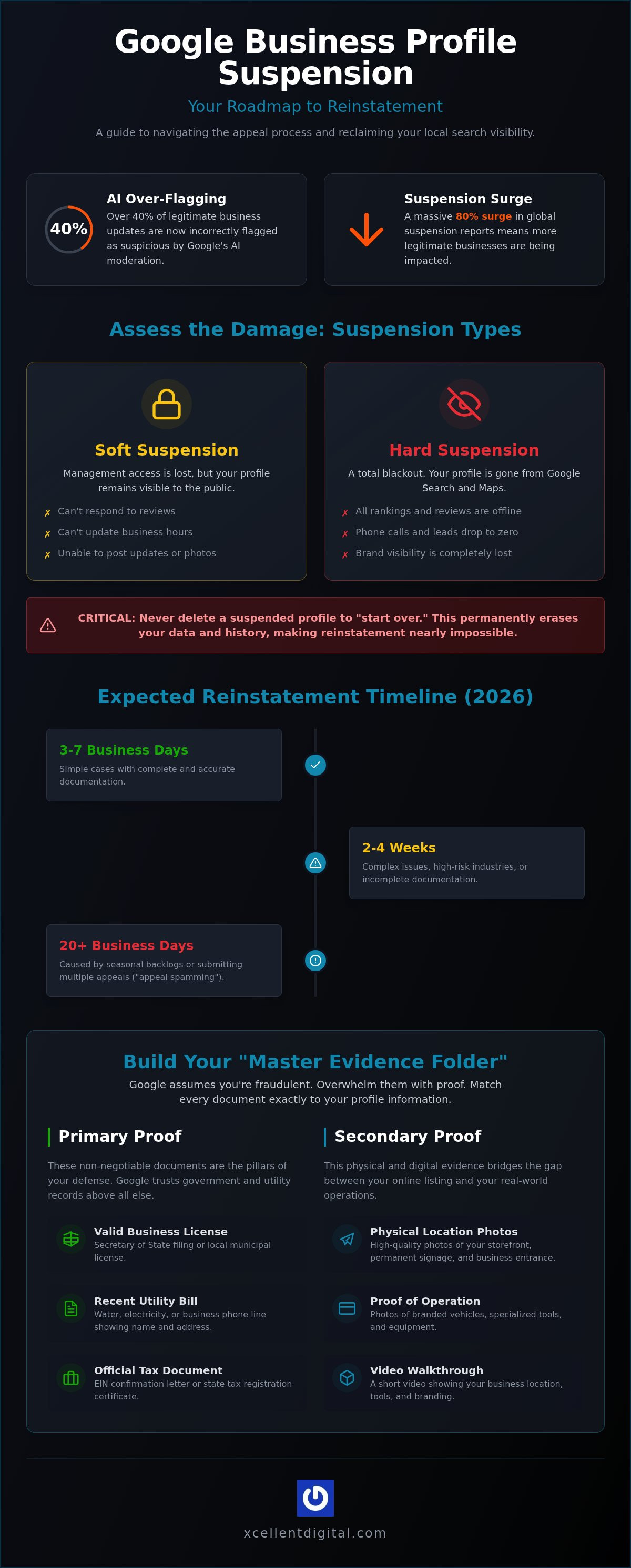
Google’s AI moderation filters now flag over 40% of legitimate local business updates as suspicious. If you woke up to a “Suspended” notice, you are part of a massive 80% surge in global suspension reports. It is frustrating to watch your phone stop ringing and your lead volume vanish while you are stuck managing the google business profile reinstatement appeal process. You have worked hard to build your brand. The fear of losing your hard-earned reviews is real. This isn’t just a technical glitch. It’s a direct hit to your livelihood.
We agree that the digital red tape feels designed to keep you out. But you can reclaim your spot on the map. This guide provides the exact roadmap to clear the hurdles and restore your visibility. We’ll show you how to gather the right evidence, fix underlying violations, and submit a defense that Google’s reviewers cannot ignore. From mastering the 2026 evidence upload workflow to protecting your profile from future flags, we are covering everything you need to get those leads flowing again. Let’s get your business back to work.
Key Takeaways
- Identify whether your suspension is “soft” or “hard” to prioritize protecting your existing customer reviews and rankings.
- Compile a “Master Evidence Folder” that satisfies Google’s burden of proof before you ever touch the appeal form.
- Navigate the google business profile reinstatement appeal process with a clear, step-by-step plan that avoids the automated filters.
- Decode Google’s vague rejection emails and implement escalation strategies that get results without risking a permanent ban.
- Stop the revenue bleed by choosing a professional path that eliminates guesswork and restores your local search visibility fast.
Understanding the Google Business Profile Reinstatement Appeal Process
The google business profile reinstatement appeal process is the formal procedure to challenge a suspension and restore your local search presence. It is a business-critical recovery mission designed to reclaim your digital storefront and protect your bottom line. While Google relies heavily on automated AI filters to flag suspicious activity, the appeal is your chance to force a human review of your business’s legitimacy. Automated bots now flag over 40% of legitimate updates as suspicious; your appeal is the key to bypassing these algorithms and speaking to a real person who can verify your existence. You aren’t just filling out a form. You are defending your right to do business online.
Soft vs. Hard Suspensions: Assessing the Damage
Check your dashboard immediately. A soft suspension means your listing is still visible to the public, but you’ve lost management access. You can’t respond to reviews or update hours. A hard suspension is a total blackout. Your profile has vanished from search results and maps. This is where the real panic sets in: your ranking history and years of customer reviews are effectively offline. The damage to your brand is immediate. Phone calls stop. Lead volume drops to zero. Never delete a suspended profile to start over. This common mistake destroys your data permanently and makes the google business profile reinstatement appeal process nearly impossible to navigate because you’ve erased the history Google needs to see.
The Timeline: What to Expect in 2026
Speed is essential, but patience is required. In 2026, the standard review window for an initial appeal is roughly 5 business days. However, reality often looks different. Simple cases might resolve in 3 to 7 days, while complex issues or high-risk industry flags can stretch into 2 to 4 weeks. In some instances, backlogs extend the wait to 14 or 20 business days. Every day of downtime is a day your competitors are stealing your leads.
Several factors cause delays:
- Incomplete documentation: Missing a single utility bill or tax certificate can trigger an automated rejection.
- Seasonal surges: High-traffic months often see a spike in spam reports, slowing down human review teams.
- Appeal spamming: Submitting multiple requests resets your position in the queue and flags your account for further scrutiny.
Monitor your status through the official management tool. Avoid the urge to “check in” via new support tickets. Every unnecessary contact can stall your progress. Focus on getting it right the first time to bypass the trial and error that costs you leads every single day. We handle the digital red tape so you can focus on running your business.
Building Your Evidence File: The Key to Winning Your Appeal
Winning your appeal isn’t about luck; it’s about overwhelming evidence. You must adopt a “Burden of Proof” mindset because Google’s automated systems are programmed to assume your profile is fraudulent until you prove otherwise. To succeed, you need to over-provide documentation. Don’t just send one bill and hope for the best. Instead, compile a “Master Evidence Folder” before you even touch the official appeal tool. Every piece of paper must match the information on your profile exactly. If your dashboard lists “123 Main Street” but your electric bill says “123 Main St.,” a bot might flag that discrepancy as a reason for denial.
There are three non-negotiable documents every service-based business needs to win. Without these, your chances of a successful google business profile reinstatement appeal process drop significantly. You need a valid business license, a recent utility bill, and an official tax registration document. These are the pillars of your defense.
Primary Proof: Government and Utility Documents
Start with the heavy hitters. Google trusts government-issued records more than anything else. Your Secretary of State filing or local business license proves you are a legal entity. Pair this with a utility bill for water, electricity, or your business phone line. These documents must clearly show your business name and the address used on your profile. If you operate as a Service Area Business, your EIN confirmation letter or tax certificates are vital to prove your home base is legitimate. Accuracy is your best friend here. Even a minor typo can stall your progress for weeks.
Secondary Proof: Physical and Digital Footprints
Physical evidence bridges the gap between a digital listing and a real-world operation. Take high-quality photos of your branded vehicles, specialized tools, and any equipment featuring your company logo. Video verification is also a powerful tool. A simple walkthrough of your office space or equipment storage area can confirm your business is active and operational. Finally, ensure your website and social media profiles are updated and active. These act as social proof that reinforces your legitimacy. If the thought of digging through years of paperwork sounds like a nightmare, XcellentDigital can manage the digital red tape for you while you focus on running your business.
Step-by-Step: How to Submit Your Google Business Profile Appeal
Log in to the official Google Business Profile Management Tool to start your recovery. If you manage several locations, pick the specific suspended profile from your dashboard. The 2026 update has streamlined this; the question for bulk reinstatement (10+ locations) now appears right at the start. Once selected, you’ll enter the heart of the google business profile reinstatement appeal process. You need to be precise here because you only get one shot at a clean first impression.
The narrative field is your chance to communicate with a human reviewer. Use this space to provide a concise, professional explanation of your compliance. Avoid fluff and keep your points brief. Your appeal description should be factual, not emotional. Upload your Master Evidence Folder using Google’s preferred formats like PDF or JPG. Remember, the integrated workflow means you submit your documents and your statement at the exact same time. There is no longer a separate window to add files later.
Navigating the Appeal Tool Interface
The 2026 interface update removed the old 60-minute window for evidence. Now, you upload everything in one sitting. This prevents the “lost document” errors that once plagued the google business profile reinstatement appeal process. Watch your file sizes; high-resolution photos are great, but files over 5MB can trigger a rejection. Once you hit submit, look for the confirmation screen. It provides a unique Case ID. Save this number immediately. It is your only way to track progress or escalate if the review stalls.
Crafting the Perfect Appeal Statement
Use the “Identify, Fix, Explain” framework to structure your written statement. First, identify why the suspension happened. If you accidentally changed your business name to include keywords, admit it. Fixing the error before you appeal is non-negotiable. Explain that the profile now follows all guidelines and reference your attached evidence as proof of your physical location.
Admitting a minor mistake shows you are a legitimate owner who made a human error. It’s much more effective than claiming perfection when your edit history says otherwise. Never use this space to beg for mercy or threaten Google Support. They deal with thousands of angry owners daily. A professional, solution-oriented tone stands out and gets your profile approved faster. Stick to the facts, prove your location, and wait for the results.
What to Do If Your Appeal Is Denied: Escalation Strategies
A “Denied” status in the google business profile reinstatement appeal process feels like a door slamming shut. Google’s rejection emails are notoriously vague; they often cite a general “policy violation” without telling you exactly what went wrong. Don’t panic. This rejection is usually a sign that your evidence didn’t clear the automated hurdle or a human reviewer found a lingering inconsistency. You have options, but your next move must be calculated. This is the point where most owners make a fatal error: they hit the appeal button again with the exact same information. This is called appeal spamming, and it is the fastest way to get your account blacklisted. Google’s systems track the frequency of your requests. Multiple identical submissions suggest you aren’t fixing the problem, which can lead to permanent account-level restrictions.
If you’ve hit a wall, the Small Business Redressal Form is your next logical step for complex policy disputes. This tool is designed for cases where you believe Google’s decision is factually incorrect based on their own guidelines. It moves the conversation beyond a simple “yes or no” and allows for a deeper look at the legal and operational facts of your business. You aren’t just asking for a second look; you are filing a formal dispute.
Analyzing the Rejection Reason
Audit your profile one more time with a clinical eye. Rejections often stem from hidden violations like keyword stuffing in your business name. If you added “Best Plumber in the City” to your official name, you’ve violated the naming policy. Fix these errors before you try again. Determine if the denial was due to missing evidence or a hard policy ineligibility. Prepare a “Second Wave” of documentation that specifically addresses the gaps. If they rejected your utility bill, find a tax certificate or a notarized lease agreement. You need to provide something new and more authoritative than your first attempt. Before resubmitting, use our Google Business Profile audit checklist for service businesses to identify every hidden gap that may have triggered the denial.
Advanced Escalation Paths
When the standard tools fail, you need to reach out to the community. The Google Business Profile Help Forum is staffed by “Product Experts” who have a direct line to Google’s internal teams. A Diamond Product Expert has the authority to escalate legitimate cases that have been unfairly trapped in a rejection loop. Provide them with your Case ID and a summary of your evidence. If your case has reached a dead end where the automated systems keep looping you back to a denial, it’s time for professional intervention. Our GBP reinstatement experts specialize in bypassing these digital deadlocks to get your leads flowing again. Don’t let a single rejection destroy years of brand building.
Why Hiring a Google Business Profile Reinstatement Expert Is a Strategic Investment
Every hour your profile remains invisible, your revenue bleeds out to the competition. The cost of downtime is high. It’s not just a single missed phone call; it’s the lifetime value of a customer who now thinks you’re out of business. Trying to navigate the google business profile reinstatement appeal process through trial and error is a gamble you cannot afford. One submission mistake can trigger a permanent ban. XcellentDigital eliminates the guesswork by applying specialized expertise to your specific case. We handle the complex digital red tape so you can get back to the work that actually pays the bills.
Expertise That Saves Time and Revenue
Professional agencies maintain a higher success rate with manual reviews because we know exactly what Google’s internal teams are looking for. Our process begins with a comprehensive audit that goes beyond the suspension itself. We identify the subtle triggers that caused the flag in the first place. Whether it’s an inconsistent address or a problematic user permission, we fix the root cause before the appeal is even submitted. This proactive approach gives you peace of mind. You manage your crew and your customers while we act as your local ally in the digital landscape.
Beyond Reinstatement: Future-Proofing Your Local Search Presence
Reclaiming your leads is only the beginning. Once your profile is restored, you need a strategy to keep it that way. We transition your profile from a state of “reinstated” to “optimized” to ensure long-term stability. This involves building a trust buffer with Google through our Reputation Program. By consistently generating positive, verified feedback, you make your profile more resilient against future automated flags. Strengthening every element of your listing — from google business profile photo optimization to service category accuracy — is essential to maintaining that resilience. We focus on physical reality: steady progress and tangible results.
We also ensure you’re ready for the surge of activity that follows a successful reinstatement. By integrating our Lead Response Automation and AI Agents, you can capture the flood of calls the moment your profile goes live. No recovered lead is ever wasted. We turn your digital recovery into a long-term engine for growth. To maximize that momentum and keep your pipeline full, pairing your restored profile with a proven facebook ads for local business strategy ensures you’re capturing customers across every channel. For service businesses looking to dominate search results beyond organic listings, a dedicated ppc for contractors strategy can fill your pipeline with high-intent leads while your profile rebuilds its ranking authority. Don’t let a suspension kill your business. Contact XcellentDigital for Expert Reinstatement Services.
Secure Your Digital Future and Restore Your Leads
Reclaiming your local visibility is a high-stakes mission. You’ve learned that a successful google business profile reinstatement appeal process requires more than just filling out a form. It demands a legal-style defense backed by a Master Evidence Folder. By fixing policy violations first and avoiding the trap of appeal spamming, you protect your brand from permanent damage. The path from a blackout to a thriving profile is narrow, but it’s navigable with the right evidence and a professional strategy.
Don’t let a technical suspension drain your revenue for another day. Our specialized GBP Reinstatement Team has delivered proven results for service-based businesses by cutting through the digital red tape. We go beyond mere recovery; we integrate a comprehensive digital growth strategy to ensure your profile stays optimized and active. Reclaim Your Profile and Your Leads with XcellentDigital. Your business belongs on the map. Let’s get you back to work.
Frequently Asked Questions
How long does the Google Business Profile reinstatement appeal process take in 2026?
Most businesses see a resolution within 3 to 7 business days for simple cases. However, complex issues or high-risk industry flags can extend the timeline to 4 weeks. Google’s official review window is up to 5 business days, but backlogs in 2026 have pushed some wait times to 20 days. Monitoring your case ID is essential to ensure your request hasn’t stalled in the system.
Can I just create a new Google Business Profile if mine is suspended?
No, you should never create a new profile to bypass a suspension. Doing so is a violation of Google’s terms and will likely lead to a permanent ban or account-level restrictions. Google’s AI filters are designed to detect duplicate listings and matching business data. The only safe path back to search results is through the formal google business profile reinstatement appeal process to fix the original listing.
What are the most common reasons for a Google Business Profile suspension?
Suspensions often occur due to address discrepancies or unauthorized name changes, such as adding keywords to your business title. Google’s automated filters now flag over 40% of legitimate updates as suspicious activity. Other common triggers include using a P.O. Box or virtual office address instead of a physical location. Identifying the specific policy violation is the first step before submitting your appeal to avoid an immediate rejection.
What documents do I need for a Google Business Profile appeal?
You need authoritative proof of your business’s legal existence and physical location. This includes your official business license, tax registration certificates, and a recent utility bill that matches your profile’s name and address. Secondary evidence like photos of your branded vehicles and signage also strengthens your case. Over-providing documentation is better than sending the bare minimum, as it provides a clear defense for human reviewers to approve.
Will I lose my Google reviews if my profile is suspended?
Your reviews are hidden during a hard suspension, but they are generally restored once your profile is reinstated. This is why you must never delete a suspended listing to start over. Deleting the profile permanently erases your ranking history and customer feedback. As long as you follow the proper google business profile reinstatement appeal process, your hard-earned reputation should remain intact once you are back on the map.
How many times can I appeal a Google Business Profile suspension?
You typically get one primary appeal through the management tool. If that is denied, you can request an additional review or use escalation paths like the Small Business Redressal Form. Avoid appeal spamming by submitting multiple identical requests. This behavior flags your account as a spam risk and can lead to a permanent blacklist. Each attempt should include new, more authoritative evidence that addresses the previous rejection reasons.
What does ‘Content that violates our policies’ actually mean?
This is a broad term Google uses to describe everything from deceptive business names to incorrect service categories. It often refers to keyword stuffing in your title or using an address that doesn’t meet physical storefront requirements. Because the automated rejection emails are vague, you must audit every field in your dashboard. Ensuring your digital presence matches your legal business documents is the best way to resolve these policy flags.
Is it worth hiring a Google Business Profile reinstatement expert?
Hiring an expert is a strategic investment that eliminates the high cost of downtime. Professional agencies like XcellentDigital navigate the digital red tape and manual review processes with a much higher success rate than a DIY approach. We handle the complex audit and evidence gathering so you can focus on running your business. It’s the most efficient way to stop the revenue bleed and restore your lead flow quickly.













Leave a Reply
Want to join the discussion?Feel free to contribute!