

How to Fix a Suspended Google Business Profile in 2026
If your Google Business Profile has disappeared or lost visibility, missed calls and inquiries may be a concern. But before you appeal, confirm what has happened and look for a possible policy issue. Knowing how to fix a suspended google business profile starts with identifying the problem and correcting what you can verify, not rushing into a request for reinstatement.
This guide explains how to check whether the issue affects your profile or a managing Google account, review common policy concerns, and decide what to address first. You’ll also learn how to prepare a clear reinstatement request and gather supporting evidence for Google’s appeal process.
We’ll cover what to do while you wait, how to respond if your appeal is denied, and when experienced help may be useful. A careful, factual approach can help you avoid preventable missteps and choose a clear next step.
Key Takeaways
- Before deciding how to fix a suspended google business profile, confirm whether the issue is a suspension, verification problem, access restriction, or disabled profile.
- Compare the profile with Google’s current policies and correct any issues you can verify before requesting reinstatement.
- Prepare a factual appeal and relevant supporting evidence, following the instructions in Google’s current appeal workflow.
- While waiting for a decision, monitor Google’s messages and avoid actions that could complicate your case.
- If the cause is unclear or the case is complex, experienced support can help review profile details and organize next steps. Google makes the reinstatement decision.
How to Fix a Suspended Google Business Profile: Confirm the Status First
A missing listing can mean fewer chances to be found, called, or contacted. Before changing anything, check what Google says has happened. The first step in how to fix a suspended google business profile depends on whether the profile is suspended, disabled, awaiting verification, or simply inaccessible from your account.
Local business information has mattered to Google for years, as Google’s history with small businesses illustrates. Still, a drop in visibility alone doesn’t prove enforcement. Search results can change for other reasons, so use the account notice and profile status as your starting evidence.
Is the profile suspended, disabled, or simply inaccessible?
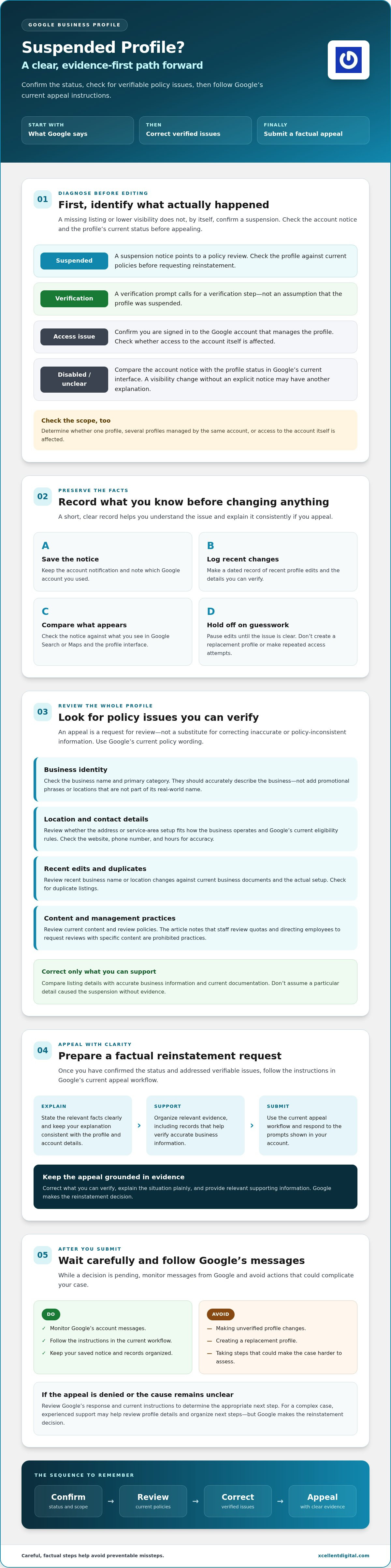
Sign in with the Google account that manages the profile. Read any notice or alert, then compare its wording with what you see when you locate the business in Google Search or Maps. A suspension notice points to a policy review; a verification prompt calls for a verification step. If you can’t access the profile, first check that you’re signed into the right account.
Check the scope, too. Does the issue affect one profile, several profiles managed by the same account, or access to the account itself? A visibility change without an explicit notice may have another explanation. Confirm the status through Google’s current Business Profile interface and account messages before appealing.
What to do before changing anything
Pause edits while you establish what happened. Changing business details before diagnosis can make it harder to tell which information is under review. Don’t create a replacement profile, either. A duplicate may add another problem rather than restore the original listing.
Record the facts first. Save the notification, note which Google account you used, and make a dated record of recent profile changes. These details give you a clear reference if you need to explain the situation later.
First-response checklist:
- Sign in to the Google account associated with the profile.
- Check account notifications and the profile’s current status in Google’s interface.
- Compare the notice with what appears in Search or Maps, and determine whether one or multiple profiles are affected.
- Save the notice and a dated record of recent changes.
- Hold off on profile edits, repeated access attempts, or creating a replacement until the issue is clear.
Google may update its menus and instructions, so follow the prompts currently shown in your account. Once you know whether this is a suspension, verification issue, disabled profile, or access problem, you can respond to the actual status instead of guessing.
Find and Correct the Google Business Profile Policy Issue
After confirming the profile’s status, investigate what might have triggered the action. An appeal asks Google to review your profile. It isn’t a substitute for correcting inaccurate or policy-inconsistent information. Check Google’s current Business Profile policies before making changes, since eligibility and content rules can change.
Review the whole profile, not just the field you suspect. A mismatch between the business’s real-world identity and its listing may be one clue, but don’t assume a specific detail caused the suspension without evidence. For a broader quality review, use this Google Business Profile audit checklist.
Which profile details should you review?
Start with the business name and primary category. They should accurately describe the business, not add promotional phrases or locations that aren’t part of its real-world name. Compare the listing with current business documents and how customers encounter the business.
Next, check that the address or service-area setup fits the way the business operates and Google’s current eligibility rules. Review the website, phone number, hours, and any duplicate listings for accuracy. Check recent edits as well. A business name or location change may deserve closer review if it no longer reflects the documentation or actual setup.
Review content and management practices, too. Google’s review policies, for example, prohibit practices such as setting staff review quotas or directing employees to request reviews that include specific content. Check the current policy wording rather than relying on hearsay. For a deeper walkthrough of the appeal process and common errors, see this expert guide to reinstatement.
How to correct a suspected compliance problem
Make changes only when you can support them with accurate business information and current Google guidance. If a detail can’t be substantiated, remove or revise it instead of guessing. For sensitive fields such as ownership or location, check Google’s latest instructions before editing. The wrong change can muddy the record.
Keep a simple record of meaningful corrections: what changed, when, and why. That gives you a factual basis for explaining the steps taken in an appeal. Avoid unrelated edits at the same time so the correction history stays clear.
Work methodically. If you’re unsure which details need attention, XcellentDigital offers Google Business Profile reinstatement support to help review the situation and organize next steps. This support can’t control Google’s decision, but it may help you prepare a more focused response.
Prepare a Strong Reinstatement Request and Supporting Evidence
Once you’ve corrected the issue you identified, prepare an appeal that explains what changed and why the profile accurately represents the business. An appeal asks Google to review your case; it doesn’t guarantee reinstatement. Keep the explanation factual and connect each point to the specific concern or correction.
Use the appeal option shown in Google’s current Business Profile workflow. As of July 8, 2026, Google’s appeals tool allows supporting evidence to be attached directly in the appeal form. Follow the instructions displayed for your case, including file requirements and any limits on submissions. Don’t rely on older guides that describe a separate upload step.
What information can help explain a legitimate business?
Choose records that support the exact profile details under review. Depending on the concern and Google’s instructions, relevant material may include a business license, tax certificate, utility bill, or clear photos of permanent storefront signage or branded work vehicles. These are examples, not a universal checklist. Submit only what applies and what the official workflow requests.
Make the connection clear. If the question concerns the business location, provide evidence that helps establish that location. If it concerns the business’s identity, use records that show the name in use. Avoid sending a large bundle of unrelated files, and don’t include sensitive customer or financial information unless Google requests it through an official process. Before submitting, check that documents are readable and consistent with the profile.
How to write a clear reinstatement explanation
Keep the explanation brief, specific, and consistent with your evidence. State what the business does, identify the profile detail you corrected, and explain why the current information is accurate. For example, if you corrected a business name to match its real-world name, say so plainly and point to relevant documentation if requested.
Avoid speculation about Google’s systems, emotional accusations, or claims you can’t support. Don’t say you fixed an issue unless you made and can explain that correction. A focused explanation is more useful than a long defense that introduces unrelated details.
Before sending, confirm that the profile, explanation, and supporting records tell the same story. Keep a copy of what you submit. For a step-by-step walkthrough of the process, see the Google Business Profile reinstatement appeal guide. A careful, consistent request is a sensible next step in how to fix a suspended google business profile, but Google makes the final decision.
After Appealing: Avoid Delays and Respond to Google Carefully
Submitting the appeal doesn’t end your part of the process. Monitor the Google account connected to the profile, including its notifications and the status shown in Google’s current appeal workflow. If Google asks for clarification or additional information, respond through the channel and by the method it specifies.
Google’s published guidance says appeal reviews can take up to five business days, but some cases take longer. Treat that as guidance, not a deadline or promise. Check the status and timing instructions in the official workflow, and don’t assume silence means approval, denial, or a missed deadline.
What happens after you submit an appeal?
Save a copy of the appeal, any evidence, and the confirmation or case details shown. If Google follows up, answer the specific request and keep your response consistent with the information already provided. Don’t send details that conflict with your profile or earlier evidence. If you’re unsure what a message requires, return to Google’s official instructions rather than guessing.
Check for updates periodically and keep a dated record of communications. That record helps you follow the case accurately if further action is available. For another submission or review, use only the options Google displays for your case.
Which actions can make the situation harder to resolve?
Don’t create a replacement profile to work around the suspension, make repeated unsupported edits, or submit altered or misleading evidence. These steps can complicate the review and make it harder to keep the facts straight. Avoid repeated appeals or complaints before Google responds unless its current workflow specifically directs you to do so.
If Google denies the appeal, read the decision and available next-step instructions carefully. Where Google offers an additional review, provide new, relevant evidence rather than resending the same material without addressing the stated issue. Follow-up options can depend on what Google shows in your account.
A measured follow-up is part of how to fix a suspended google business profile: keep the record clear, follow the official process, and avoid actions that muddy the case. If you’d like experienced support reviewing the situation and organizing next steps, discuss Google Business Profile reinstatement support with XcellentDigital. Google retains control of the decision.
When to Get Google Business Profile Reinstatement Help
Some suspension cases are straightforward: Google identifies a clear issue, you can verify the correct profile details, and you understand the steps shown in the appeal workflow. If the cause remains unclear, profile ownership or location details are complicated, or an earlier appeal didn’t resolve the issue, experienced support may help you organize a focused next step.
A provider can review the profile information and help prepare a compliant response. They can’t override Google’s policies or control its decision. Ask how they assess the situation, what evidence they may need, and how they’ll keep account access under your control. Be cautious of anyone who guarantees reinstatement. No outside provider can promise Google’s outcome.
What should you prepare before asking for help?
A clear record makes it easier to explain the situation without starting from scratch. Gather the suspension notice, the profile identifier, and the Google account context. Add a short timeline of relevant profile changes, corrections already made, and appeals or messages you’ve submitted. Share only the information needed to understand the case, and use a secure channel for sensitive records.
Clarify what you need next, too. Your immediate goal may be to restore an accurate profile and regain visibility; rebuilding customer inquiries may follow once the profile is active. Keeping those priorities distinct helps focus the review on the suspension rather than unrelated marketing changes.
Before engaging a provider, ask direct questions:
- What profile details or account issues will you review?
- How will you determine which supporting records are relevant?
- Will you explain proposed changes and keep me in control of the account?
- What happens if Google requests more information or declines the appeal?
XcellentDigital offers Google Business Profile reinstatement and optimization services. Support can help you review the situation and organize next steps; Google makes the reinstatement decision. After a profile is restored, accurate information remains central to keeping it aligned with the business.
If you’re unsure how to fix a suspended google business profile or want help assessing your next step, contact XcellentDigital about your profile. Bring the notice and change history you’ve gathered so the conversation can start with the facts.
Take the Next Step Toward Restoring Your Profile
A suspended profile can disrupt visibility and customer inquiries, but a careful response gives you a clearer path forward. Confirm the exact status before acting, correct policy issues you can verify, then submit a concise appeal with relevant evidence. Follow Google’s instructions and keep your records consistent. These steps are the foundation of how to fix a suspended google business profile without adding avoidable confusion.
You don’t have to work through every detail alone. XcellentDigital provides Google Business Profile reinstatement, optimization, and reputation management services. The team can help review your situation and organize next steps, while Google retains control of the reinstatement decision.
Talk with XcellentDigital about your suspended profile if you’d like support assessing what to do next. Start with the notice, profile details, and changes you’ve already made. With a clear record and a sensible plan, you can move forward with greater confidence.
Frequently Asked Questions
How do I fix a suspended Google Business Profile?
Start by checking Google’s notice and confirming which profile and account are affected. Review the profile against Google’s current Business Profile policies, correct details that are inaccurate or unsupported, then follow the appeal instructions shown in your account. Keep your explanation factual and submit relevant evidence requested through the official workflow. Knowing how to fix a suspended google business profile means preparing a clear case, not assuming reinstatement is guaranteed.
Why was my Google Business Profile suspended?
Google may suspend or restrict a profile because of a policy or eligibility concern, but the notice and account context matter. Don’t assume a drop in visibility alone means Google suspended your profile. Review the notification, profile details, recent edits, and current policies to look for a possible issue. If the reason isn’t clear, document what you find before making changes or submitting an appeal.
Can I appeal a suspended Google Business Profile?
Yes, if Google provides an appeal option for your case. First review the profile and correct relevant issues, then follow the instructions in the official account workflow. Prepare a concise explanation and include supporting evidence when the process requests it. Check Google’s current guidance for submission instructions and any applicable limits. An appeal asks Google to review your case; it doesn’t guarantee reinstatement.
How long does Google Business Profile reinstatement take?
Google’s official guidance says appeal reviews can take up to five business days, but actual cases may take longer, and there’s no guaranteed resolution time. Check the appeal status and instructions in the Google account used to manage the profile. Respond to requests through official channels, and avoid repeated submissions unless Google directs you to take another step. Verify current timing guidance in Google’s workflow before relying on an estimate.
What happens if my Google Business Profile appeal is denied?
Read Google’s decision and any follow-up instructions carefully. Check whether the message identifies a profile detail to correct or offers an additional review option. Don’t create a duplicate profile or submit evidence that’s altered, irrelevant, or unsupported. Use Google’s current guidance to understand what steps are available for your case. If the issue remains unclear or complex, consider experienced help reviewing the profile and your previous appeal.
Should I create a new profile if my Google Business Profile is suspended?
No, don’t create a replacement profile simply to get around a suspension. A duplicate or inconsistent listing may complicate the situation, and the right approach depends on the notice and Google’s current policies. Confirm which profile is affected, review the stated issue, and follow Google’s instructions before taking action. If you’re unsure whether a separate listing is eligible, check the current rules rather than creating one and risking another problem.
Can an agency guarantee Google Business Profile reinstatement?
No. An agency can’t control Google’s review or guarantee its decision. A provider may help assess profile details, identify possible compliance concerns, organize relevant evidence, and prepare a clear response. Before engaging one, ask what support it provides and how it handles account access. Be cautious of promises of guaranteed reinstatement, especially if the provider hasn’t reviewed the suspension notice or the profile details behind the case.












Leave a Reply
Want to join the discussion?Feel free to contribute!