

Business Case for Marketing Automation: Practical ROI Guide
What if the strongest business case for marketing automation starts with one missed follow-up, not a bigger marketing budget? If leads sit unanswered while your team juggles daily work, it’s reasonable to question whether new software will pay off or just add another system to manage. The answer depends on finding a specific, repeatable bottleneck you can measure and improve.
This guide shows you how to assess whether automation fits your business, build a credible case around expected returns, and choose a manageable first use case. You’ll learn how to weigh software and implementation needs against alternatives, define what success should look like, and set a practical evaluation plan before committing. You’ll also see how automation can connect lead capture with timely follow-up, so fewer prospects depend on someone remembering the next step. Start with the problem, the numbers you can track, and the work your team can realistically support. That’s how you make a sound decision without relying on vague promises.
Key Takeaways
- Build a business case for marketing automation around one repeatable bottleneck and the business outcome you want to improve, not a list of software features.
- Use current lead, response, conversion, staff-effort, and spending data to create conservative, expected, and upside ROI scenarios.
- Compare automation with manual processes, hiring, and additional advertising based on the problem each can solve and the effort it takes to sustain.
- Reduce implementation risk by testing one measurable workflow with a clear owner, baseline, data map, and plan for exceptions and human follow-up.
- Connect lead generation with timely engagement by aligning advertising and search activity with AI agents and lead response automation.
What a Business Case for Marketing Automation Should Prove
Marketing automation is software-supported, rule-based marketing work: the system carries out a task or sends a communication when a defined condition is met. For example, a new inquiry might receive an acknowledgment, then enter a planned follow-up sequence. The software can make those steps more consistent, but it can’t decide what your business should promise or replace a useful sales conversation. For a broader overview of its functions, see What is Marketing Automation?
Keep the goal separate from the feature list. Workflows, integrations, and AI are capabilities, not business results. A stronger case names the outcome those capabilities should support: less time spent on repetitive follow-up, fewer inquiries left without a response, or clearer reporting on what happens after a lead arrives. Choose an outcome you can observe, then identify the part of the current process that may be holding it back.
A business case is a documented comparison of expected value, effort, and risk. Make the comparison specific: describe one bottleneck, record a baseline, and define a measurable result. Your baseline could include lead volume, response time, the share of inquiries that receive follow-up, or staff hours spent on routine tasks. Without it, a later change may seem promising but remain difficult to connect to automation.
Separate the evidence into three parts:
- Business problem: Where does work slow down, vary by person, or fall through?
- Expected outcome: What observable measure should improve?
- Required effort and risk: What data, setup, ownership, and ongoing review will the process need?
Which business problems can automation address?
Look for repeated friction, not a vague desire to “do more marketing.” Manual data entry can consume staff time; delayed follow-up can leave a qualified inquiry waiting; inconsistent nurturing can give prospects different experiences; and disconnected reporting can make it hard to see which steps lead to a sales conversation. For each issue, note where it occurs and what it costs in time, missed opportunities, or incomplete records.
Then test the cause. If the lead source is weak, automating follow-up won’t create demand. It may simply process fewer or less relevant inquiries faster. Automation is a better fit when a dependable activity already exists and a repeatable step needs to happen more consistently.
Who is likely to benefit, and who should wait?
Businesses with recurring customer journeys, repeatable follow-up, and a clear person responsible for the next step are better positioned to evaluate automation. High volume isn’t required: when each opportunity matters, consistent handling can be valuable even with a small number of inquiries. Start by checking whether staff can identify each lead, record its status, and follow an agreed process.
Weak data, unclear ownership, or a process that changes every week are readiness gaps, not reasons to buy more features. First clarify who acts, what information they need, and how exceptions reach a person. A stable starting process gives you a fair test of whether automation helps.
How to Calculate the Potential ROI of Marketing Automation
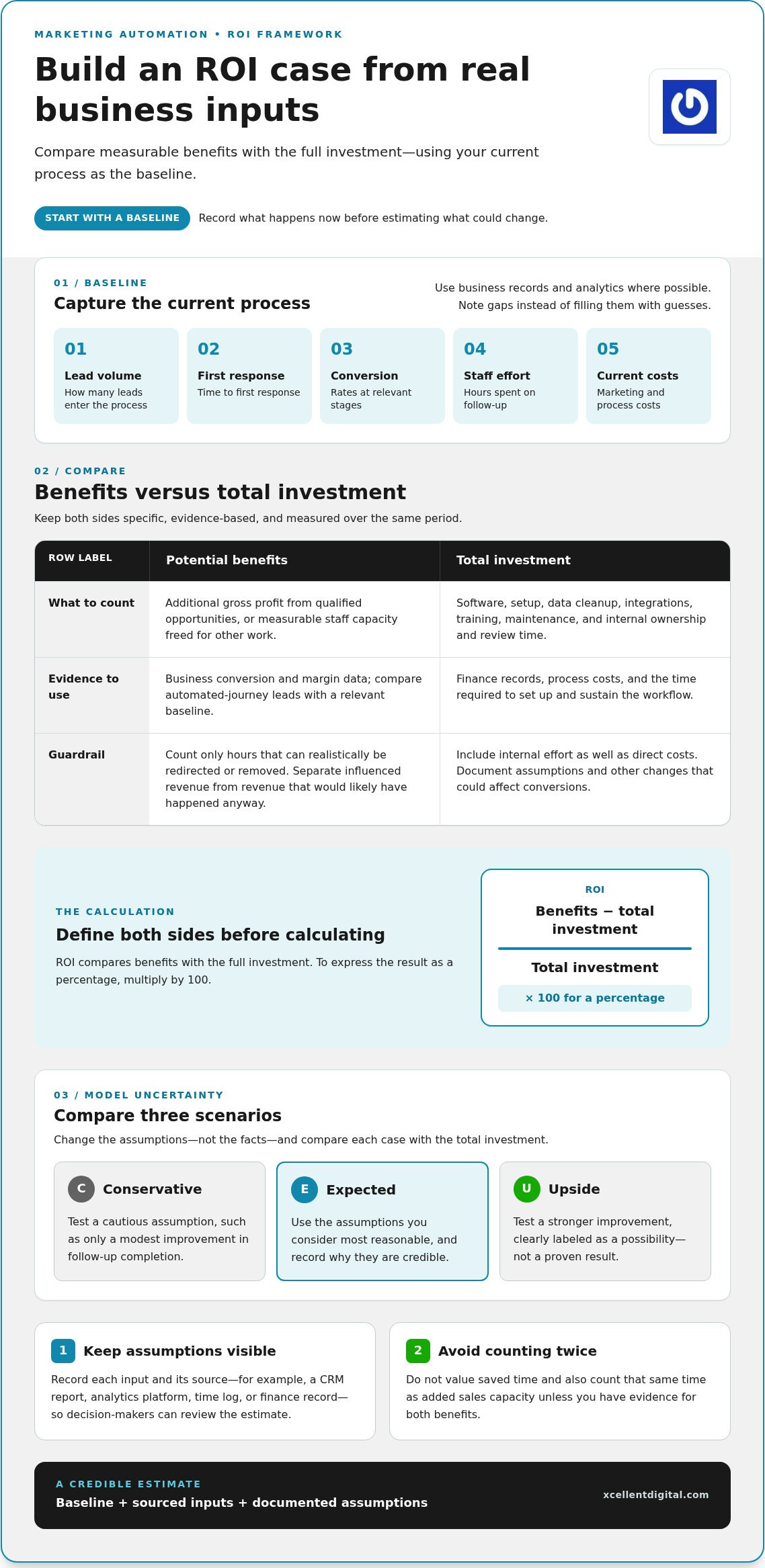
A credible ROI estimate starts with what happens now, not a software vendor’s best-case promise. Record current lead volume, time to first response, conversion rates at relevant stages, staff hours spent on follow-up, and existing marketing and process costs. Use business records and analytics where possible, and note gaps instead of filling them with guesses. These figures give you a baseline for comparing results after a workflow changes.
ROI is benefits minus total investment, divided by total investment. To express the result as a percentage, multiply by 100. Define both sides carefully. Benefits might include additional gross profit from qualified opportunities or measurable staff capacity freed for other work. Investment includes more than software: account for setup, data cleanup, integrations, training, maintenance, and the internal time needed to own and review the process.
Which inputs belong in the calculation?
Build a simple record of each input and its source, such as a CRM report, analytics platform, time log, or finance record. Separate revenue automation may influence from revenue that would likely have happened anyway. For example, compare results for leads entering the automated journey with a relevant baseline, while noting other changes that could affect conversions. Document assumptions so decision-makers can challenge them instead of mistaking estimates for proven results.
For a practical model, list expected benefits and effort over the same period. If you estimate fewer staff hours on routine follow-up, value only hours that can realistically be redirected or removed from the workload. If you expect more completed sales, use the business’s own conversion and margin data rather than treating every additional inquiry as revenue. Avoid counting the same benefit twice, such as valuing saved time and also counting that time as added sales capacity without evidence.
How should you measure payback without overclaiming?
Model three scenarios: conservative, expected, and upside. Change the assumptions, not the facts. A cautious case might assume only a modest improvement in follow-up completion; an upside case can test a stronger improvement, clearly labeled as a possibility. Compare each scenario with the total investment, then check which assumptions have the greatest effect on the result. This shows whether the case depends on a realistic change or an optimistic forecast.
Revenue can take time to appear, so pair it with leading indicators: response time, engagement, qualified opportunities, and the share of leads reaching the next step. Set an evaluation window that fits your customer journey and sales cycle. Review the same measures before and after implementation, and account for seasonality or changes in lead sources. Projected savings and conversion gains remain hypotheses until the data supports them.
A useful model doesn’t need false precision. It needs visible assumptions, consistent measurement, and a fair account of the work involved. If your plan connects lead generation with reliable follow-up, XcellentDigital’s marketing and automation support can help bring those activities together as one measurable journey.
Marketing Automation vs. Manual Work, Hiring, and More Advertising
Automation isn’t automatically the best answer to a marketing problem. The right choice depends on what’s slowing growth: too few qualified prospects, inconsistent follow-up, or a team that lacks capacity for work requiring judgment. A sound business case for marketing automation compares options against the same bottleneck, including ongoing effort, data needs, flexibility, and how results will be measured.
Use this comparison as a starting point, not a universal ranking. It assumes you already have a defined process and can identify where leads enter and what happens next. If those assumptions don’t hold, resolve the gaps before treating the options as directly comparable.
| Option | Best fit | Ongoing effort and measurement |
|---|---|---|
| Manual work | Low-volume tasks that need frequent judgment or change. | Flexible, but consistency depends on staff availability. Track time, completion, and missed handoffs. |
| Marketing automation | Frequent, rule-based steps with clear triggers, such as acknowledging an inquiry or sending planned follow-up. | Requires setup, clean data, oversight, and exception handling. Measure completion, response, and qualified progress. |
| Hiring | More capacity for nuanced communication, customer care, or work that can’t be standardized. | Adds people to manage and train, but can support changing needs. Measure workload handled and service quality. |
| More advertising | Qualified demand is the constraint and the team can handle additional inquiries. | Requires ongoing campaign management and clear lead-source tracking. Measure lead quality and movement toward sales. |
When does automation beat another manual process?
Look for a task that happens often, follows clear rules, and has a defined trigger. The case gets stronger when delays create a visible problem, such as inquiries waiting for an initial response or prospects missing a planned next step. Compare the staff time the workflow could save with setup, monitoring, and the time needed to handle exceptions. If review and correction consume the same effort, automation may not solve the bottleneck.
Keep judgment in human hands. Unusual requests, sensitive customer concerns, and decisions that depend on context should reach a person rather than trigger a rigid sequence. Automation can standardize routine communication and handoffs; it can’t replace a thoughtful sales conversation.
Should the next investment be automation, advertising, or staff?
Match the investment to the constraint. If qualified demand is low, more advertising through channels such as Facebook Ads, PPC, or search optimization may address the gap, provided the team can respond. If prospects already arrive but follow-up is inconsistent, automation may improve the process. If the work requires nuanced care or direct conversation, added staff may be the better fit.
Start with evidence, not the appeal of a particular tool or tactic. Identify where the process breaks, confirm the team can support the proposed change, and choose the option whose results you can track without losing the human judgment customers still need.
A Low-Risk Plan to Test Marketing Automation
Don’t automate the whole customer journey at once. Choose one contained workflow, assign a named owner, and record how it performs today. That gives you a useful comparison and keeps a pilot manageable. For example, test how new inquiries are routed and followed up, then review whether the process improves without creating extra work or a poor customer experience.
Before launch, define what success looks like, what would count as failure, and what would make you stop, adjust, or scale the test. Set those decision points against your baseline and business priorities, not a generic benchmark. A clear plan makes the pilot a practical test of the business case for marketing automation, not just a software demonstration.
What should a pilot include?
Start with a repeatable task such as routing an inquiry, sending a reminder, or following up with a prospect. Write down the trigger, who owns the message, how quality will be checked, and which situations must go to a person. Train the people monitoring results and handling exceptions before the workflow goes live. For a lead follow-up test, the lead response automation and instant engagement guide can help you frame the use case.
Map the handoffs before turning anything on. Identify where lead information comes from, which systems receive it, and what happens if a record is incomplete, duplicated, or routed incorrectly. Document how consent and communication preferences are captured and respected. Make human escalation easy to spot: the workflow should have a clear path for unusual requests, customer concerns, and messages that need judgment.
- Trigger: Define the event that starts the workflow and the records it should include.
- Ownership: Name who reviews messages, data quality, and exceptions.
- Checks: Test the route and message with sample records before launch.
- Decision rules: Set success, failure, and stop-or-scale criteria in advance.
How do you decide whether to scale?
Review the pilot against its baseline and documented assumptions. Look beyond a single metric: check whether follow-up became more consistent, qualified opportunities progressed, customer experience remained sound, and staff workload stayed manageable. Confirm that the underlying data is reliable and handoffs work as designed. If results are mixed, adjust the process or extend the test rather than treating early signals as proof.
Scale only when the workflow is repeatable, the value is worthwhile, and the team can maintain it. Pause if errors, poor data, or exception handling outweigh the benefit. Use what you learn to refine the next test or build on a successful one. XcellentDigital supports practical marketing automation implementation as part of a connected lead journey.
How XcellentDigital Connects Marketing Automation to Growth Goals
Marketing automation works best as part of a measured customer journey, not as a stand-alone tool. XcellentDigital connects digital advertising and search optimization with lead response automation and AI agents, helping businesses plan how prospects move from discovery to follow-up. The purpose isn’t to promise a particular return. It’s to connect each activity to a business goal and make the handoffs easier to understand and evaluate.
Connect acquisition, engagement, and follow-up
Start by mapping the journey from the first interaction. Facebook Ads, Pay Per Click, and search optimization can attract prospective customers. A lead capture point records the inquiry, then a defined response process helps ensure it reaches the appropriate next step. AI agents and lead response automation can support timely engagement, while staff handle questions or decisions that need context and judgment.
Make the connection measurable. If the goal is to improve inquiry handling, track where leads come from, whether they receive a response, and whether they progress to a qualified opportunity. If the goal is to understand campaign contribution, connect acquisition sources to subsequent lead stages. Choose measures that reflect the business case you’ve built, not activity for its own sake.
Other capabilities can support the journey without replacing the core test. Sales funnel development can help clarify the stages a prospect moves through. Reputation management can complement acquisition by supporting how a business is presented to potential customers. Give each activity a purpose and measures rather than assuming that adding services guarantees growth.
Turn the business case into an actionable plan
Bring four things into the planning conversation: the bottleneck you want to address, the workflow proposed to improve it, the current baseline, and the criteria you’ll use to evaluate results. For instance, if inconsistent inquiry follow-up is the issue, define where inquiries enter, who owns the next action, what automation supports, and which response or lead progression measures you’ll review.
Clear ownership keeps the work moving. Assign responsibility for campaign strategy, automation setup, message and data quality, and ongoing performance review. These roles may sit with different people, but the handoffs should be explicit. Agree on how the team will manage exceptions and who will decide whether to adjust, pause, or expand the workflow.
A practical business case for marketing automation turns a growth priority into a focused plan the team can evaluate. XcellentDigital connects acquisition activity with lead engagement and follow-up, then aligns the approach with your goals and operating needs. Explore XcellentDigital’s marketing and automation solutions to discuss a plan shaped around the bottleneck you want to solve and the outcomes you need to measure.
Make Your Next Growth Move With Confidence
The next step isn’t to automate everything. Decide which growth priority deserves attention first, then align your people, process, and tools around it. A defensible business case for marketing automation can turn that priority into a focused plan, with a clear reason to act and a way to judge progress.
XcellentDigital brings together digital advertising and search optimization to attract prospects, AI agents and lead response automation to support timely engagement, and sales funnel development and reputation management to complement the customer journey. The right mix depends on your goals and where your process needs support.
Bring your growth priorities into the conversation and shape a practical direction for what comes next. Build a clearer growth plan with XcellentDigital.
Frequently Asked Questions
Is marketing automation worth it for a small business?
Yes, if it addresses a real, recurring problem and the value is meaningful relative to the effort required. A small business doesn’t need a large contact list to benefit: a few valuable inquiries slipping through can justify improving how they’re handled. Start with a narrow use case, such as acknowledging form submissions, and assess whether the business case for marketing automation holds up against actual workload and lead outcomes.
Can marketing automation work without a CRM?
Yes, some basic automations can run without a CRM, but you still need a dependable way to store and track information. A shared spreadsheet or another organized record may work for a simple process if staff keep it current and can see who owns the next action. As workflows grow, scattered records can make personalization, handoffs, and reporting harder. Choose a setup your team can maintain accurately.
Does marketing automation replace salespeople?
No. Automation can handle routine steps, such as sending a confirmation or reminding a team member to follow up, but it can’t reliably replace discovery, negotiation, or a conversation that depends on customer context. Think of it as support for the sales process: it can help keep basic tasks from being forgotten, while people interpret needs, answer nuanced questions, and build trust.
How long does it take to see results from marketing automation?
There’s no fixed timeline. You may be able to observe process changes, such as fewer missed handoffs, before you can judge effects on sales. Revenue results depend on factors including how long customers take to decide and whether enough prospects move through the workflow. Track operational signals first, then evaluate sales outcomes over a period that reflects your actual buying journey.
What should I automate first in my business?
Start with a task that happens repeatedly, has a clear trigger, and doesn’t require a person to make a nuanced decision each time. For example, after someone requests information, an automated acknowledgment could confirm the inquiry was received, while assigning a team member to handle the substantive response. Keep the first workflow easy to check, and make sure a person can step in when the situation calls for it.
What risks should a business consider before automating marketing?
Consider what happens if the data is wrong, a message goes to the wrong person, or an automated reply feels inappropriate. Review the information collected, who can access it, how communication preferences are handled, and how errors reach a person. Also account for staff training and ongoing oversight. Test messages and handoffs before launch, and make it clear who can pause or correct a workflow.













Leave a Reply
Want to join the discussion?Feel free to contribute!