

Google Business Profile Reinstatement Timeline: What to Expect in 2026
What if the google business profile reinstatement timeline isn’t a countdown you can plan around? A suspension can disrupt how customers find your business on Google Search and Maps, so it’s natural to want a firm answer. But Google doesn’t promise a guaranteed turnaround for reinstatement. Its official guidance says appeal reviews can take up to five business days. That review window is not a promise that your profile will be restored within that time.
Conflicting estimates can add to the pressure, especially when every day offline feels costly. The time involved can vary with the issues under review and the clarity of your supporting evidence. Reports of faster or longer cases may offer context, but they can’t predict what will happen with your profile.
This guide separates Google’s stated review timing from practitioner estimates, explains the stages of an appeal, and outlines what you can check while a case is pending or after you receive a response. You’ll also learn why another appeal or profile edit may not be the right next move. Careful preparation can help reduce avoidable errors, but it can’t control Google’s timing or decision.
Key Takeaways
- Think of the google business profile reinstatement timeline as a series of review steps, not a countdown based on online estimates.
- Track submission, any request for information, and the final decision as separate updates so you know what has and hasn’t happened.
- Before deciding whether to act, check that your supporting documents and profile details are relevant, clear, and consistent.
- While your appeal is pending, organize your records and check the official status channel. Confirm Google’s current instructions before making changes or submitting again.
- Consider professional reinstatement support if the case is complex or you’re unsure whether your appeal and evidence are ready.
Google Business Profile reinstatement timeline: what Google officially promises
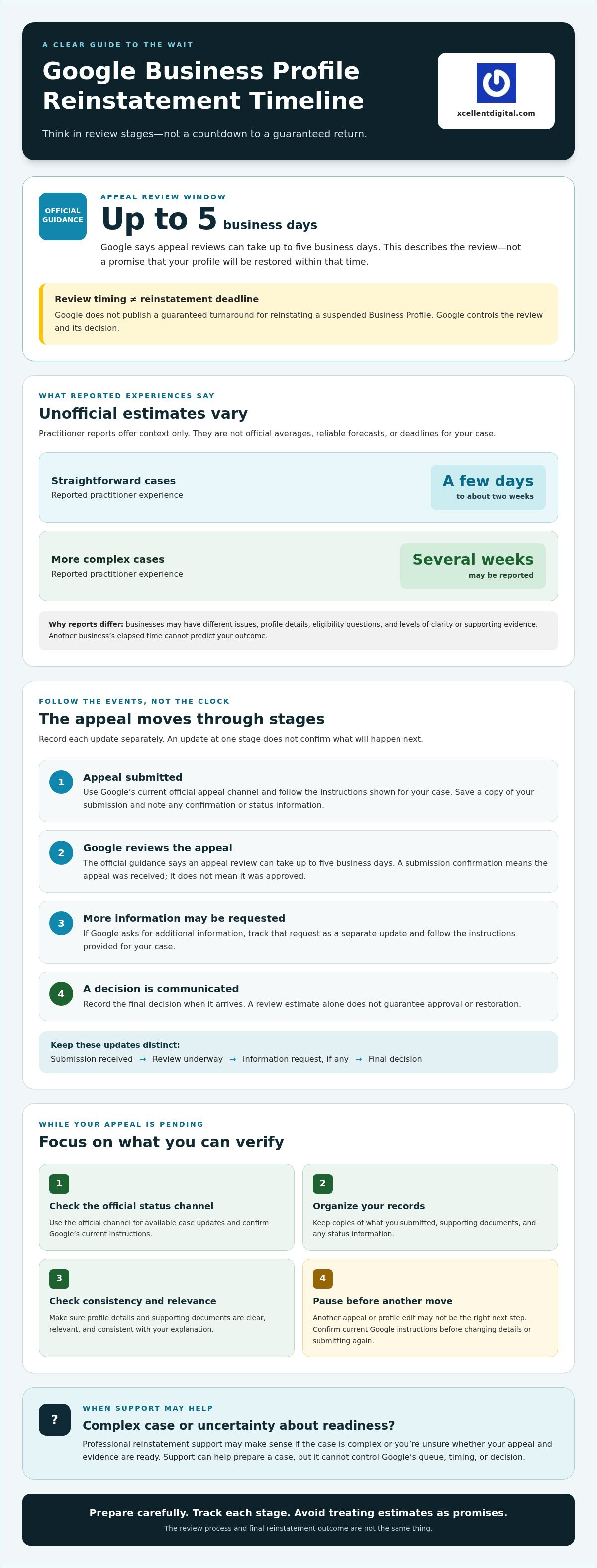
Google does not publish a guaranteed turnaround for reinstating a suspended Business Profile. Its Help Center guidance says an appeal review can take up to five business days. That describes the review, not a promise that Google will restore the profile within five business days. Google reviews the appeal and decides the outcome. An outside agency can help prepare a case, but it can’t control Google’s queue or decision.
A reinstatement timeline can describe reported experiences or an official review estimate, but it can’t establish a guaranteed deadline for your profile to return. That distinction matters when you’re planning around lost visibility. Treat the five-business-day guidance as information about the appeal review, not a service-level commitment for reinstatement.
Is there an official Google Business Profile reinstatement timeframe?
No guaranteed reinstatement timeframe is published in the cited Google guidance. Google says appeal reviews can take up to five business days, but the review and the final restoration are different outcomes. A case may need further attention, and a review estimate doesn’t guarantee approval. Check the current Google Business Profile Help Center and your appeal status for the latest instructions instead of relying on an estimate copied from an older post.
Why reported reinstatement estimates differ
Businesses don’t all submit the same kind of case. One appeal may clearly address the profile issue and include relevant evidence. Another may involve inconsistent details, questions about eligibility, or several issues that need clarification. Practitioner reports range from a few days to about two weeks for straightforward cases, while more complex cases are sometimes reported to take several weeks. These are reported experiences, not official averages or dependable deadlines.
Online timelines can provide context, but they’re not a forecast for your appeal. A business reporting a quick outcome may not share every detail of its case, while a long-running appeal may involve circumstances that don’t apply to yours. Compare your situation with Google’s current instructions and the evidence you can provide, rather than with someone else’s elapsed days.
For a closer look at the practical stages of preparing and submitting an appeal, see our Google Business Profile reinstatement appeal process guide. The platform itself has evolved from earlier efforts such as Google’s business initiatives, but that history doesn’t establish a current appeal deadline. Focus on the present process: follow Google’s instructions, keep your documentation organized, and don’t treat third-party estimates as promises.
The Google Business Profile reinstatement process: stages that shape the wait
The google business profile reinstatement timeline is easier to understand as a series of stages than as a countdown to a promised date. Each stage answers a different question: Was the appeal submitted? Is Google reviewing it? Does Google need more information? Has a decision been made? These events can happen at different points, and an update at one stage doesn’t confirm what will happen next.
A stage-based view is more reliable than a promised date because it records what has happened without pretending to predict when Google will act. Google controls the review and decision. You control the accuracy of your submission, the supporting information you provide, and how promptly you respond if Google asks for more.
From appeal submission to Google’s review
Use Google’s current official appeal channel and follow the instructions shown for your case. Provide the requested details and attach supporting evidence through the method currently offered in the appeal form. Before submitting, check that your explanation addresses the issue and that the documents support the details you’ve provided. Keep a copy of what you submit and note any confirmation or status information the tool displays.
A submission confirmation means the appeal was received. It does not mean reinstatement has been approved or that a decision is imminent. Check the official channel for available case updates instead of treating a receipt or a period of silence as a final status. For additional background on common appeal steps and documentation, see this Google Business Profile suspension appeal process guide.
When Google requests more information or makes a decision
During review, Google may ask for supporting evidence or clarification. Follow the request closely, check the current instructions for acceptable materials, and submit only information that accurately represents the business. A follow-up request adds a step to the process, but it doesn’t tell you how long Google will take to review your response.
Keep these stages distinct:
- Pending: The appeal has been submitted, but no final decision is shown. Check the official channel for updates and respond if Google requests information.
- Information requested: Google needs a follow-up from you. Review the request and its instructions before replying.
- Decision issued: Google has provided an outcome. If the request is denied, check the notice and current appeal options before deciding what to do next.
A pending case isn’t the same as a denial. Treating it as one may lead to unnecessary resubmissions or changes before you understand the status. If you want help checking appeal readiness, profile details, and supporting evidence, XcellentDigital’s GBP reinstatement support can help you review the case. It cannot control Google’s timing or decision.
What can delay reinstatement, and how to interpret timeline estimates
Some appeal details may make a case harder to assess, but no single factor guarantees a delay or determines the outcome. Treat them as areas to check, not a formula for predicting your Google Business Profile reinstatement timeline. Google’s review timing remains uncertain, and third-party estimates aren’t dependable deadlines for an individual business.
| Possible process factor | What to check | Timing claim |
|---|---|---|
| Evidence gaps | Does the information you submit clearly support your explanation? | No guaranteed delay or review duration can be inferred. |
| Mismatched details | Do profile information and supporting materials consistently describe the business? | Inconsistency may raise questions, but it doesn’t predict a specific timeline. |
| Unresolved eligibility questions | Does your appeal address the policy or eligibility concern behind the suspension? | Google determines what needs review. There’s no fixed duration to apply. |
| Case complexity | Are several profile issues or explanations involved? | Complexity may call for closer assessment, but no outcome or timing is assured. |
Which case details may affect the review?
An appeal is easier to assess when its explanation directly addresses the suspected reason for suspension and the supporting information is clear and consistent. For example, if the concern relates to a business detail, documents that don’t match the profile may leave questions unresolved. That doesn’t prove the appeal will take longer or be denied. It does give you a reason to check for gaps before submitting or responding.
Review the profile and related business details for consistency. A Google Business Profile audit checklist can help you organize broader profile checks. For the appeal itself, follow Google’s current instructions about what evidence to provide.
Do repeat appeals or profile edits reset the clock?
Don’t assume that an edit or another submission automatically resets Google’s review clock. Unless Google confirms that effect in its current guidance, a specific reset claim is speculation. Still, multiple submissions or changes made while an appeal is under review can make it harder to keep your explanation, profile details, and evidence aligned.
Before editing the profile or submitting again, check the official status and instructions for your case. If Google has requested information, focus on answering that request accurately. If there’s no request or decision, don’t act on a forum estimate alone. The practical goal isn’t to guess how many days a change might add. It’s to keep your case clear and follow the process Google provides.
What to do while your reinstatement appeal is pending
Waiting can feel like lost ground, especially if customers usually find you through Google Search or Maps. You can’t control Google’s review pace, but you can keep your records organized, monitor the official appeal channel, and maintain communication through other business channels while the google business profile reinstatement timeline unfolds.
A practical checklist for the waiting period
- Save your submission. Keep a copy of the appeal, the supporting documents you provided, and any confirmation or status information from Google. Store them together so you can respond consistently if Google requests more information.
- Check the evidence against the case. Confirm that the information you submitted supports the relevant profile details and directly addresses the suspected suspension issue. Note any discrepancies for reference, but don’t rush to change the profile while you’re unsure what the case requires.
- Monitor official updates. Check Google’s current appeal channel for available status information and follow any instructions tied to your case. Forum posts and third-party estimates can’t tell you the status of your individual appeal.
- Keep customers informed elsewhere. Use the communication channels your business already maintains, such as your website, email, or social media, to share accurate contact details and updates. Don’t say that your Google profile has been restored until you can confirm it.
Profile consistency is worth reviewing, but treat it as preparation rather than a reason to make unrequested edits. For broader guidance on keeping your profile information accurate, see this Google Business Profile optimization guide.
Actions to pause until you understand the case status
A pending appeal can create pressure to act immediately. Before doing so, check Google’s current instructions for your case. Avoid sending duplicate appeals without a clear reason and guidance that supports doing so. Multiple versions of your explanation may make it harder to keep your case details consistent, though that doesn’t establish that Google’s review clock will reset.
Also pause profile edits that aren’t necessary or requested. A change could make your current profile harder to reconcile with the information already submitted. If Google asks for a correction or further details, follow the request and keep a record of what you change or provide.
Be cautious of anyone claiming guaranteed reinstatement or privileged control over Google’s timing. No outside provider can decide the appeal or promise when Google will act. Professional support can help you review the appeal, evidence, and profile consistency to reduce avoidable errors. If you want help with your case, explore Google Business Profile reinstatement support.
When reinstatement support makes sense, and what it can realistically do
You don’t have to hire help to appeal a suspended profile. If you understand the issue, can match your supporting evidence to it, and feel confident following Google’s instructions, managing the appeal yourself may be a reasonable choice. If the suspension reason is unclear, profile details don’t line up, or you’re unsure what evidence supports your case, a specialist review may help you prepare more carefully.
No agency can control Google’s appeal queue or guarantee reinstatement. Support can help you assess your appeal and reduce avoidable process errors, but Google alone reviews the case, sets its pace, and decides the outcome. Keep that distinction in mind when evaluating any service or claim about your google business profile reinstatement timeline.
Should you manage the appeal yourself or get expert help?
Choose the approach that fits your case, available time, and confidence. Self-management can work well when the concern is clear and you can explain how your documents address it. Consider a professional review when the cause is uncertain, evidence seems incomplete, or you need another set of eyes on profile consistency before taking the next step.
| Consideration | Self-management | Professional review |
|---|---|---|
| Case complexity | You understand the suspected issue and what needs explaining. | Several details are unclear or difficult to reconcile. |
| Time | You can organize the case and follow Google’s instructions. | You want help reviewing the appeal materials and profile details. |
| Confidence | You’re comfortable deciding what information to submit. | You’d value a second look at appeal readiness and evidence gaps. |
Before working with a provider, ask what its review includes, how communication works, and what it can realistically influence. Be wary of anyone presenting agency assistance as a way to bypass Google’s process or secure a specific result.
How XcellentDigital can support a reinstatement case
XcellentDigital provides Google Business Profile reinstatement support as process guidance, not a shortcut into Google’s review system. A review can help assess whether your appeal addresses the suspected issue, whether supporting evidence is relevant, and whether profile details appear consistent. That can help you make a more informed next move without promising faster review or reinstatement.
If you’re weighing your options, gather your appeal and supporting materials, check the current status through Google’s official channel, and decide whether you’re comfortable handling the next step alone. To discuss Google Business Profile reinstatement support, contact XcellentDigital with questions about your case. There’s no promise of a particular timeline or outcome, but you can find out what support may help with.
Move forward with a clear, careful next step
The google business profile reinstatement timeline isn’t a guaranteed countdown. Google’s stated appeal-review guidance and reports from other businesses offer context, but neither can promise when your profile will be restored. Focus on what you can control: keep your appeal records organized, check Google’s official channel for updates, and make sure any response addresses the issue clearly.
If the case is still pending, avoid rushing into duplicate submissions or profile changes without checking the current instructions. If Google has responded, review the decision and available next steps before acting. A measured approach can help you avoid confusion while Google considers the appeal.
XcellentDigital provides Google Business Profile reinstatement support, along with profile optimization and reputation management. That support can help you review appeal readiness, profile details, and supporting evidence, but Google controls the review and outcome. For a professional review of your case, get expert help reviewing your Google Business Profile reinstatement case.
You can’t set Google’s pace, but you can make your next move informed and deliberate. Keep moving forward with confidence.
Frequently Asked Questions
How long does Google Business Profile reinstatement take?
There’s no dependable universal turnaround for reinstatement. Google says an appeal review can take up to five business days, but that isn’t a promise that your profile will be restored within that period. Some agencies and businesses report faster outcomes or waits of several weeks, especially for complex cases. Treat those experiences as context, not a deadline for your case. Check Google’s current appeal channel for updates.
Does Google publish an official reinstatement timeline?
Google doesn’t publish a guaranteed timeframe for restoring a suspended Business Profile. Its guidance says an appeal review can take up to five business days, which describes the review rather than guaranteeing reinstatement by a specific date. Google alone assesses the appeal and decides the outcome. Before acting on timing advice, check the current Google Business Profile Help Center and the official channel associated with your appeal.
Can I speed up my Google Business Profile reinstatement?
You can’t control Google’s queue or guarantee a faster decision. You can help keep your case clear by following the current appeal instructions, submitting relevant and accurate supporting information, and responding if Google requests more details. Avoid unsupported edits or repeat submissions based only on online estimates. These steps can reduce avoidable confusion, but they don’t promise faster review or approval.
What happens if my reinstatement appeal is still pending?
A pending appeal means you haven’t received a final decision through the available status channel. Check Google’s official appeal tool for updates and instructions, and keep your submitted appeal and supporting documents organized. If Google requests more information, follow the request carefully. While you wait, use other existing business channels to communicate accurate contact details to customers. Don’t treat a pending status as a denial.
Should I submit another appeal if Google has not responded?
Don’t submit a duplicate appeal simply because you haven’t received a response. First, check the current official status and instructions for your case, then follow any action Google specifies. Another submission without a clear reason may make it harder to keep your explanations consistent. If Google issues a denial, review the decision and available options. An additional review may be possible when you can provide new evidence.
Why is my Google Business Profile reinstatement taking so long?
There may be several explanations, and the elapsed time alone doesn’t reveal what’s happening. The case may involve unclear evidence, profile details that don’t match, eligibility questions, or multiple issues requiring review. These factors can make a case harder to assess, but none automatically determines the timing or outcome. Check for official requests, confirm your materials address the suspected issue, and don’t treat third-party estimates as a deadline.
Can a reinstatement specialist guarantee approval or a faster timeline?
No. A specialist or agency can’t control Google’s review queue, decide the appeal, guarantee reinstatement, or promise a faster timeline. Professional support can help assess whether your appeal addresses the suspected issue, whether your evidence is relevant, and whether profile details are consistent. XcellentDigital provides Google Business Profile reinstatement support, but Google makes the decision. Be cautious of any provider claiming privileged access or a guaranteed result.













Leave a Reply
Want to join the discussion?Feel free to contribute!