

How to Appeal a Google Business Profile Suspension in 2026
A suspended Google Business Profile can cut off visibility in Google Search and Maps just when customers are looking for you. Rushing to submit an appeal before you understand the issue can make an already stressful situation harder. If you’re searching for how to appeal a GBP suspension, start with a clear principle: address possible policy problems first, then give Google focused evidence to review.
It’s understandable to feel unsure about why your profile was suspended or what Google needs to see. The appeal process lets you upload multiple evidence files directly in the form, so prepare the right documents before submitting. This guide explains the appeal sequence, policy issues to check, and evidence that may help show your business is eligible and your profile information is accurate.
You’ll also learn what to avoid, including creating a replacement profile, and how to handle the waiting period without adding complications. XcellentDigital provides Google Business Profile reinstatement support to help you review the case, organize evidence, and prepare a focused appeal. No service can promise a particular decision.
Key Takeaways
- Learn how to appeal a GBP suspension by following a clear sequence, from understanding the notice to reviewing your submission before sending it.
- Distinguish a profile suspension from other access or verification problems so you can focus on the right next step.
- Compare your profile with your real-world business information and identify possible policy issues before building your appeal.
- Choose evidence that directly supports your business eligibility and the accuracy of your profile details.
- See when a careful self-review may be enough and when structured GBP reinstatement support could help clarify a complex appeal.
Why a Google Business Profile suspension happens, and what an appeal can resolve
A suspension can disrupt the local visibility your business relies on, but the label alone doesn’t explain the cause. A Google Business Profile suspension is a restriction on a profile or its management after Google identifies a possible policy or eligibility issue. The effect and next steps depend on the notice and profile status. An appeal asks Google to review a suspension. A separate access or verification problem may require a different resolution.
Your profile helps people find business information in Search and Maps. For a general explanation of its purpose, see this Google Business Profile overview. If the listing is removed from public results, potential customers may have a harder time discovering you, requesting directions, or calling from the profile. In other cases, the listing may still appear while you’ve lost the ability to manage it. The impact varies by case.
What does a suspended Google Business Profile mean?
Start with the notice and the status shown in your account. A problem affecting your Google account or access can look different from a restriction on a specific profile. For example, a verification prompt may mean Google needs more information before you can manage or display the profile as expected. It doesn’t automatically mean the profile is suspended. Read the account and profile notices carefully, then follow the instructions for the status you see.
People sometimes describe suspensions as “soft” when a profile remains visible but management access is restricted, and “hard” when it no longer appears in Search or Maps. These are informal labels, not explanations of why Google acted. Check what customers can currently see, but don’t assume visibility alone means the profile is in good standing.
Why might Google suspend a business profile?
Google reviews profiles against its current policies and eligibility requirements. A suspension can follow a concern about whether the business qualifies or whether its profile accurately represents the business. For example, the business may be ineligible, or profile details such as the business name may not reflect the real-world business accurately. These are possibilities, not proof of what happened in your case.
Don’t guess at Google’s reasoning or treat every profile change as evidence of a violation. The notice may identify a policy area without spelling out every detail that needs attention. Compare the notice with the profile and the business’s actual operations. Then distinguish a policy concern from a verification request or account-access issue. That initial diagnosis helps you choose the right route and gives you a clearer starting point for how to appeal a GBP suspension.
Keep the goal practical: understand what Google has restricted, identify the stated issue, and determine what needs review. An appeal can ask Google to reconsider a profile suspension, but it isn’t a shortcut around eligibility rules or a solution to an unrelated access or verification problem. Getting that distinction right can prevent a misdirected request and make the next steps more effective.
Before you appeal a Google Business Profile suspension, diagnose and fix the issue
Before submitting anything, build a clear picture of what needs attention. A rushed change based on a guess can create more confusion. A careful review helps connect the notice to the profile and to how the business actually operates. Follow Google’s current Business Profile policies and the instructions shown in your account. These are the sources of truth, and the appeal route and requirements can change.
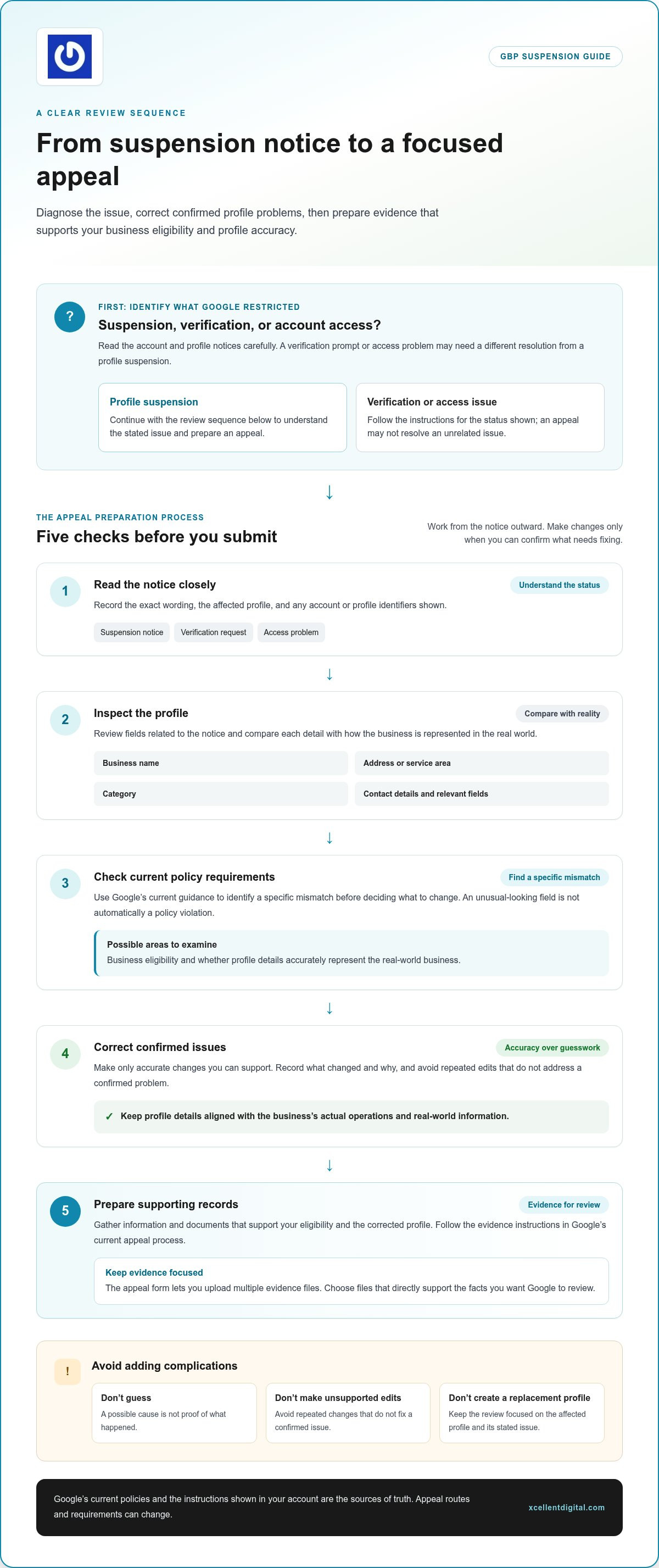
- Read the notice closely. Save or record its exact wording, the affected profile, and any account or profile identifiers shown. Note whether it describes a suspension, a verification request, or an access problem.
- Inspect the profile. Review the business name, address or service-area settings, category, contact details, and any other fields related to the notice. Compare each detail with how the business is represented in the real world.
- Check current policy requirements. Look up the relevant Google guidance and identify a specific mismatch before deciding what to change. A field that looks unusual is not automatically a policy violation.
- Correct confirmed issues. Make only accurate changes you can support. Record what you changed and why, and avoid repeated edits that don’t address a confirmed problem.
- Prepare your records. Gather information and documents that support the corrected profile and your eligibility. Follow the evidence instructions shown in Google’s current appeal process.
Review the suspension notice and profile details
Work from the notice outward. First, check whether the issue affects one profile or account access. Then inspect the relevant details rather than changing every field. If the business name, location, or operating model differs between the profile and real-world information, record the exact difference. Review your own records for recent profile edits, possible duplicate listings, or account access changes that could help explain what needs investigation. Don’t assume any one of these caused the suspension without evidence.
Correct policy issues before submitting
Use Google’s current guidelines to decide whether a correction is necessary and what an accurate profile should show. If a detail is incorrect, replace it with truthful, supportable information rather than adding wording to influence the review. Keep relevant records of the original detail and the correction. Don’t create a replacement profile or use a series of speculative edits as a workaround. Focus on resolving the issue with the original profile and follow the account-specific appeal instructions.
Pre-appeal check: Record the notice, inspect the affected fields, verify any policy mismatch, make supported corrections, and prepare relevant records. If the cause is still unclear, pause before editing. XcellentDigital’s Google Business Profile reinstatement support can help organize profile findings and evidence before you proceed.
What evidence should you include in a GBP suspension appeal?
Choose evidence that answers the specific concern in Google’s notice. A document is useful when it supports a concrete point, such as the business’s eligibility or the accuracy of a profile detail. It isn’t useful just because it shows that the business exists. Before attaching anything, follow the instructions displayed in the current appeal process. Google’s accepted evidence and requirements can change.
As of July 8, 2026, the appeal form allows businesses to upload multiple evidence files directly within the form. Potentially relevant records may include business registration or tax documents, utility bills showing the business name and address, storefront signage, or, for a service-area business, a photo of a branded vehicle. These are examples, not a universal checklist. Use a document only if it’s relevant to the issue and permitted by Google’s current instructions.
Choose evidence that supports the appeal
Match each attachment to a disputed detail or policy concern. If the question involves the business’s address, a record showing the business name and address may help. If it concerns a storefront, a clear photo of its signage may be more directly relevant. Check the live appeal instructions before relying on any document type. Don’t pad the submission with unrelated files or material that conflicts with the profile.
Make every file readable and consistent. Check that names, addresses, and other details are legible and align across the records and the profile. Remove unrelated pages or sensitive information where Google’s instructions allow, but don’t alter a document in a way that makes it misleading. If a file doesn’t support a clear point, leave it out.
Organize a clear appeal explanation
Keep the explanation factual and easy to follow. State the issue described in the notice, explain what you corrected or clarified, and connect the attached evidence to the relevant profile detail. Avoid emotional appeals, guesses about Google’s motives, or claims you can’t substantiate. A concise explanation gives reviewers a direct path from the concern to the supporting record.
- Business eligibility: Include a relevant business record only if the appeal instructions accept it and it helps establish the point under review.
- Profile information: Use records that support the specific name, address, or other detail being questioned.
- Physical presence: Where relevant, use clear signage or other requested evidence that corresponds to the business’s real-world setup.
Save copies of the explanation and files you submit, and record the submission date. Before sending, check that each attachment opens, the wording matches the evidence, and no file contradicts another. This final review makes your appeal clearer: every item should explain a compliance point, not create a new question.
How to submit a Google Business Profile appeal and avoid common setbacks
Once you’ve reviewed the notice, corrected supported issues, and organized your evidence, use the appeal option provided for your account or profile. Google’s interface and instructions can change, so follow the route currently displayed in your account rather than relying on an old walkthrough. Read each prompt carefully, especially account-specific guidance about what to include or do next.
Submit through Google’s current appeal process
As of July 8, 2026, Google’s appeal form allows multiple evidence files to be uploaded within the form itself. The previous separate upload step and 60-minute window no longer apply. Follow the fields and prompts you see, since the exact sequence may vary with the case. Before sending, confirm that you selected the affected profile and that the explanation and attachments match the issue in the notice.
- Open the official appeal option. Start from the appeal instructions shown in the relevant Google account or profile. Confirm that you’re working on the suspended profile, not another listing.
- Complete the requested information. Answer each prompt accurately. Explain the issue, the correction made, and how your evidence supports the profile’s compliance.
- Attach relevant files. Upload the evidence requested or permitted in the current form. Check that each file is readable and directly relates to the concern.
- Review before submitting. Compare the explanation with the profile and attachments. Remove unsupported claims, inconsistencies, or files that don’t address the stated issue.
- Save a record. Keep a copy of the submission, the attached files, and the date you sent it. This makes it easier to track the case and respond consistently if Google follows up.
Don’t send repeated appeals just to attract attention. Duplicate submissions, conflicting explanations, or unsupported new claims can make the case harder to follow. Use the instructions shown for your specific appeal, and submit another response only when Google’s process asks you to take further action.
What to do while Google reviews the appeal
Monitor the email associated with the account and any official profile support channel connected to the case. Look for requests or decisions, including messages that need a response. While you wait, avoid unnecessary profile edits and don’t create a replacement listing. Timing depends on Google’s review process, so don’t treat an estimate as a deadline or submit again simply because you haven’t heard back.
If the appeal is difficult to organize, XcellentDigital’s Google Business Profile reinstatement support can help you review the profile and prepare a clear, evidence-led submission. This support can bring structure to a complex case, but no provider can promise Google’s decision.
When expert GBP reinstatement help can make the appeal process clearer
You may be able to manage a straightforward case yourself, especially when the notice points to a clear issue and you can correct it using accurate business information. The decision to get support should come down to complexity, not panic. If the reason is still unclear after reviewing Google’s notice and policies, or your records don’t line up neatly, a structured review can help you prepare a more coherent appeal.
Signs you may benefit from hands-on reinstatement support
Consider assistance if the profile has a complicated history, several recent edits, possible duplicate listings, or records that appear inconsistent. These details can make it harder to explain what happened and which changes matter. Support may also help if you’ve reviewed the notice and relevant policies but still can’t identify a clear issue to address. The aim is to organize the next step, not to pressure you to act before you’re ready.
A self-managed appeal may be practical when the notice is specific, the profile issue is clear, and you can support the correction with consistent records. More involved cases can benefit from a second look at how the profile history, policy concern, and available evidence fit together. For further process detail, consult the related Google Business Profile reinstatement appeal process guide.
How XcellentDigital supports a more organized appeal
XcellentDigital provides Google Business Profile reinstatement support for business owners who want help making sense of a difficult case. A review can examine profile details, assess how they align with relevant policies, and help organize evidence around the concern raised. This gives you a clearer way to explain the issue and the steps taken to address it, instead of submitting a scattered set of details.
Good preparation matters, but no specialist can guarantee Google’s decision or when it will arrive. The goal is to approach the appeal responsibly, with a focused explanation and relevant support for the profile’s accuracy and eligibility. If you need guidance on how to appeal a GBP suspension, structured help can make a complex process easier to manage while you work toward restoring your profile’s visibility.
If you’re dealing with a complicated suspension, get help with your GBP suspension from XcellentDigital. Reinstatement support can help you bring the case into focus without relying on guesswork or promises about the outcome.
Take the next step toward a stronger profile
A suspension can make it harder for customers to find and choose your business, but your next move can be steady and deliberate. Use what you’ve learned to decide whether you’re ready to handle the appeal or would benefit from experienced support. The right approach to how to appeal a GBP suspension is grounded in the details of your case, not rushed guesses or promises of a particular outcome.
XcellentDigital provides Google Business Profile reinstatement support, along with profile optimization and reputation management. If you want help bringing your appeal into focus, contact XcellentDigital for Google Business Profile reinstatement support and take the next step with a clear plan.
Frequently Asked Questions
How long does a Google Business Profile suspension appeal take?
An appeal may take a few days to several weeks, and there’s no guaranteed decision date. Estimates cited for this guide suggest simple cases may take 3-7 days, more complex cases 2-4 weeks, and cases requiring further verification up to 6 weeks. Treat these as estimates, not deadlines. Monitor the email linked to your Google account and the official appeal status for requests or decisions.
Can I appeal a Google Business Profile suspension more than once?
Whether another appeal is available depends on the instructions and status shown for your case. Follow the account-specific guidance rather than sending the same request again to seek a faster review. If Google asks for more information or directs you to another official step, respond through that route and address the request directly. Keep the original confirmation and later messages together so your follow-up remains consistent.
What happens if Google denies my Business Profile appeal?
If Google denies the appeal, read the decision closely and identify whether it explains a remaining concern or gives you another official step. Recheck the relevant policy and compare it with the profile as it currently appears. Don’t assume another appeal is available or submit a new one automatically. Follow the instructions Google provides for your case, and keep the decision and any related correspondence with your records.
Should I edit my Google Business Profile before appealing?
Make accurate corrections before submitting if you’ve identified a genuine issue, but avoid changing details just to test what might work. A key part of how to appeal a GBP suspension is ensuring that the profile reflects the real business and that any edits address a specific policy concern. Record each correction, then follow the current appeal instructions, which may tell you what to review before filing.
What documents do I need to appeal a Google Business Profile suspension?
There isn’t one document set for every appeal. Requirements depend on Google’s current instructions and the concern in your case. Choose accurate records that help establish the business’s eligibility or support a profile detail under review. For example, if the issue concerns an address, prioritize a relevant record that shows the business name and address, if Google’s form accepts it. Skip unrelated files that don’t clarify the point.
Can a suspended Google Business Profile still appear on Google Maps?
It may, but visibility depends on the specific restriction and profile status. A listing that remains visible doesn’t necessarily mean you can manage it or that every feature is working. Another profile may no longer appear publicly. Check the notice in your account and the profile’s live status. If search results seem inconsistent, confirm you’re looking at the correct business listing before drawing conclusions about the suspension.
Should I create a new profile while my Google Business Profile appeal is pending?
No. Don’t create a replacement profile to get around the suspension. A second listing for the same business can complicate the case and may create additional policy concerns. Keep your attention on the original profile, review Google’s current eligibility rules, and follow the instructions attached to the pending appeal. If Google specifically directs you to take another action, use that official guidance rather than setting up a workaround.












Leave a Reply
Want to join the discussion?Feel free to contribute!