

Reasons for GBP Suspension: Why Google Suspends Profiles in 2026
What if your Google Business Profile suspension isn’t tied to one obvious mistake? The reasons for GBP suspension can range from an ineligible address or misleading business name to duplicate listings, account restrictions, or profile details that don’t match your real-world business.
A suspension can interrupt calls, inquiries, and customer discovery, especially when Google doesn’t clearly identify the issue. Making several quick edits or creating a replacement profile can make the situation harder to diagnose. Start with the status, account notices, and records you have, not guesswork.
This guide explains common policy and profile issues that can trigger suspension, and how to investigate likely causes before changing anything. You’ll review business information, location setup, account access, and recent profile activity, then prepare for a compliant reinstatement appeal. The goal is to identify what you can verify, address the underlying issue, and choose a clear next step.
Key Takeaways
- Understand the main reasons for GBP suspension, from eligibility and profile details to content and account signals.
- Use a step-by-step review of Google’s notice, profile status, account access, and recent changes to narrow down the likely cause.
- Check your business representation, location setup, categories, and contact details for potential compliance issues.
- Pause unnecessary edits and gather relevant, accurate records before pursuing an appeal.
- See when specialist GBP reinstatement support can help organize your review and next steps.
Why Google Suspends a Business Profile, and What the Suspension Means
A suspended Google Business Profile can disrupt how customers find your business. Calls and inquiries may drop if your profile is restricted or no longer appears as expected in Search or Maps. A suspension doesn’t prove your business deliberately broke a rule. Google may restrict a profile while it reviews whether the business and its information meet its requirements.
The Google Business Profile Wikipedia overview describes the profile’s role in presenting business information across Google. That role brings a practical responsibility: customers should be able to rely on the details they see, and profiles should represent eligible businesses accurately. Enforcement is intended to protect the quality of information in Search and Maps, not to judge a business owner’s intentions.
What changes when a Google Business Profile is suspended?
A profile restriction can limit public visibility, management access, or both; it does not by itself confirm intentional misconduct or identify a specific policy violation. Depending on the status, customers may see reduced information or may not find the profile, while the owner may lose some or all ability to manage it. These effects are separate: what appears publicly can differ from what the account owner can access. Check the status in your account and any Google notices instead of relying on one visible symptom.
People sometimes describe suspensions as “soft” or “hard,” but those labels can oversimplify what’s happening. A change in public visibility doesn’t necessarily tell you whether owner access is restricted, and trouble accessing management tools doesn’t prove the public profile has disappeared. Treat the status shown in your account and any related Google notice as evidence to review, not a complete explanation of the cause.
Why does Google enforce Business Profile policies?
Customers use profile details to decide whether a business fits their needs, where it operates, and how to get in touch. If a profile gives a misleading impression or represents an ineligible business, people may make decisions based on inaccurate information. Eligibility and representation checks help maintain trustworthy results across Google Search and Maps.
That purpose matters when you’re investigating the reasons for GBP suspension. A restriction can follow a concern about the profile or its management, but the notice may not spell out the precise trigger. Separate what you know from what you suspect: note the status Google displays, save the notice, and review the profile and account context before making changes. A careful diagnosis gives you a stronger basis for deciding what to correct and what to do next.
The Most Common Reasons for GBP Suspension: Eligibility, Information, and Account Signals
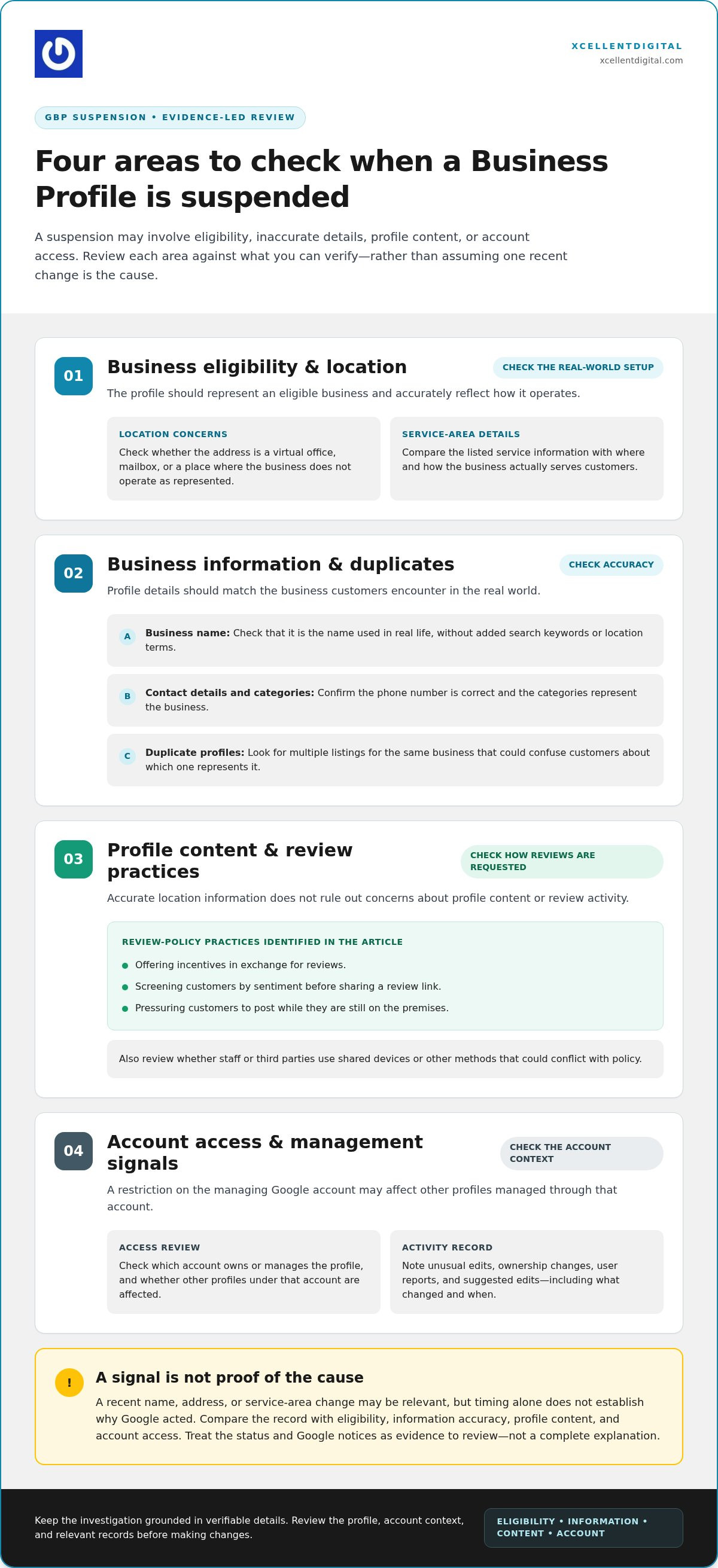
Suspensions don’t always point to one obvious mistake. Group possible causes into four areas: whether the business is eligible, whether its details match real-world operations, whether profile content follows the rules, and whether there’s an issue with account access. This structure helps you investigate the reasons for GBP suspension without treating every warning or profile change as proof of a violation.
Eligibility and location details that can put a profile at risk
A Business Profile must represent a business that meets Google’s current eligibility requirements. Pay close attention to location details: a virtual office, mailbox, or address where the business doesn’t operate as represented may raise questions. Service-area businesses should ensure the profile reflects how and where they actually serve customers. Compare the address and service information with day-to-day operations, not just with what’s convenient to display.
Profile content, duplicates, and management issues
Profile details should describe the business accurately. A business name padded with search keywords or location terms, an incorrect phone number, or categories that don’t represent the business can create compliance concerns. Duplicate profiles for the same business may confuse customers and make it unclear which listing represents the business. Check the name as used in real life, then confirm that the categories and contact details are relevant and accurate.
Other content and activity can matter, too. Google’s review policies prohibit practices such as offering incentives for reviews, screening customers by sentiment before sharing a review link, or pressuring customers to post while still on the premises. These tactics can put a profile at risk even if its location information is accurate. Review how feedback is requested, including whether staff or third parties use shared devices or other methods that could conflict with policy.
Account access is a separate diagnostic area. A restriction on the Google account managing a profile may affect other profiles managed through that account, rather than indicating that each listing has a separate problem. Check which account owns or manages the profile and whether other profiles under that account are affected.
Unusual edits, ownership changes, user reports, or suggested edits may also prompt closer review, but they don’t prove the underlying cause. A sudden change to a business name, address, or service area could be relevant, but timing alone doesn’t establish why Google acted. Record what changed and when, then compare those details with eligibility, information accuracy, profile content, and account access. This keeps the investigation evidence-led instead of treating every recent edit as a presumed violation.
If several possible causes overlap, XcellentDigital provides a structured Google Business Profile review to help organize the evidence and identify a compliant path toward reinstatement.
How to Identify the Likely Reason for a GBP Suspension
Start with evidence, not a theory. A suspension notice may not identify the precise issue, and a missing profile alone won’t tell you whether customers can’t see the listing, you can’t manage it, or both. Work through these checks in order and keep a record of what you find. This helps separate useful clues from assumptions about the reasons for GBP suspension.
- Read the notice carefully. Save the exact wording and note where it appeared, such as in the profile account or a Google email. Don’t paraphrase it from memory. Specific language can point to what Google wants you to review, even if it doesn’t name the exact trigger.
- Check the profile’s status. Look for the status shown in the account and compare it with what customers can currently see in Search or Maps. Record whether the profile is visible, whether key details appear, and whether the listing can be opened. Public visibility and owner access are separate clues.
- Review account access. Confirm which Google account owns or manages the profile and whether you can access its management controls. If other profiles managed through the same account are affected, record that pattern. The issue may involve account access rather than only one listing.
- Compare the profile with policy and business records. Review the current Google guidance that applies to the suspected issue. Compare profile details with your website and relevant business records, such as documents showing the business name or location. A mismatch deserves investigation, but it doesn’t automatically prove that the mismatch caused the suspension.
What clues should you check first?
Build a simple timeline. Include the date of the suspension notice, profile edits, ownership or verification changes, address and service-area updates, and changes to account managers. Add relevant real-world changes, such as a move or a change in how customers are served. Keep screenshots or copies of notices where available, and distinguish confirmed events from recollections or guesses.
A timeline can show whether a profile or account change deserves closer review. It also gives you a clear record to refer to if you need to explain the situation later. Don’t treat the newest event as the answer just because it happened shortly before the restriction.
Could a recent edit or report have triggered the suspension?
A recent edit, user report, or suggested change may be a clue to investigate. It isn’t proof that the edit violated a policy or that the report caused the suspension. Timing can suggest a lead, but it doesn’t establish the suspension’s cause. Check the changed information against how the business actually operates and the relevant current Google requirements before drawing a conclusion.
Avoid a series of speculative edits while the cause remains unclear. Changing several details at once can make it harder to connect the timeline to the evidence. Instead, document what changed, identify which policy area may apply, and correct information only when you can substantiate the correction. That measured review gives you a more reliable basis for deciding what to do next.
How to Reduce GBP Suspension Risk With a Practical Compliance Review
A regular compliance review can catch gaps before they become harder to diagnose. Compare the profile with the way your business actually operates, check current Google guidance, and record the reason for every important change. The aim isn’t to make the profile look more promotional. It’s to keep its information accurate, eligible, and consistent.
A pre-change check for profile managers
Before editing, confirm that the proposed change reflects a real business detail and fits current Google requirements. Keep useful records for the business name, location, ownership, and operations. Give profile access only to people who need to manage it, and remove access when responsibilities change. This creates a clear record if you later need to explain what changed and why.
Use this repeatable review for each profile:
- Eligibility: Confirm the business meets current Business Profile requirements and that its profile accurately reflects its customer-facing operations.
- Business name: Match the real-world name used by the business. Keep marketing phrases, extra keywords, and location descriptors out of the name unless they are genuinely part of it.
- Address or service area: Check that the location and service details reflect where and how the business operates. For a service-area business that doesn’t serve customers at its physical location, Google’s guidance says to hide the address.
- Categories: Choose the fewest relevant categories that describe what the business is. Avoid treating categories as a place to list every service or feature.
- Contact details: Verify phone and website information, then compare them with the business’s own materials so customers aren’t directed to outdated or inconsistent details.
Keep profile information accurate as the business changes
Review core details when operations change, such as a move, a new service-area setup, or a change in ownership. Update only what needs to change, and save the date, reason, and supporting records. Avoid multiple speculative edits in quick succession. A clear record makes it easier to understand the profile’s history.
Keep promotional language in appropriate marketing materials, not in fields meant to identify factual business information. For a more detailed process, use this Google Business Profile audit checklist. For wider visibility practices, the Google Business Profile optimization guide offers a broader reference.
A disciplined review can help you spot unsupported details and make changes with a clear reason, although it can’t guarantee that a profile avoids every restriction. XcellentDigital provides compliant review and reinstatement support through GBP reinstatement services.
GBP Suspension: What to Do and When to Get Expert Help
A suspension can make it tempting to change profile details immediately or submit an appeal before you understand the issue. Slow the process down. Pause edits that aren’t necessary, use the notice and your account status to identify possible policy concerns, and correct only problems you can substantiate. A focused response is more useful than rushed changes that make the profile history harder to follow.
Prepare a clear, evidence-led response
Build your appeal around the specific concern you’ve identified. For each correction or explanation, connect the profile detail to the way the business actually operates and to records that support it. Keep statements factual, concise, and consistent with the profile and your business materials. Avoid broad claims or explanations you can’t back up.
Before starting, organize relevant records and review Google’s current appeal instructions and evidence requirements. Have your supporting files ready before opening an upload form. The evidence-upload form allows 60 minutes for submitting documents once opened, so preparation matters. Use Google’s official guidance to confirm the current process and available evidence options before you submit.
For a step-by-step overview, follow the GBP reinstatement appeal process guide. Avoid creating another profile to replace the suspended one, as a duplicate can complicate the review. Once you’ve submitted an appeal, follow the instructions shown in your account and avoid unsupported changes while waiting for Google’s decision.
When specialist GBP reinstatement help can make the process clearer
Some cases are difficult to untangle. The reasons for GBP suspension may involve overlapping profile details, account access, and a history of changes made by different managers. XcellentDigital provides GBP reinstatement services, including a structured review of those signals and support organizing appeal work around relevant records and the suspected policy issue.
Reinstatement depends on Google’s review. No appeal approach can promise approval, a particular decision time, or restored rankings. You can control the quality of your diagnosis and the accuracy of the information you provide. If the notice is unclear or the profile and account history are complicated, expert support can help bring the evidence and next steps into focus.
Get help with your Google Business Profile and take a structured step toward a compliant reinstatement appeal.
Turn the Suspension Into a Clear Next Step
A suspension can feel like a setback, but it doesn’t have to leave you stuck. Treat the review as a chance to strengthen how your business is represented online, with decisions grounded in accurate information rather than guesswork. The reasons for GBP suspension may not be immediately clear, but a careful, documented response can help you move forward with greater confidence.
XcellentDigital provides Google Business Profile reinstatement and optimization, along with search optimization and reputation management. This connects profile accuracy with the way customers discover and assess your business online. Reinstatement still depends on Google’s review, but you don’t have to organize the next steps alone.
Get help with your Google Business Profile and take a practical step toward a compliant path forward. With a clear plan, you can focus on rebuilding a steady presence and serving the customers looking for your business.
Frequently Asked Questions
Can a Google Business Profile be suspended without a clear reason?
Yes. A notice or account status may show that Google has restricted a profile without pinpointing the underlying concern. Treat the notice as a starting point: compare the profile’s eligibility and information with current Google guidance, then check whether the managing account has restrictions. A recent edit may be worth investigating, but it doesn’t automatically explain the suspension. Assess the reasons for GBP suspension against evidence, not timing alone.
Can changing my business address cause a GBP suspension?
An address change can prompt scrutiny if the new details don’t match the business’s real-world operations or Google’s current eligibility requirements. The change alone doesn’t prove why a profile was suspended. Review how the profile represents the location, whether the business’s operations support that representation, and whether records reflect the updated details. Before making another edit, compare the information with current Google guidance and correct only what you can substantiate.
How long does a Google Business Profile suspension last?
There’s no universal restoration timeline that can be responsibly promised. The time involved may depend on the issue, the information submitted, and Google’s review. Monitor the status and instructions in the account you use to manage the profile, and keep a copy of any appeal or related notice. Avoid repeated submissions or unsupported changes while a review is underway, since those actions can make the case harder to track.
Does a GBP suspension affect every profile in my account?
Not necessarily. A restriction may apply to one profile, or the issue may involve account access and affect how you manage several listings. Check each profile’s status and any notices separately, then review whether the same Google account or manager is connected to the affected profiles. If multiple listings become inaccessible, don’t assume they share one policy issue. Avoid creating replacement profiles while you determine the scope.
Will my business disappear from Google Maps after a suspension?
Not in every case. Public visibility can vary with the type and scope of the restriction, and what customers see may differ from what you can access as the profile manager. Check the profile status in your account, then search Google Maps for the business name and relevant identifying details. Search results can vary, so one person’s view or a single search shouldn’t be treated as definitive proof of the profile’s status.
Can I create a new Business Profile while the original is suspended?
It’s best not to create a duplicate as a workaround. A second listing for the same business and location or service area can add confusion and create further policy complications. First determine the original profile’s status, review the suspected compliance issue, and follow Google’s current reinstatement instructions. Keep records of the original listing and its management access so you can focus your next steps on the existing profile.
Does a GBP suspension automatically lower my website’s organic rankings?
No. A profile suspension affects Business Profile visibility, but it doesn’t by itself establish that your website’s organic rankings have changed. Local profile visibility and organic website results are distinct search surfaces. Review performance data for each separately, such as website search performance and profile visibility, and compare changes over time. Don’t assume reinstatement will restore a particular ranking; assess website performance on its own evidence.












Leave a Reply
Want to join the discussion?Feel free to contribute!